
Ordering Display of products grouped by category

13 years 8 hours ago - 13 years 8 hours ago #126089
by iedwards
Ordering Display of products grouped by category was created by iedwards
- HikaShop version -- : 2.2.2
-- Joomla version -- : 3.1.5
-- PHP version -- : 5.3.1
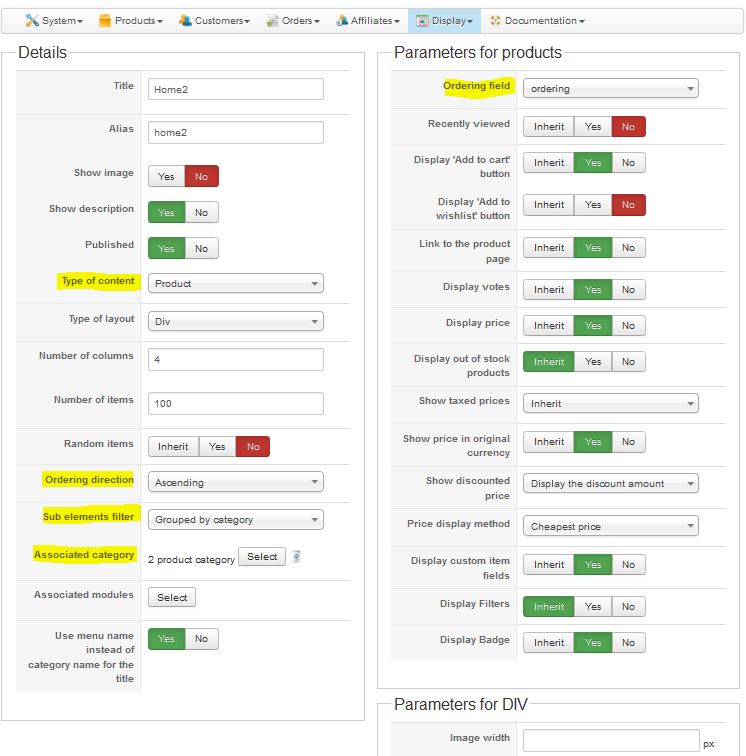
I have configured a Joomla Menu item to link to a Hikashop product listing.
I have configured the Hikashop options for this menu to display products "grouped by categories"
I have configured this to order by "Ordering"
Screen shot Capture 1 shows the configuration screen for this menu item
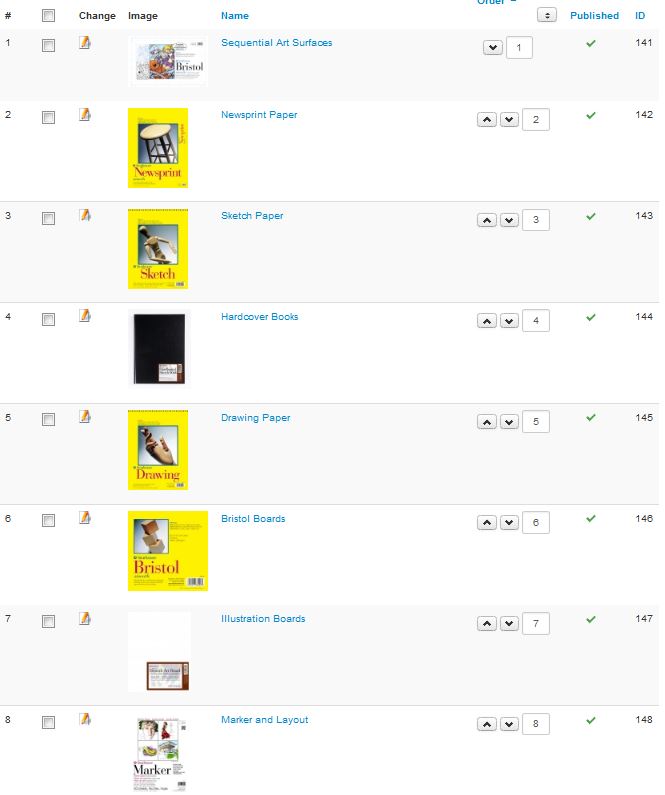
Capture 3 Shows the ordering for the categories, and I would expect this to be the order they are displayed on the front end.
But Capture 2 shows how this displays on the front end, it does not respect the category ordering
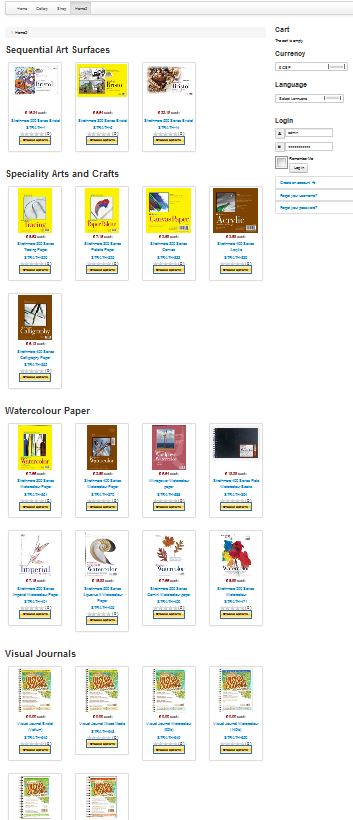
(Note: there are more categories than I can fit on one screen)
The display is what I am looking for but I need the "Group by Category" option to respect the category ordering - can this be done?
There is another issue regarding editing the category ordering via the backend but I'll put this in another post.
Many thanks,
Ian
-- Joomla version -- : 3.1.5
-- PHP version -- : 5.3.1
I have configured a Joomla Menu item to link to a Hikashop product listing.
I have configured the Hikashop options for this menu to display products "grouped by categories"
I have configured this to order by "Ordering"
Screen shot Capture 1 shows the configuration screen for this menu item
Capture 3 Shows the ordering for the categories, and I would expect this to be the order they are displayed on the front end.
But Capture 2 shows how this displays on the front end, it does not respect the category ordering
(Note: there are more categories than I can fit on one screen)
The display is what I am looking for but I need the "Group by Category" option to respect the category ordering - can this be done?
There is another issue regarding editing the category ordering via the backend but I'll put this in another post.
Many thanks,
Ian
Last edit: 13 years 8 hours ago by iedwards.
Please Log in or Create an account to join the conversation.

Less
More
- Posts: 12953
- Thank you received: 1778
12 years 11 months ago #126149
by Mohamed Thelji
Replied by Mohamed Thelji on topic Ordering Display of products grouped by category
Hi,
The problem is coming from the fact that your "Ordering field" option of your product listing content menu is ordering your product regarding their ordering through "Hikashop->Products".
The best solution will be to directly sort your products regarding their category through "Hikashop->Products".
The problem is coming from the fact that your "Ordering field" option of your product listing content menu is ordering your product regarding their ordering through "Hikashop->Products".
The best solution will be to directly sort your products regarding their category through "Hikashop->Products".
Please Log in or Create an account to join the conversation.
12 years 11 months ago #126155
by iedwards
Replied by iedwards on topic Ordering Display of products grouped by category
Thank you very much for the prompt reply.
What you say makes sense but doesn't seem to work in practice. If I understand you correctly, if I want the products in Category A to appear first I order them 1,2,3 ... etc. Then If I want the products from category B to list next I should number them sequentially with the products in Category A so 11,12,13 ... etc. But the User interface doesn't allow me to do this, if I try and number products ordering as 11, 12, 13 and then save the ordering it reverts to 1,2,3 - so it only allows me to set the product order within the category and not globally.
Am I doing something wrong somewhere?
Thanks,
Ian
What you say makes sense but doesn't seem to work in practice. If I understand you correctly, if I want the products in Category A to appear first I order them 1,2,3 ... etc. Then If I want the products from category B to list next I should number them sequentially with the products in Category A so 11,12,13 ... etc. But the User interface doesn't allow me to do this, if I try and number products ordering as 11, 12, 13 and then save the ordering it reverts to 1,2,3 - so it only allows me to set the product order within the category and not globally.
Am I doing something wrong somewhere?
Thanks,
Ian
Please Log in or Create an account to join the conversation.

12 years 11 months ago #126199
by Xavier
Replied by Xavier on topic Ordering Display of products grouped by category
Hi,
I just tried on my end, and it is working fine.
You can't make a global ordering as you said. You have to order the products category by category.
Your configuration seems to be correct, do you have edited any views related on the products listing ?
I just tried on my end, and it is working fine.
You can't make a global ordering as you said. You have to order the products category by category.
Your configuration seems to be correct, do you have edited any views related on the products listing ?
Please Log in or Create an account to join the conversation.
12 years 11 months ago #126207
by iedwards
Replied by iedwards on topic Ordering Display of products grouped by category
Hi,
Sorry, I still don't understand what I need to do to change the order of the categories when I have selected "group by category" as editing the product order within a category has no effect on the display illustrated in my original post.
If you have selected "group by category" then I would expect it to order by category first and then by product within each category group, but what you seem to be saying is that it doesn't do that?
Ian
Sorry, I still don't understand what I need to do to change the order of the categories when I have selected "group by category" as editing the product order within a category has no effect on the display illustrated in my original post.
If you have selected "group by category" then I would expect it to order by category first and then by product within each category group, but what you seem to be saying is that it doesn't do that?
Ian
Please Log in or Create an account to join the conversation.
12 years 11 months ago #126283
by Xavier
Replied by Xavier on topic Ordering Display of products grouped by category
Hi,
Sorry I don't understood that you were talking about the categories order. I was thinking about the products ordering inside a category.
To change the order of the categories, you have to go through Products > Categories, then display only the sub elements, and you can order the categories which are inside another one. It can only order the categories on 1 level.
Hope this will help you.
Sorry I don't understood that you were talking about the categories order. I was thinking about the products ordering inside a category.
To change the order of the categories, you have to go through Products > Categories, then display only the sub elements, and you can order the categories which are inside another one. It can only order the categories on 1 level.
Hope this will help you.
Please Log in or Create an account to join the conversation.
12 years 11 months ago - 12 years 11 months ago #126334
by iedwards
Replied by iedwards on topic Ordering Display of products grouped by category
Hi Xavier,
It doesn't help I'm afraid, the problem seems to be the limit of ordering on one level. I have my categories on two levels and would expect them to display ....
1st Level / 2nd Level
1 / 1
1 / 2
1 / 3
1 / 4
2 / 1
2 / 2
2 / 3
2 / 4
3 / 1
3 / 2
.... etc
In fact they display as
1st Level / 2nd Level
1 / 1
3 / 1
5 / 1
6 / 1
2 / 1
1 / 10
1 / 11
1 / 12
1 / 2
5 / 2
6 / 2
2 / 2
1 / 3
5 / 3
4 / 3
1 / 4
6 / 4
1 / 5
6 / 5
2 / 5
1 / 6
1 / 7
1 / 8
1 / 9
Which is unusable really, they might just as well be random.
Can something be done to correct this?
Many thanks,
Ian
It doesn't help I'm afraid, the problem seems to be the limit of ordering on one level. I have my categories on two levels and would expect them to display ....
1st Level / 2nd Level
1 / 1
1 / 2
1 / 3
1 / 4
2 / 1
2 / 2
2 / 3
2 / 4
3 / 1
3 / 2
.... etc
In fact they display as
1st Level / 2nd Level
1 / 1
3 / 1
5 / 1
6 / 1
2 / 1
1 / 10
1 / 11
1 / 12
1 / 2
5 / 2
6 / 2
2 / 2
1 / 3
5 / 3
4 / 3
1 / 4
6 / 4
1 / 5
6 / 5
2 / 5
1 / 6
1 / 7
1 / 8
1 / 9
Which is unusable really, they might just as well be random.
Can something be done to correct this?
Many thanks,
Ian
Last edit: 12 years 11 months ago by iedwards.
Please Log in or Create an account to join the conversation.

12 years 11 months ago #126468
by Jerome
Jerome - Obsidev.com
HikaMarket & HikaSerial developer / HikaShop core dev team.
Replied by Jerome on topic Ordering Display of products grouped by category
Hi,
You asked for a sorting on the field "product_ordering" and HikaShop display you the products in the sort you asked for.
Because you are displaying products of sub categories, the display is not right like you expected to but it's logically regarding the configuration.
So in your situation, you want a more specific and more complex sorting which is possible using a little joomla plugin.
And it will sort first by the category id, and second by the ordering value.
But it uses the category id and not some kind of ordering between the categories. If you want something more complex, you will have to improve the algorithm and add more values in the SQL query made by HikaShop in order to get the product listing.
The code I gave require to create a little Joomla plugin with a XML and a PHP file.
Please check the Joomla documentation in order to know more about that. You can also use a simple HikaShop plugin as a base for your XML content (just have to rename some values).
Kind regards,
You asked for a sorting on the field "product_ordering" and HikaShop display you the products in the sort you asked for.
Because you are displaying products of sub categories, the display is not right like you expected to but it's logically regarding the configuration.
So in your situation, you want a more specific and more complex sorting which is possible using a little joomla plugin.
Code:
class plgHikaShopCustomerOrdering extends JPlugin {
function onBeforeProductListingLoad(&$filters, &$order, &$view, &$select, &$a, &$b, &$on) {
if($order == ' ORDER BY a.ordering ASC')
$order = ' ORDER BY a.category_id ASC, a.ordering ASC';
}
}
But it uses the category id and not some kind of ordering between the categories. If you want something more complex, you will have to improve the algorithm and add more values in the SQL query made by HikaShop in order to get the product listing.
The code I gave require to create a little Joomla plugin with a XML and a PHP file.
Please check the Joomla documentation in order to know more about that. You can also use a simple HikaShop plugin as a base for your XML content (just have to rename some values).
Kind regards,
Jerome - Obsidev.com
HikaMarket & HikaSerial developer / HikaShop core dev team.
Please Log in or Create an account to join the conversation.
12 years 11 months ago #126736
by iedwards
Replied by iedwards on topic Ordering Display of products grouped by category
Hi,
I'm disappointed that you don't agree that the way ordering works in this case is completely illogical.
Yes I am displaying products, I haven't specifically asked to order by product_ordering, I have simply selected to order by "Ordering", but I have also selected to "Group by Category", therefore I would expect category ordering to be taken into account - so I would see products ordered by category ordering then ordered by product ordering within each category.
I don't see how you can logically order just by product_ordering as there are products from many categories with the same value of product_ordering. I have tried editing product ordering so that no two products have the same value but the interface doesn't allow that. If I set products in Category A to order 1 to 10 and then try and set products in Category B to 11 to 20 when I save ordering for category B it is automatically reset to 1 to 10.
I will try the plug in code you suggest but it appears the code will sort by category_id which is not what I need, I'm assuming I can change that to sort by category_ordering which is what I am after. Having said that I would still prefer it f Hikashop worked logically!
Thanks
Ian
I'm disappointed that you don't agree that the way ordering works in this case is completely illogical.
Yes I am displaying products, I haven't specifically asked to order by product_ordering, I have simply selected to order by "Ordering", but I have also selected to "Group by Category", therefore I would expect category ordering to be taken into account - so I would see products ordered by category ordering then ordered by product ordering within each category.
I don't see how you can logically order just by product_ordering as there are products from many categories with the same value of product_ordering. I have tried editing product ordering so that no two products have the same value but the interface doesn't allow that. If I set products in Category A to order 1 to 10 and then try and set products in Category B to 11 to 20 when I save ordering for category B it is automatically reset to 1 to 10.
I will try the plug in code you suggest but it appears the code will sort by category_id which is not what I need, I'm assuming I can change that to sort by category_ordering which is what I am after. Having said that I would still prefer it f Hikashop worked logically!
Thanks
Ian
Please Log in or Create an account to join the conversation.
Time to create page: 0.312 seconds