

- Posts: 344
- Thank you received: 3
Remove hikashop content module on product page
12 years 11 months ago #129394
by river
Remove hikashop content module on product page was created by river
Hikashop version 2.0
Joomla 2.5
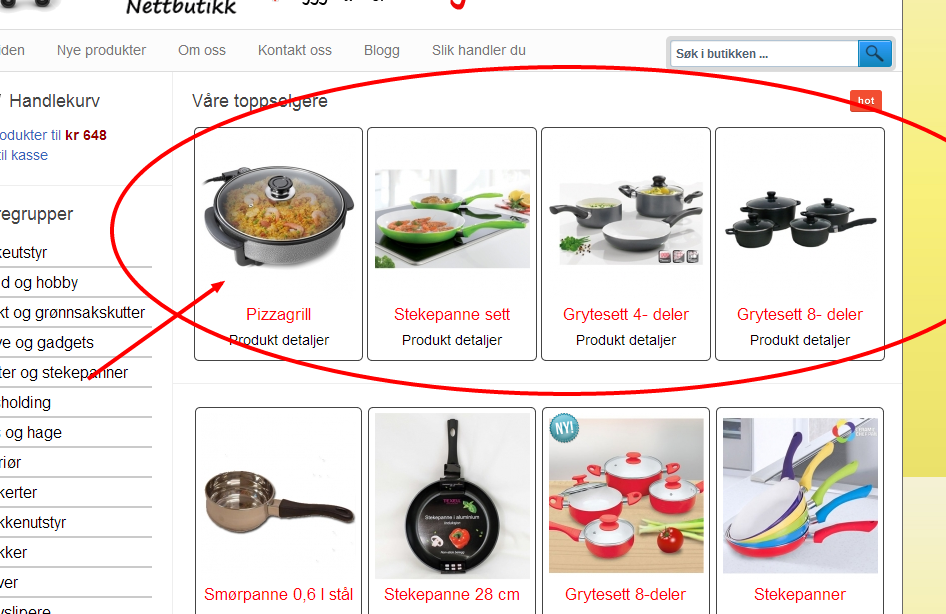
I have the "Hikashop content module" enabeld in the product listning, so that it is displaying the bestselling product at the top of each category. see image below
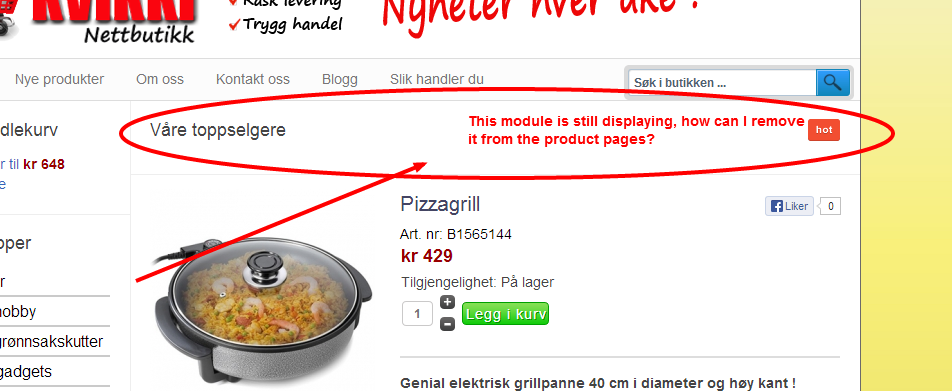
But When I click on a selected product, the module is still displaying. It is not showing any products, but the title of the module is still displaying. How can I make to "Hikashop content module" NOT to display in the product pages ? (See image below)
Joomla 2.5
I have the "Hikashop content module" enabeld in the product listning, so that it is displaying the bestselling product at the top of each category. see image below
But When I click on a selected product, the module is still displaying. It is not showing any products, but the title of the module is still displaying. How can I make to "Hikashop content module" NOT to display in the product pages ? (See image below)
Please Log in or Create an account to join the conversation.

12 years 11 months ago #129452
by Xavier
Replied by Xavier on topic Remove hikashop content module on product page
Hi,
I guess you have configure modules to be shown under the product page (in the HikaShop configuration).
Regards,
I guess you have configure modules to be shown under the product page (in the HikaShop configuration).
Regards,
Please Log in or Create an account to join the conversation.
12 years 11 months ago #129468
by river
Replied by river on topic Remove hikashop content module on product page
Yes I already have to modules there below the product on the product page, but I only want this module to display at the top of the category listings, and NOT above the product in the product pages, is there any way to remove it ?
Please Log in or Create an account to join the conversation.

Less
More
- Posts: 12953
- Thank you received: 1778
12 years 11 months ago #129506
by Mohamed Thelji
Replied by Mohamed Thelji on topic Remove hikashop content module on product page
Hi,
You probably used the "Modules under the product page" option of the Display tab of the "Hikashop->System->Configuration". If not, you should :
- Go to your Module configuration page through your Joomla module manager page
- Set the "Module Assignment" option to Only on the pages selected
- Only check the menu where you want your module to be displayed.
You probably used the "Modules under the product page" option of the Display tab of the "Hikashop->System->Configuration". If not, you should :
- Go to your Module configuration page through your Joomla module manager page
- Set the "Module Assignment" option to Only on the pages selected
- Only check the menu where you want your module to be displayed.
Please Log in or Create an account to join the conversation.
12 years 11 months ago #129580
by river
Replied by river on topic Remove hikashop content module on product page
That did not work, but I found a solution
I just used the plugin loadmoule position and placed the "hikashop content module" in a new module position that I just called "tester", and then I added this code to the file: listing_div under category....
<?php
$mypostion="{loadposition tester}";
echo JHTML::_('content.prepare',$mypostion );
?>
Now the module is just showing at the top of the category, and not on the product page.
Regards
I just used the plugin loadmoule position and placed the "hikashop content module" in a new module position that I just called "tester", and then I added this code to the file: listing_div under category....
<?php
$mypostion="{loadposition tester}";
echo JHTML::_('content.prepare',$mypostion );
?>
Now the module is just showing at the top of the category, and not on the product page.
Regards
Please Log in or Create an account to join the conversation.
Time to create page: 0.226 seconds