

- Posts: 344
- Thank you received: 3
Remove navigation button from Hikashop Content mod
12 years 11 months ago #129581
by river
Remove navigation button from Hikashop Content mod was created by river
Hikashop 2.2
Joomla .2.5.14
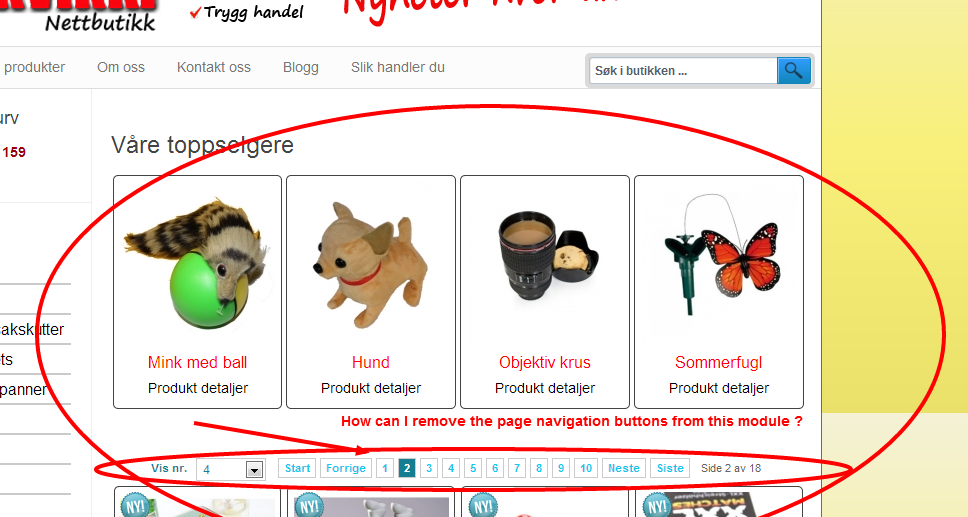
How can I remove the navigation buttons/numbers from the "Hikashop Content module" ? I only want it to display the 4 bestselling products without navigation. Please see image below to see what I mean.
Tnx
Joomla .2.5.14
How can I remove the navigation buttons/numbers from the "Hikashop Content module" ? I only want it to display the 4 bestselling products without navigation. Please see image below to see what I mean.
Tnx
Please Log in or Create an account to join the conversation.

12 years 11 months ago #129635
by nicolas
Replied by nicolas on topic Remove navigation button from Hikashop Content mod
There is no option to remove pagination on a per menu basis. The option is global to all the listings in the configuration of HikaShop.
Note however that the pagination doesn't display on modules. That is unless it's a module associated to the current menu instead of being a module displayed by your template. I would thus recommend to remove the module from your menu's associated modules and instead display it in a position of your template and assign it to that menu and it should display similarly but without the pagination automatically.
Note however that the pagination doesn't display on modules. That is unless it's a module associated to the current menu instead of being a module displayed by your template. I would thus recommend to remove the module from your menu's associated modules and instead display it in a position of your template and assign it to that menu and it should display similarly but without the pagination automatically.
Please Log in or Create an account to join the conversation.
12 years 11 months ago #129764
by river
Yes I know, but If I do this the module also display on the product page, and I only want it to display above the product listning.
Any solution to this ?
Replied by river on topic Remove navigation button from Hikashop Content mod
I would thus recommend to remove the module from your menu's associated modules and instead display it in a position of your template and assign it to that menu and it should display similarly but without the pagination automatically.
Yes I know, but If I do this the module also display on the product page, and I only want it to display above the product listning.
Any solution to this ?
Please Log in or Create an account to join the conversation.

Less
More
- Posts: 12953
- Thank you received: 1778
12 years 11 months ago #129829
by Mohamed Thelji
Replied by Mohamed Thelji on topic Remove navigation button from Hikashop Content mod
Hi,
If you only want it to display above you product listing page, you should assign it to product listing menu by :
- Going to your Module configuration page through your Joomla module manager page
- Setting the "Module Assignment" option to Only on the pages selected
- Only checking the menu where you want your module to be displayed (you product listing menu).
If you only want it to display above you product listing page, you should assign it to product listing menu by :
- Going to your Module configuration page through your Joomla module manager page
- Setting the "Module Assignment" option to Only on the pages selected
- Only checking the menu where you want your module to be displayed (you product listing menu).
Please Log in or Create an account to join the conversation.
Time to create page: 0.199 seconds