
- Posts: 28
- Thank you received: 0
Popup modal color darken out!!!
- jokercyclone
-
 Topic Author
- Offline
Less
More
12 years 11 months ago - 12 years 11 months ago #130224
by jokercyclone
Popup modal color darken out!!! was created by jokercyclone
I just purchased and installed the latest version of Hikashop on Joomla 3.1.5.
Can you see the screenshot? The popup modal for filling the address is darken out. It looks awful. Can you tell me where possibly is the css or template conflict?
Thanks!
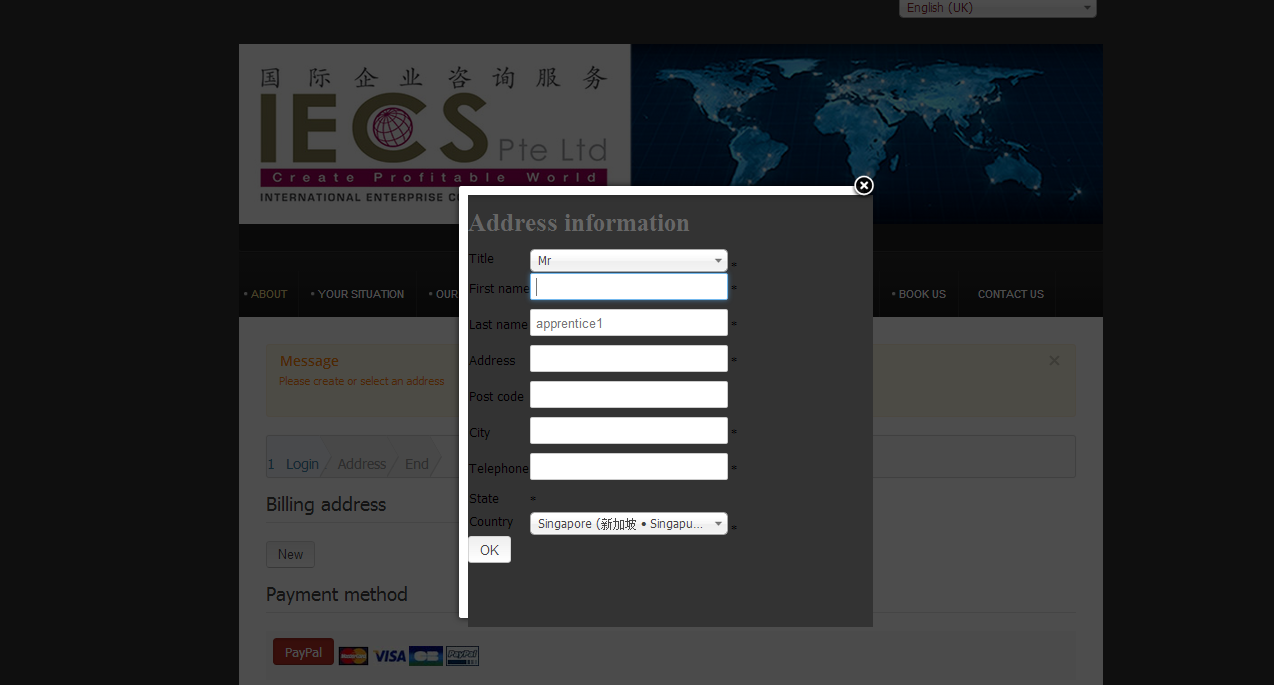
Can you see the screenshot? The popup modal for filling the address is darken out. It looks awful. Can you tell me where possibly is the css or template conflict?
Thanks!
Last edit: 12 years 11 months ago by jokercyclone. Reason: Remove some privacy info from the screenshot
Please Log in or Create an account to join the conversation.

12 years 11 months ago #130242
by nicolas
Replied by nicolas on topic Popup modal color darken out!!!
Hi,
The background color of the popups on a joomla website is defined by the CSS of the template. So it has to be changed in the template.
The background color of the popups on a joomla website is defined by the CSS of the template. So it has to be changed in the template.
Please Log in or Create an account to join the conversation.
- jokercyclone
-
Topic Author
- Offline
Less
More
- Posts: 28
- Thank you received: 0
12 years 11 months ago #130245
by jokercyclone
Replied by jokercyclone on topic Popup modal color darken out!!!
Is it possible to tell me which file or which line to change? The popup modal color of many of my other extensions work okay though. I am sure why this color impact only HikaShop. I am using a T3 based template.
Please advise.
Please advise.
Please Log in or Create an account to join the conversation.
12 years 11 months ago #130247
by nicolas
Replied by nicolas on topic Popup modal color darken out!!!
I can't say as that depends on the template...
If you give a link to the page I can have a look and maybe tell you where it comes from.
If you give a link to the page I can have a look and maybe tell you where it comes from.
Please Log in or Create an account to join the conversation.
- jokercyclone
-
Topic Author
- Offline
Less
More
- Posts: 28
- Thank you received: 0
12 years 11 months ago #130262
by jokercyclone
Replied by jokercyclone on topic Popup modal color darken out!!!
May I tell you that the popup happen during the checkout stage of Hikashop after the existing Joomla user login.
Is this sufficient to advise me?
Is this sufficient to advise me?
Please Log in or Create an account to join the conversation.
12 years 11 months ago #130263
by nicolas
Replied by nicolas on topic Popup modal color darken out!!!
We already know that. The problem is that we don't know where your template puts its CSS. So no, it's not enough.
Please Log in or Create an account to join the conversation.
- jokercyclone
-
Topic Author
- Offline
Less
More
- Posts: 28
- Thank you received: 0
12 years 11 months ago #130276
by jokercyclone
Replied by jokercyclone on topic Popup modal color darken out!!!
Hi,
My template file sits in this directory relative to Joomla $root
$root/templates/revision/css/themes/growth/template.css
Please tell me what else I can tell you to help me? I am now a little confused about what I need to supply you.
Thanks!
My template file sits in this directory relative to Joomla $root
$root/templates/revision/css/themes/growth/template.css
Please tell me what else I can tell you to help me? I am now a little confused about what I need to supply you.
Thanks!
Please Log in or Create an account to join the conversation.
12 years 11 months ago #130279
by nicolas
Replied by nicolas on topic Popup modal color darken out!!!
I already told you:
If you give a link to the page I can have a look and maybe tell you where it comes from.
Please Log in or Create an account to join the conversation.
- jokercyclone
-
Topic Author
- Offline
Less
More
- Posts: 28
- Thank you received: 0
12 years 11 months ago #130284
by jokercyclone
Replied by jokercyclone on topic Popup modal color darken out!!!
I assume you meant the URL link.
You need to hit URL iecservice.com
then click Shop
then pick a product
then login with my test account name 'apprentice1' & password 'testerroot!'
then the dark popup with appear immediate after the login.
iecservice.com/en/product-listing/checkout/step/step-1
Is this good enough to help me?
Thanks!
You need to hit URL iecservice.com
then click Shop
then pick a product
then login with my test account name 'apprentice1' & password 'testerroot!'
then the dark popup with appear immediate after the login.
iecservice.com/en/product-listing/checkout/step/step-1
Is this good enough to help me?
Thanks!
Please Log in or Create an account to join the conversation.
12 years 11 months ago #130291
by nicolas
Replied by nicolas on topic Popup modal color darken out!!!
It comes from the CSS:
of the file
iecservice.com/templates/revision/css/th.../growth/template.css
Code:
html > body {
background: #333;
font-size: 14px;
margin: 0;
}
Please Log in or Create an account to join the conversation.
- jokercyclone
-
Topic Author
- Offline
Less
More
- Posts: 28
- Thank you received: 0
12 years 11 months ago #130350
by jokercyclone
Replied by jokercyclone on topic Popup modal color darken out!!!
Hi,
Thanks for digging into the matter. The issue is now resolved.
You have been a great help!
Thanks for digging into the matter. The issue is now resolved.
You have been a great help!
Please Log in or Create an account to join the conversation.
Time to create page: 0.207 seconds