

- Posts: 344
- Thank you received: 3
remove sub categories
12 years 10 months ago #131395
by river
remove sub categories was created by river
Joomla 2.5.14
Hikashop 2.0
I have the accordion function with sub categories enabled together with the funchtion "Link on main categories" set to YES
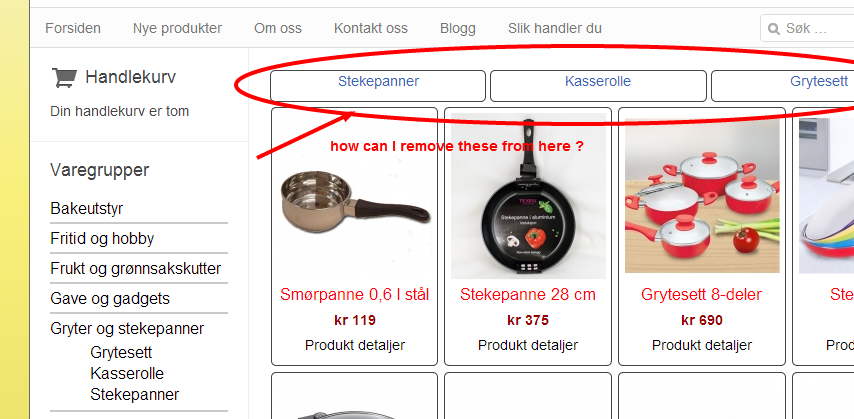
But when I click on a product category with Sub-categories, the sub categories are displaying at the top of the product listning. How can I remove them from here ?
It is enough for me that they are displaying to the left in the Category module.
Please see image below to see what I mean.
Hikashop 2.0
I have the accordion function with sub categories enabled together with the funchtion "Link on main categories" set to YES
But when I click on a product category with Sub-categories, the sub categories are displaying at the top of the product listning. How can I remove them from here ?
It is enough for me that they are displaying to the left in the Category module.
Please see image below to see what I mean.
Please Log in or Create an account to join the conversation.

Less
More
- Posts: 12953
- Thank you received: 1778
12 years 10 months ago #131424
by Mohamed Thelji
Replied by Mohamed Thelji on topic remove sub categories
Hi,
And can you five us a link to the page where you are having this issue, so that I can understand the problem that you are facing ?
Thank you.
And can you five us a link to the page where you are having this issue, so that I can understand the problem that you are facing ?
Thank you.
Please Log in or Create an account to join the conversation.
12 years 10 months ago #131428
by river
Replied by river on topic remove sub categories
Please Log in or Create an account to join the conversation.
Less
More
- Posts: 12953
- Thank you received: 1778
12 years 10 months ago #131440
by Mohamed Thelji
Replied by Mohamed Thelji on topic remove sub categories
Ok, I think that I finally understood your problem, you'll be able to do that by :
- Using a product listing instead of a CATEGORY listing, so you'll be able to list the product under your category, and not your category under your category
OR
- Using some CSS code like :
- Using a product listing instead of a CATEGORY listing, so you'll be able to list the product under your category, and not your category under your category
OR
- Using some CSS code like :
Code:
#hikashop_category_information_menu_156 .hikashop_subcategories_listing {
display: none;
}
Please Log in or Create an account to join the conversation.
11 years 9 months ago #184256
by river
Replied by river on topic remove sub categories
I am now updating my hikashop online store to Joomla 3.3 with hikashop version 2.3.4
I want to remove the sub-categories in the Product listning. So I implemented the the code like explained in this thread.
But this time it does not work. The men number "102" is correct. And I tried implementing the code in both Front-end CSS File "Custom" and Styles for the front-end "Pictureblue".
But it does not work, any advice ?
I want to remove the sub-categories in the Product listning. So I implemented the the code like explained in this thread.
Code:
#hikashop_category_information_menu_102 .hikashop_subcategories_listing {
display: none;
}
But this time it does not work. The men number "102" is correct. And I tried implementing the code in both Front-end CSS File "Custom" and Styles for the front-end "Pictureblue".
But it does not work, any advice ?
Please Log in or Create an account to join the conversation.

11 years 9 months ago #184258
by nicolas
Replied by nicolas on topic remove sub categories
Please provide a link to the page you're talking about so that we can look at the HTML/CSS in order to answer you.
Please Log in or Create an account to join the conversation.
11 years 9 months ago #184339
by river
Replied by river on topic remove sub categories
Ok, tnx. ....here is a link
Code:
http://www.kvikkimedia.no/
Please Log in or Create an account to join the conversation.
11 years 9 months ago #184354
by nicolas
Replied by nicolas on topic remove sub categories
Hi,
There is no categories listing on that page.
On this page however ( www.kvikkimedia.no/shop/kategori/fritid-og-hobby ) there are categories at the top and it is for the menu item with the id 103.
Thus, that CSS will do the job:
There is no categories listing on that page.
On this page however ( www.kvikkimedia.no/shop/kategori/fritid-og-hobby ) there are categories at the top and it is for the menu item with the id 103.
Thus, that CSS will do the job:
Code:
#hikashop_category_information_menu_103 .hikashop_subcategories_listing {
display: none;
}
Please Log in or Create an account to join the conversation.
Time to create page: 0.248 seconds