
- Posts: 24
- Thank you received: 1
How to implement str_word_count() for textarea
- alexsmirnov
-
 Topic Author
- Offline
Less
More
12 years 10 months ago - 12 years 10 months ago #132999
by alexsmirnov
Seek and you shall find.
How to implement str_word_count() for textarea was created by alexsmirnov
-- url of the page with the problem -- : http://localhost
-- HikaShop version -- : Business 2.2.2
-- Joomla version -- : 2.5.16
-- PHP version -- : 5.3.17
Hi guys,
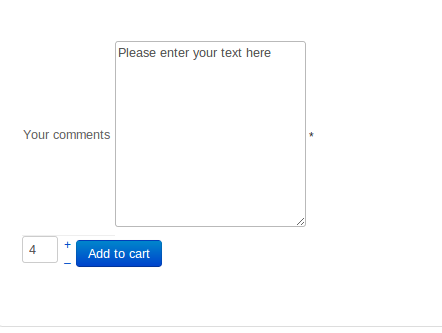
I've created a custom field of the "textarea" type and "item" table. Now is it possible to somehow count (may be with $count = str_word_count($_POST) and echo/display to the customer in the cart how many words he has entered into this field?
The counting doesn't have to occur on the fly, as the customer enters his text, but it does have to eventually, after he entered his text, be shown to my customer before he selects the number of the product that he is purchasing.
Cheers,
Alex
-- HikaShop version -- : Business 2.2.2
-- Joomla version -- : 2.5.16
-- PHP version -- : 5.3.17
Hi guys,
I've created a custom field of the "textarea" type and "item" table. Now is it possible to somehow count (may be with $count = str_word_count($_POST) and echo/display to the customer in the cart how many words he has entered into this field?
The counting doesn't have to occur on the fly, as the customer enters his text, but it does have to eventually, after he entered his text, be shown to my customer before he selects the number of the product that he is purchasing.
Cheers,
Alex
Seek and you shall find.
Last edit: 12 years 10 months ago by alexsmirnov.
Please Log in or Create an account to join the conversation.

12 years 10 months ago #133061
by nicolas
Replied by nicolas on topic How to implement str_word_count() for textarea
Hi,
Not really, but something similar is possible with the options available. Simply enter the maximum characters limit you want in the "Maximum length" field of your custom field and it will display the user how much characters is left while he types.
If you really wants to display the number of characters he typed, it would require custom code. If you want to do in in the cart display on the checkout, you can edit the file "cart" of the view "checkout" via the menu Display>Views and add your code next to the display of the custom fields.
Not really, but something similar is possible with the options available. Simply enter the maximum characters limit you want in the "Maximum length" field of your custom field and it will display the user how much characters is left while he types.
If you really wants to display the number of characters he typed, it would require custom code. If you want to do in in the cart display on the checkout, you can edit the file "cart" of the view "checkout" via the menu Display>Views and add your code next to the display of the custom fields.
The following user(s) said Thank You: alexsmirnov
Please Log in or Create an account to join the conversation.
- alexsmirnov
-
Topic Author
- Offline
Less
More
- Posts: 24
- Thank you received: 1
12 years 10 months ago - 12 years 10 months ago #133087
by alexsmirnov
Did I pick up the right snippet?
Seek and you shall find.
Replied by alexsmirnov on topic How to implement str_word_count() for textarea
If you really wants to display the number of characters he typed, it would require custom code. If you want to do in in the cart display on the checkout, you can edit the file "cart" of the view "checkout" via the menu Display>Views and add your code next to the display of the custom fields.
Did I pick up the right snippet?
Code:
<div class="hikashop_cart_product_custom_item_fields">
<?php
if(hikashop_level(2) && !empty($this->extraFields['item'])){
foreach($this->extraFields['item'] as $field){
$namekey = $field->field_namekey;
if(empty($row->$namekey) && !strlen($row->$namekey)) continue;
echo '<p class="hikashop_cart_item_'.$namekey.'">'.$this->fieldsClass->getFieldName($field).': '.$this->fieldsClass->show($field,$row->$namekey).'</p>';
}
}
$input='';
if($group){
foreach($this->rows as $j => $optionElement){
if($optionElement->cart_product_option_parent_id != $row->cart_product_id) continue;
if(!empty($optionElement->prices[0])){
if(!isset($row->prices[0])){
$row->prices[0]->price_value=0;
$row->prices[0]->price_value_with_tax=0;
$row->prices[0]->price_currency_id = hikashop_getCurrency();
}
foreach(get_object_vars($row->prices[0]) as $key => $value){
if(is_object($value)){
foreach(get_object_vars($value) as $key2 => $var2){
if(strpos($key2,'price_value')!==false) $row->prices[0]->$key->$key2 +=@$optionElement->prices[0]->$key->$key2;
}
}else{
if(strpos($key,'price_value')!==false) $row->prices[0]->$key+=@$optionElement->prices[0]->$key;
}
}
}
?>
<p class="hikashop_cart_option_name">
<?php
echo $optionElement->product_name;
if(@$optionElement->prices[0]->price_value_with_tax>0){
echo ' ( + ';
$this->row=&$optionElement;
$this->unit=true;
echo strip_tags($this->loadTemplate()).' )';
}
?>
</p>
<?php
$input .='document.getElementById(\'product_option_'.$optionElement->cart_product_id.'\').value=qty_field.value;';
if(empty($this->disable_modifications)) echo '<input type="hidden" id="product_option_'.$optionElement->cart_product_id.'" name="item['.$optionElement->cart_product_id.']" value="'.$row->cart_product_quantity.'"/>';
}
}?>
</div>
Seek and you shall find.
Last edit: 12 years 10 months ago by alexsmirnov.
Please Log in or Create an account to join the conversation.
12 years 10 months ago #133104
by nicolas
Replied by nicolas on topic How to implement str_word_count() for textarea
Yes.
You'll find the comment text in $row->COLUMN where COLUMN is the column name of your custom field.
You'll find the comment text in $row->COLUMN where COLUMN is the column name of your custom field.
Please Log in or Create an account to join the conversation.
- alexsmirnov
-
Topic Author
- Offline
Less
More
- Posts: 24
- Thank you received: 1
12 years 10 months ago #133119
by alexsmirnov
Seek and you shall find.
Replied by alexsmirnov on topic How to implement str_word_count() for textarea
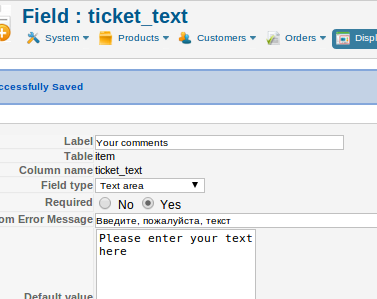
I tried (I must admit - I am not a coder)
=======================
<div class="hikashop_cart_product_custom_item_fields">
<?php
echo $row->ticket_text;
.....
===================
where "ticket_text" is the name of the column, but nothing showed up in the cart.
=======================
<div class="hikashop_cart_product_custom_item_fields">
<?php
echo $row->ticket_text;
.....
===================
where "ticket_text" is the name of the column, but nothing showed up in the cart.
Seek and you shall find.
Please Log in or Create an account to join the conversation.
12 years 10 months ago #133173
by nicolas
Replied by nicolas on topic How to implement str_word_count() for textarea
It will only show up if you enter something in the field of course.
Also, you need to do the modification in the cart file of the view checkout (for the checkout) not the view "product" (for the cart module).
Also, you need to do it for the correct frontend template you're using, not another one or you won't see the change.
Also, you need to do the modification in the cart file of the view checkout (for the checkout) not the view "product" (for the cart module).
Also, you need to do it for the correct frontend template you're using, not another one or you won't see the change.
The following user(s) said Thank You: alexsmirnov
Please Log in or Create an account to join the conversation.
Time to create page: 0.191 seconds