
Cant get thumbs to resize

12 years 9 months ago #138055
by CNXTim
Cant get thumbs to resize was created by CNXTim
-- url of the page with the problem -- :
thebestconferencephones.com.au/index.php...nds/polycom-showroom
-- HikaShop version -- :2.2.3
-- Joomla version -- .2.1
.2.1
-- PHP version -- : 5.3.3
-- Browser(s) name and version -- : Chrome Version 32.0.1700.41 m Aura
-- Error-message(debug-mod must be tuned on) -- : Error_message
Hi,
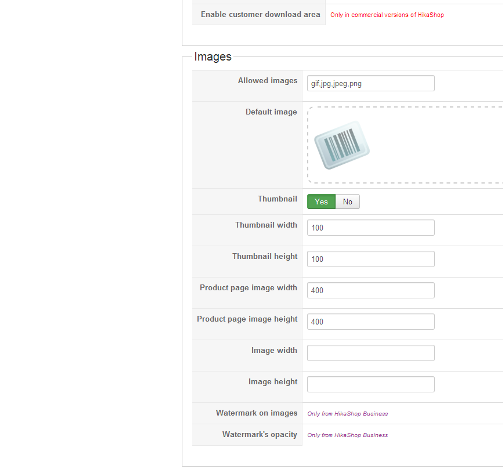
i have set Thumbs to 100x100. Product Page to 400x400 and Image to blankxblank
The thumb and product remain at the uploaded size 387x277
Sorry, can't see what i am doing wrong.
-- HikaShop version -- :2.2.3
-- Joomla version --
.2.1-- PHP version -- : 5.3.3
-- Browser(s) name and version -- : Chrome Version 32.0.1700.41 m Aura
-- Error-message(debug-mod must be tuned on) -- : Error_message
Hi,
i have set Thumbs to 100x100. Product Page to 400x400 and Image to blankxblank
The thumb and product remain at the uploaded size 387x277
Sorry, can't see what i am doing wrong.
Please Log in or Create an account to join the conversation.
12 years 9 months ago #138080
by CNXTim
Replied by CNXTim on topic Cant get thumbs to resize
OK,
I have re-read the FAQ's and it seems, the oversized Thumb is cached in the folder media/com_hikashop/upload/thumbnail and I should go via C Panel FTP and delete all the files there.
Question, is it possible to reach this folder via the HikaShop Component inside Joomla?
I have re-read the FAQ's and it seems, the oversized Thumb is cached in the folder media/com_hikashop/upload/thumbnail and I should go via C Panel FTP and delete all the files there.
Question, is it possible to reach this folder via the HikaShop Component inside Joomla?
Please Log in or Create an account to join the conversation.

12 years 9 months ago #138101
by Jerome
Jerome - Obsidev.com
HikaMarket & HikaSerial developer / HikaShop core dev team.
Replied by Jerome on topic Cant get thumbs to resize
Hi,
No you can't reach the folder via HikaShop. We do not provide file/media manager.
I will recommend you to install a specialized Joomla extension for this specific purpose, there are several good file manager components for Joomla.
Regards,
No you can't reach the folder via HikaShop. We do not provide file/media manager.
I will recommend you to install a specialized Joomla extension for this specific purpose, there are several good file manager components for Joomla.
Regards,
Jerome - Obsidev.com
HikaMarket & HikaSerial developer / HikaShop core dev team.
The following user(s) said Thank You: CNXTim
Please Log in or Create an account to join the conversation.
Time to create page: 0.159 seconds