

- Posts: 105
- Thank you received: 1
2 different views of the product listing
12 years 8 months ago - 12 years 8 months ago #139015
by moneymr
2 different views of the product listing was created by moneymr
-- url of the page with the problem -- :
cnpr.ru/catalog/tsepochki-pod-zoloto-gold-dream.html
-- HikaShop version -- : 2.2.3
-- Joomla version -- : 3.2.1
Hi.
I have 2 different views of the product listing.
First view (from Menu) - If I click to menu and choose category, I saw - cnpr.ru/catalog/tsepochki-pod-zoloto-gold-dream.html
Second view (From category listing)- I goes to category listing and click on category, I saw - cnpr.ru/catalog/category/15-tsepochki-po...aya-bizhuteriya.html
In first view - I saw category description, on second view - I don't.
How to show Category description when I goes thru category listing?
Why you make different views for one product listing page?
How can I make one view for this page with description?
Also I find two different view of product page:
From menu:
cnpr.ru/catalog/tsepochki-pod-zoloto-gol...am-light-unisex.html
From category listing:
cnpr.ru/catalog/product/4-tsepochka-na-s...am-light-unisex.html
I have the same questions...
-- HikaShop version -- : 2.2.3
-- Joomla version -- : 3.2.1
Hi.
I have 2 different views of the product listing.
First view (from Menu) - If I click to menu and choose category, I saw - cnpr.ru/catalog/tsepochki-pod-zoloto-gold-dream.html
Second view (From category listing)- I goes to category listing and click on category, I saw - cnpr.ru/catalog/category/15-tsepochki-po...aya-bizhuteriya.html
In first view - I saw category description, on second view - I don't.
How to show Category description when I goes thru category listing?
Why you make different views for one product listing page?
How can I make one view for this page with description?
Also I find two different view of product page:
From menu:
cnpr.ru/catalog/tsepochki-pod-zoloto-gol...am-light-unisex.html
From category listing:
cnpr.ru/catalog/product/4-tsepochka-na-s...am-light-unisex.html
I have the same questions...
Last edit: 12 years 8 months ago by moneymr.
Please Log in or Create an account to join the conversation.

Less
More
- Posts: 12953
- Thank you received: 1778
12 years 8 months ago #139030
by Mohamed Thelji
Replied by Mohamed Thelji on topic 2 different views of the product listing
Hi,
1. The solution will just be to configure your category listing content menu which have the ID number 133 like you configured the one which have the ID number 102 through the page "Hikashop->DIsplay->Content menus"
2. The only difference is your module which is showing in only one of these pages, note that you can control the displaying of your modules by using "Module assignment" Joomla option of your module
1. The solution will just be to configure your category listing content menu which have the ID number 133 like you configured the one which have the ID number 102 through the page "Hikashop->DIsplay->Content menus"
2. The only difference is your module which is showing in only one of these pages, note that you can control the displaying of your modules by using "Module assignment" Joomla option of your module
Please Log in or Create an account to join the conversation.
12 years 8 months ago - 12 years 8 months ago #139078
by moneymr
Replied by moneymr on topic 2 different views of the product listing
Thanks
Last edit: 12 years 8 months ago by moneymr.
Please Log in or Create an account to join the conversation.
12 years 8 months ago #139224
by moneymr
Replied by moneymr on topic 2 different views of the product listing
Now I know how to ask.
I have menu hierarchy:
Catalog - [COM_HIKASHOP_CATEGORY_VIEW_DEFAULT_TITLE ]
-> First Category [COM_HIKASHOP_PRODUCT_VIEW_DEFAULT_TITLE]
So I saw some differences on product page. When I goes to menu and click to First Categry - everything is ok.
When I click to Catalog and then click to First Category from listing I saw this difference:
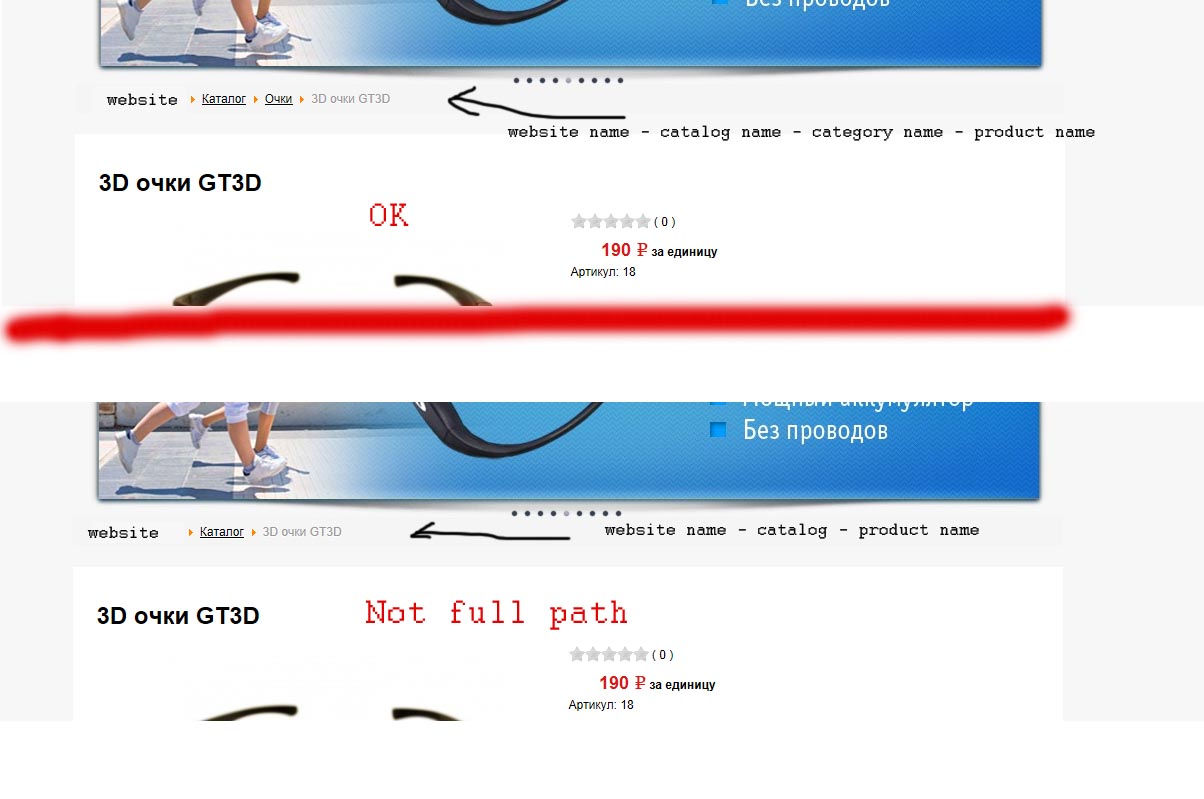
Not full path in Breadcrumbs.
How to fix this?
I have menu hierarchy:
Catalog - [COM_HIKASHOP_CATEGORY_VIEW_DEFAULT_TITLE ]
-> First Category [COM_HIKASHOP_PRODUCT_VIEW_DEFAULT_TITLE]
So I saw some differences on product page. When I goes to menu and click to First Categry - everything is ok.
When I click to Catalog and then click to First Category from listing I saw this difference:
Not full path in Breadcrumbs.
How to fix this?
Please Log in or Create an account to join the conversation.
12 years 8 months ago #139229
by moneymr
Replied by moneymr on topic 2 different views of the product listing
The main touble is: I have module -custom_HTML and this module shows only on one menu item - First Category.
So when I goes to menu and click on First category - this module is shows ok.
But when I goes to Category listing [COM_HIKASHOP_CATEGORY_VIEW_DEFAULT_TITLE] and then click to First Category - I don't saw my module.
So when I goes to menu and click on First category - this module is shows ok.
But when I goes to Category listing [COM_HIKASHOP_CATEGORY_VIEW_DEFAULT_TITLE] and then click to First Category - I don't saw my module.
Please Log in or Create an account to join the conversation.

12 years 8 months ago #139425
by Xavier
Replied by Xavier on topic 2 different views of the product listing
Hi,
In the category listing menu options, you have set an associated module to display the products.
In the options of this products listing module you have to select the desired menu for the menu option in order to have the correct breadcrumb.
In the category listing menu options, you have set an associated module to display the products.
In the options of this products listing module you have to select the desired menu for the menu option in order to have the correct breadcrumb.
Please Log in or Create an account to join the conversation.
12 years 8 months ago - 12 years 8 months ago #139488
by moneymr
Replied by moneymr on topic 2 different views of the product listing
I have category listing. I can't choose one of the category from it. It shows all categories.
Video: cnpr.ru/breadcrumbs.avi
login: web
passw: site
Video: cnpr.ru/breadcrumbs.avi
login: web
passw: site
Last edit: 12 years 8 months ago by moneymr.
Please Log in or Create an account to join the conversation.
12 years 8 months ago #140329
by moneymr
Replied by moneymr on topic 2 different views of the product listing
Is there some news?
Please Log in or Create an account to join the conversation.

12 years 8 months ago #140577
by nicolas
Replied by nicolas on topic 2 different views of the product listing
Hi,
Thanks for the video. It's clearer now and sorry for the delay.
You need to turn off the option "simplified breadcrumb" of the Hikashop configuration and you should get the full breadcrumb in both cases.
Thanks for the video. It's clearer now and sorry for the delay.
You need to turn off the option "simplified breadcrumb" of the Hikashop configuration and you should get the full breadcrumb in both cases.
Please Log in or Create an account to join the conversation.
Time to create page: 0.212 seconds