

- Posts: 222
- Thank you received: 1
pager in one line to fix
12 years 8 months ago #139765
by Vero
pager in one line to fix was created by Vero
-- url of the page with the problem -- :
mywebsite.com/mypage
-- HikaShop version -- : x.x.x
-- Joomla version -- : x.x
-- PHP version -- : x.x.x
-- Browser(s) name and version -- : XXXXX x.x.x
-- Error-message(debug-mod must be tuned on) -- : Error_message
latest versions.
I just want one line in pager to show. Like: 1 2 3 4 5 6 7 ... 45.
But my pager shows not a button "..." and shows all buttons. I have artisteer template. When I asked artisteer, I have the answer:
"the "..." button should be created by the hikashop plug-in so please explore its settings, that will solve the issue."
I don't now how to solve this issue.
Can anybody help me?
Thanks, Vero
-- HikaShop version -- : x.x.x
-- Joomla version -- : x.x
-- PHP version -- : x.x.x
-- Browser(s) name and version -- : XXXXX x.x.x
-- Error-message(debug-mod must be tuned on) -- : Error_message
latest versions.
I just want one line in pager to show. Like: 1 2 3 4 5 6 7 ... 45.
But my pager shows not a button "..." and shows all buttons. I have artisteer template. When I asked artisteer, I have the answer:
"the "..." button should be created by the hikashop plug-in so please explore its settings, that will solve the issue."
I don't now how to solve this issue.
Can anybody help me?
Thanks, Vero
Please Log in or Create an account to join the conversation.

Less
More
- Posts: 12953
- Thank you received: 1778
12 years 8 months ago #139818
by Mohamed Thelji
Replied by Mohamed Thelji on topic pager in one line to fix
Hello Vero,
That's probably coming from a CSS issue, can you give me more information about your issue by showing it to me through some screenshtos and also by giving me a link to the page where you are having your issue ?
Thank you .
.
That's probably coming from a CSS issue, can you give me more information about your issue by showing it to me through some screenshtos and also by giving me a link to the page where you are having your issue ?
Thank you
. Please Log in or Create an account to join the conversation.
12 years 8 months ago #139962
by Vero
Replied by Vero on topic pager in one line to fix
On this page the latest button is in second line. If I will ad all (about 3000) products, I will have so much lines... I want not wide pager, about width:300px.
Page url:
www.adrialle.com/delicious/swarovski
screen:
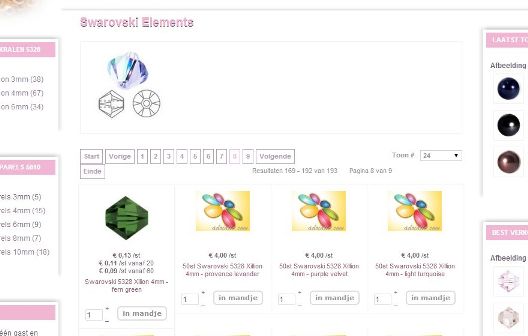
Page url:
www.adrialle.com/delicious/swarovski
screen:
Please Log in or Create an account to join the conversation.

12 years 8 months ago #140024
by nicolas
Replied by nicolas on topic pager in one line to fix
Hi,
Artisteer is right and wrong. It's indeed HikaShop which displays the pagination, but it's displayed by calling the joomla pagination system. And like the joomla pagination, it can actually be overridden by the template since it uses the same library.
So like the joomla pagination, you'll get the ... when you'll have too many pages, if your template doesn't override the pagination, or if it does it properly.
Artisteer is right and wrong. It's indeed HikaShop which displays the pagination, but it's displayed by calling the joomla pagination system. And like the joomla pagination, it can actually be overridden by the template since it uses the same library.
So like the joomla pagination, you'll get the ... when you'll have too many pages, if your template doesn't override the pagination, or if it does it properly.
Please Log in or Create an account to join the conversation.
Time to create page: 0.173 seconds