

- Posts: 89
- Thank you received: 1
File Upload Problem
12 years 8 months ago #140743
by Awards4u
File Upload Problem was created by Awards4u
-- url of the page with the problem -- :
www.awards4u.ca/name-tags/metal-namebadg...al-name-tags-1-x-3--
HikaShop version -- : 2.0.0
-- Joomla version -- : Joomla! 2.5.8
Hi,
I have a few questions:
1. When a customer uploads a file from www.awards4u.ca/name-tags/metal-namebadg...etal-name-tags-1-x-3 it won't upload and you can't see it on the checkout page and I don't get it! However, in www.awards4u.ca/name-tags/metal-namebadg...-nametag-badge-1-x-3 the file uploads? So the upload file works for some products but not others. I'm not sure why?
2. Please see www.awards4u.ca/pga-golf-gifts/916-blue-hat-pga-tour is there a way not to show the price. I don't like the way it looks. $7.50 per unit for buying at least 48
$6.99 per unit for buying at least 144
$6.75 per unit for buying at least 288
$6.49 per unit for buying at least 576
I want it to look like : Item #
Size 1-6 7-12 13-24 25-49 50+ Shipping
AWD2541 7" x 4½" 66.00 64.50 63.00 61.50 60.00 1 lb 2½" x 4"
AWD2542 8" x 5¼" 86.00 84.50 83.00 81.50 80.00 1½ lbs 3" x 5"
AWD2543 9" x 6" 106.00 104.00 102.00 100.00 98.00 2 lbs 3½" x 6"
I can do this in html so I don't want to see the pricing!
Thanks
Mohammed
-- Joomla version -- : Joomla! 2.5.8
Hi,
I have a few questions:
1. When a customer uploads a file from www.awards4u.ca/name-tags/metal-namebadg...etal-name-tags-1-x-3 it won't upload and you can't see it on the checkout page and I don't get it! However, in www.awards4u.ca/name-tags/metal-namebadg...-nametag-badge-1-x-3 the file uploads? So the upload file works for some products but not others. I'm not sure why?
2. Please see www.awards4u.ca/pga-golf-gifts/916-blue-hat-pga-tour is there a way not to show the price. I don't like the way it looks. $7.50 per unit for buying at least 48
$6.99 per unit for buying at least 144
$6.75 per unit for buying at least 288
$6.49 per unit for buying at least 576
I want it to look like : Item #
Size 1-6 7-12 13-24 25-49 50+ Shipping
AWD2541 7" x 4½" 66.00 64.50 63.00 61.50 60.00 1 lb 2½" x 4"
AWD2542 8" x 5¼" 86.00 84.50 83.00 81.50 80.00 1½ lbs 3" x 5"
AWD2543 9" x 6" 106.00 104.00 102.00 100.00 98.00 2 lbs 3½" x 6"
I can do this in html so I don't want to see the pricing!
Thanks
Mohammed
Please Log in or Create an account to join the conversation.

12 years 8 months ago #140755
by Jerome
Jerome - Obsidev.com
HikaMarket & HikaSerial developer / HikaShop core dev team.
Replied by Jerome on topic File Upload Problem
Hi,
1. www.hikashop.com/support/support/documen...ashop-changelog.html
2. I don't see want you want to display exactly but the best will be to create an override for the price display in the product page.
Regards,
1. www.hikashop.com/support/support/documen...ashop-changelog.html
HikaShop 2.1.0
The upload for custom item fields on products with variants was not working properly in some cases
2. I don't see want you want to display exactly but the best will be to create an override for the price display in the product page.
Regards,
Jerome - Obsidev.com
HikaMarket & HikaSerial developer / HikaShop core dev team.
Please Log in or Create an account to join the conversation.
12 years 7 months ago - 12 years 7 months ago #143318
by Awards4u
Replied by Awards4u on topic File Upload Problem
Hi Jerome,
1. So my problem to question 1. is solved! I upgraded to a new paid update for the business and everything uploaded fine! Thanks!
2. For problem number 2 I need to find out how to customize the price. Example:
This is what I have!!!
www.awards4u.ca/pga-golf-gifts/916-blue-hat-pga-tour is there a way not to show the price. I don't like the way it looks.
$7.50 per unit for buying at least 48
$6.99 per unit for buying at least 144
$6.75 per unit for buying at least 288
$6.49 per unit for buying at least 576
This is what I want on the product page:
48-143 144-287 288-575 576+
$7.50 $6.99 $6.75 $6.49
On the listing page I only want it to show $6.49 not $6.49 per unit for buying at least 576!
Also, please see www.gcmstores.com/component/hikashop/pro...721-695-gcm-cardigan
How did he cross out the price and have a new price?
1. So my problem to question 1. is solved! I upgraded to a new paid update for the business and everything uploaded fine! Thanks!
2. For problem number 2 I need to find out how to customize the price. Example:
This is what I have!!!
www.awards4u.ca/pga-golf-gifts/916-blue-hat-pga-tour is there a way not to show the price. I don't like the way it looks.
$7.50 per unit for buying at least 48
$6.99 per unit for buying at least 144
$6.75 per unit for buying at least 288
$6.49 per unit for buying at least 576
This is what I want on the product page:
48-143 144-287 288-575 576+
$7.50 $6.99 $6.75 $6.49
On the listing page I only want it to show $6.49 not $6.49 per unit for buying at least 576!
Also, please see www.gcmstores.com/component/hikashop/pro...721-695-gcm-cardigan
How did he cross out the price and have a new price?
Last edit: 12 years 7 months ago by Awards4u.
Please Log in or Create an account to join the conversation.

12 years 7 months ago #143396
by Eliot
Replied by Eliot on topic File Upload Problem
Hi there,
What you have to do is use our view edition system in Display>Views and find out what you want to edit. For example, you can find the product page in show/product and change the layout and/or add whatever you want. You'll need some HTML and php knowledge though.
If it seems to difficult for you, do not hesitate to ask on our commercial jobs forum.
What you have to do is use our view edition system in Display>Views and find out what you want to edit. For example, you can find the product page in show/product and change the layout and/or add whatever you want. You'll need some HTML and php knowledge though.
If it seems to difficult for you, do not hesitate to ask on our commercial jobs forum.
Please Log in or Create an account to join the conversation.
12 years 7 months ago #145562
by Awards4u
Replied by Awards4u on topic File Upload Problem
Hi,
After I did the update. I have another problem. Please see www.awards4u.ca/name-tags/metal-namebadg...etal-name-tags-1-x-3 . When I add the attachment to Magnet which is $1.50 more. I won't show up when a click on the add to cart?
Where it says "Login or create a new account" it will how up as $9.99 so it didn't add the $1.50? How do I fix this problem?
Mohammed
After I did the update. I have another problem. Please see www.awards4u.ca/name-tags/metal-namebadg...etal-name-tags-1-x-3 . When I add the attachment to Magnet which is $1.50 more. I won't show up when a click on the add to cart?
Where it says "Login or create a new account" it will how up as $9.99 so it didn't add the $1.50? How do I fix this problem?
Mohammed
Please Log in or Create an account to join the conversation.
12 years 7 months ago #145690
by Eliot
Replied by Eliot on topic File Upload Problem
Hi Mohammed,
I couldn't reproduce this issue.
Are your attachments "options"? If so, could you try to create a new product with new options and tell me if it's the same problem? Also, which version are you running and when did you get it? You can try to download the last version again (we fixed few things) and tell me if it solves the problem.
I couldn't reproduce this issue.
Are your attachments "options"? If so, could you try to create a new product with new options and tell me if it's the same problem? Also, which version are you running and when did you get it? You can try to download the last version again (we fixed few things) and tell me if it solves the problem.
Please Log in or Create an account to join the conversation.
12 years 7 months ago #145731
by Awards4u
Replied by Awards4u on topic File Upload Problem
Hi,
" You have the latest stable version of HikaShop Business: 2.2.3"
So I have the latest version. I just updated it 2 weeks ago. I using Characteristics which worked great before I did this update. And now it won`t work. I even tried to put a new product with new Characteristics however, it won`t work right!
" You have the latest stable version of HikaShop Business: 2.2.3"
So I have the latest version. I just updated it 2 weeks ago. I using Characteristics which worked great before I did this update. And now it won`t work. I even tried to put a new product with new Characteristics however, it won`t work right!
Please Log in or Create an account to join the conversation.
12 years 7 months ago #145739
by Eliot
Replied by Eliot on topic File Upload Problem
Last version is 2.3.0
You can download it on your subscription page.
Try it and tell me if it works!
You can download it on your subscription page.
Try it and tell me if it works!
Please Log in or Create an account to join the conversation.
12 years 7 months ago #145742
by Awards4u
Replied by Awards4u on topic File Upload Problem
Hi Eliot,
I updated it to 2.3.0 and it still won`t work for some reason.
I updated it to 2.3.0 and it still won`t work for some reason.
Please Log in or Create an account to join the conversation.
12 years 7 months ago #145752
by Eliot
Replied by Eliot on topic File Upload Problem
That's really strange. Did you modified any view on the front-end related to the product page?
You could try to remove it and see if it solves the problem.
You could try to remove it and see if it solves the problem.
Please Log in or Create an account to join the conversation.
12 years 7 months ago #145754
by Awards4u
Replied by Awards4u on topic File Upload Problem
I haven`t changed anything on the website for few months. I only did the upgrade because customers were complaining that their images or files were not being uploaded and I was not receiving them. So I upgraded and now customers are saying there is a problem on my website. I have no idea why! I`m not sure what to do
Please Log in or Create an account to join the conversation.
12 years 7 months ago #146037
by Eliot
Replied by Eliot on topic File Upload Problem
I just though about it, do you still have stock for these variants?
It might explain the problem.
It might explain the problem.
Please Log in or Create an account to join the conversation.
12 years 7 months ago #146102
by Awards4u
Replied by Awards4u on topic File Upload Problem
Hi Eliot,
Sorry, I didn't understand what you mean by stock for these variants. If you can explain it that would be great. Or how I can check if I have stock?
Thanks,
Mohammed
Sorry, I didn't understand what you mean by stock for these variants. If you can explain it that would be great. Or how I can check if I have stock?
Thanks,
Mohammed
Please Log in or Create an account to join the conversation.
12 years 7 months ago #146121
by Eliot
Replied by Eliot on topic File Upload Problem
Hi Mohammed,
Your products should have a quantity set (if you used it).
Simply go in your product page (backend) and check that the quantity field is not at 0.
Then, do the same thing for each variant of this product (the quantity is displayed on the listing so you can see it directly).
Your products should have a quantity set (if you used it).
Simply go in your product page (backend) and check that the quantity field is not at 0.
Then, do the same thing for each variant of this product (the quantity is displayed on the listing so you can see it directly).
Please Log in or Create an account to join the conversation.
12 years 7 months ago #146125
by Awards4u
Replied by Awards4u on topic File Upload Problem
Hi Eliot,
My quantity is not set to 0 so it should work. Please see the attachments.
Thanks,
Mohammed
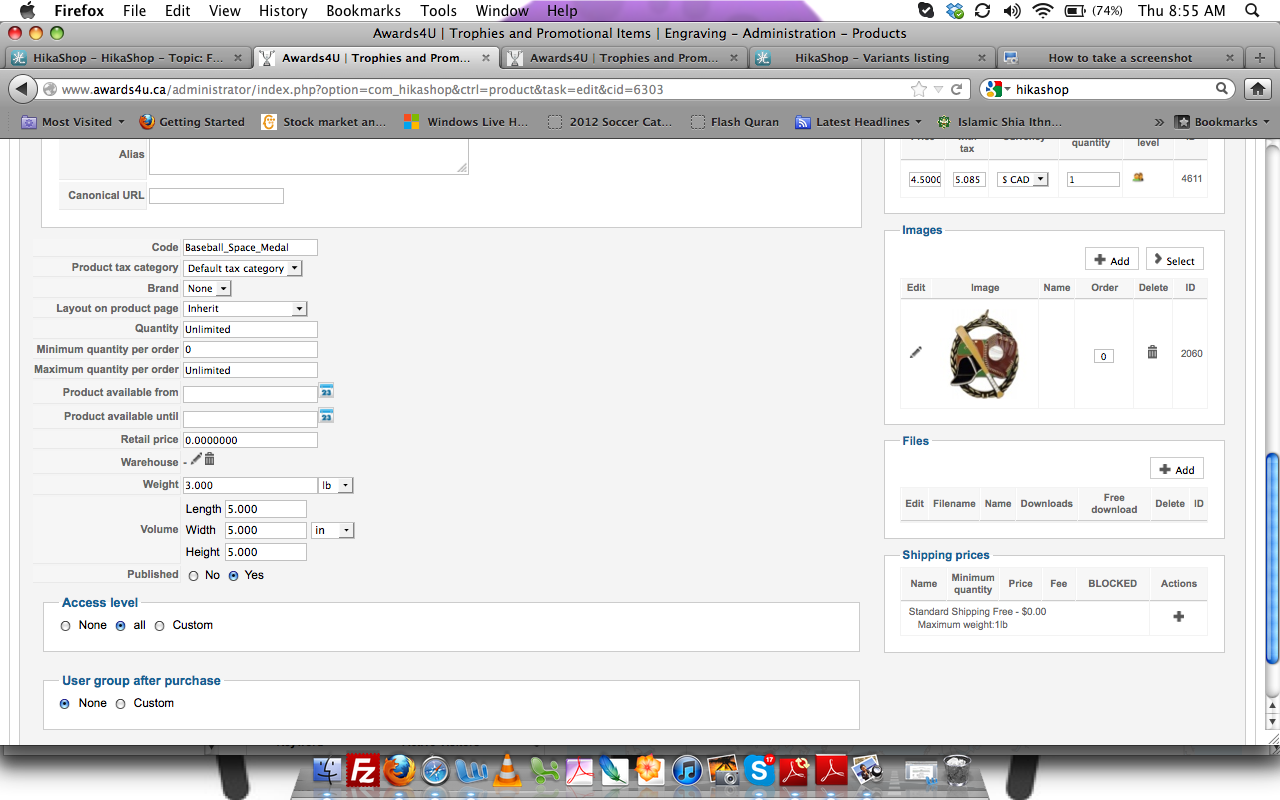
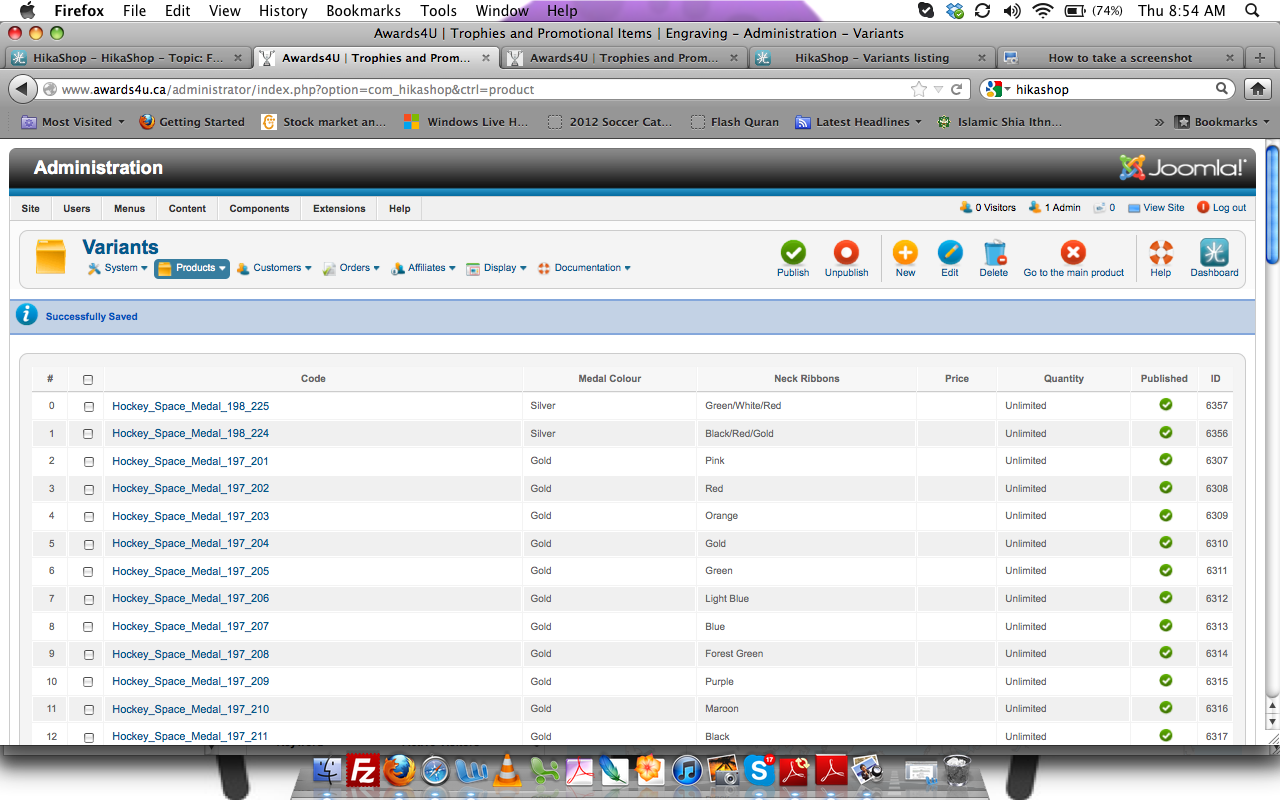
My quantity is not set to 0 so it should work. Please see the attachments.
Thanks,
Mohammed
Please Log in or Create an account to join the conversation.
12 years 7 months ago #146399
by Jerome
Jerome - Obsidev.com
HikaMarket & HikaSerial developer / HikaShop core dev team.
Replied by Jerome on topic File Upload Problem
Hi,
The quantity is not 0 for the main product but what is the quantity for the variants ?
HikaShop first use the quantify of the variant and if the quantity for the variant is "unlimited" it uses the quantity of the main product.
So, you have to check your variants too.
Regards,
The quantity is not 0 for the main product but what is the quantity for the variants ?
HikaShop first use the quantify of the variant and if the quantity for the variant is "unlimited" it uses the quantity of the main product.
So, you have to check your variants too.
Regards,
Jerome - Obsidev.com
HikaMarket & HikaSerial developer / HikaShop core dev team.
Please Log in or Create an account to join the conversation.
12 years 7 months ago #146407
by Awards4u
Replied by Awards4u on topic File Upload Problem
Hi Jerome,
Please see the image in the file of my last post it shows the variants! They are unlimited. I also tested it to 1000 in their but still didn't work??
Thanks
Please see the image in the file of my last post it shows the variants! They are unlimited. I also tested it to 1000 in their but still didn't work??
Thanks
Please Log in or Create an account to join the conversation.
12 years 7 months ago #146604
by Awards4u
Replied by Awards4u on topic File Upload Problem
Hi,
I tried to inserted a new product with new variants. I played with the new variants to make sure it's a number or unlimited. I'm not sure what else to try? Please let me know if you have any idea's. It's been working fine before I updated hikashop.
Thanks,
I tried to inserted a new product with new variants. I played with the new variants to make sure it's a number or unlimited. I'm not sure what else to try? Please let me know if you have any idea's. It's been working fine before I updated hikashop.
Thanks,
Please Log in or Create an account to join the conversation.
12 years 6 months ago #146812
by Eliot
Replied by Eliot on topic File Upload Problem
Hi,
I must say I don't have much more idea. You may have something in your configuration that generate this issue since we can't reproduce it. Could you try to enable error reporting and the debug mode in joomla and perform the same action again? It might display some errors that could help us.
I must say I don't have much more idea. You may have something in your configuration that generate this issue since we can't reproduce it. Could you try to enable error reporting and the debug mode in joomla and perform the same action again? It might display some errors that could help us.
Please Log in or Create an account to join the conversation.
12 years 6 months ago #147199
by Awards4u
Replied by Awards4u on topic File Upload Problem
Hi Elliot,
Part of the problem is with the show_tabular in views. Once I clear it to default the variants show up however the price won't change and the big problem is the product pages gets messed up. I would have to get someone who know php to fix this problem.
My questions are
1. Why did these variants get messed up? I see others had this problem as well.
2. If there are more updates will they get messed up again?
3. Is there another solution?
Thanks for all your help.
Mohammed
Part of the problem is with the show_tabular in views. Once I clear it to default the variants show up however the price won't change and the big problem is the product pages gets messed up. I would have to get someone who know php to fix this problem.
My questions are
1. Why did these variants get messed up? I see others had this problem as well.
2. If there are more updates will they get messed up again?
3. Is there another solution?
Thanks for all your help.
Mohammed
Please Log in or Create an account to join the conversation.
Time to create page: 0.328 seconds