

- Posts: 96
- Thank you received: 3
How to show always all categories?
12 years 8 months ago #140752
by Digishop
How to show always all categories? was created by Digishop
-- url of the page with the problem -- :
mywebsite.com/mypage
-- HikaShop version -- : Business 2.2.3
-- Joomla version -- : 3.2.1
-- PHP version -- : x.x.x
-- Browser(s) name and version -- : XXXXX x.x.x
-- Error-message(debug-mod must be tuned on) -- : Error_message
Hello,
I have as mainpage in my shop 3 categories with products. First I see the categories. When I click on one of the 3 categories I get a screen with the products. OK.
But the categories are gone. So you can't click on another categorie to see the products from that one.
How can the categories stay on the screen when I'm having a list with products.
Thanks
-- HikaShop version -- : Business 2.2.3
-- Joomla version -- : 3.2.1
-- PHP version -- : x.x.x
-- Browser(s) name and version -- : XXXXX x.x.x
-- Error-message(debug-mod must be tuned on) -- : Error_message
Hello,
I have as mainpage in my shop 3 categories with products. First I see the categories. When I click on one of the 3 categories I get a screen with the products. OK.
But the categories are gone. So you can't click on another categorie to see the products from that one.
How can the categories stay on the screen when I'm having a list with products.
Thanks
Please Log in or Create an account to join the conversation.

12 years 8 months ago #140771
by nicolas
Replied by nicolas on topic How to show always all categories?
Hi,
That's probably because in the options of your categories module, you have the option "Synchronize with currently displayed item when possible" activated. Please check that option of your module via the menu Display->Content modules.
That's probably because in the options of your categories module, you have the option "Synchronize with currently displayed item when possible" activated. Please check that option of your module via the menu Display->Content modules.
Please Log in or Create an account to join the conversation.
12 years 8 months ago #140799
by Digishop
Replied by Digishop on topic How to show always all categories?
Hello Nicolas,
Thanks for your answer. But when I disable the option "Synchronize with currently displayed item when possible" I don't see any product when I click on a category?
Enclosed you find the settings of this module.
Thanks
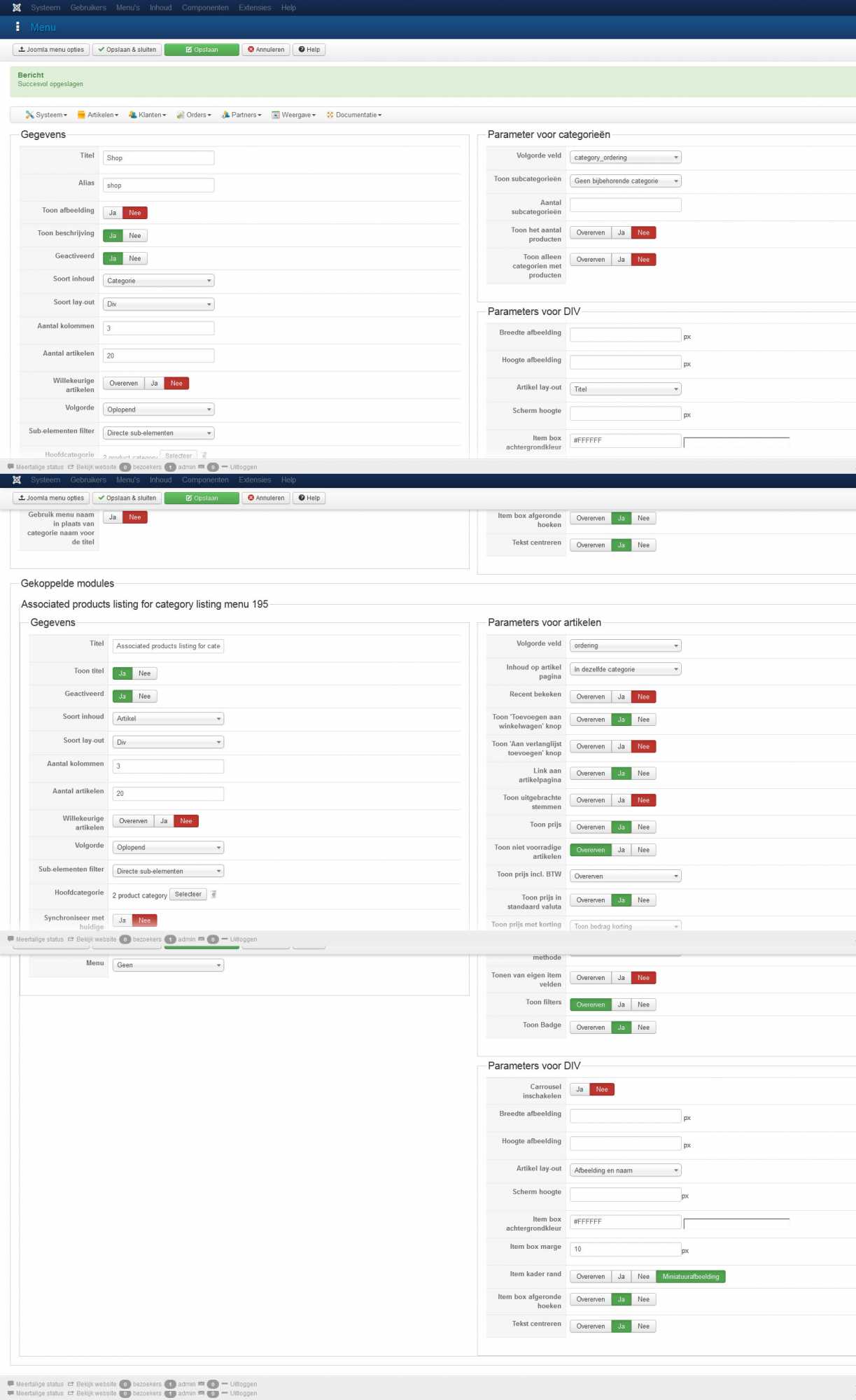
Thanks for your answer. But when I disable the option "Synchronize with currently displayed item when possible" I don't see any product when I click on a category?
Enclosed you find the settings of this module.
Thanks
Please Log in or Create an account to join the conversation.
12 years 8 months ago #140857
by nicolas
Replied by nicolas on topic How to show always all categories?
Hi,
You should keep that option turned on there.
What you need to do:
create a page (a joomla article for example) with the "categories listing : 1 level" module displayed on it.
You can configure the display of the module via the menu Display>Content modules. That's on this page that the synchronize option need to be turned off (and it should already be the case actually).
You should keep that option turned on there.
What you need to do:
create a page (a joomla article for example) with the "categories listing : 1 level" module displayed on it.
You can configure the display of the module via the menu Display>Content modules. That's on this page that the synchronize option need to be turned off (and it should already be the case actually).
Please Log in or Create an account to join the conversation.
12 years 8 months ago #140945
by Digishop
Replied by Digishop on topic How to show always all categories?
Hello,
Thanks for answering, That works for me. Only I have in the first screen 2 rows with the same categories. But that's not really a problem.
I have now another issue in the checkout. I have a template for my website but for the shop (a link in the website) I use the Joomla! protostar template. That works fine until I do the checkout and click on the "Shopping Cart". Then I came back in the website template for filling in the name etc.. How can I stay in the protostar template.
Part of the message is hidden for the guests. Please log in or register to see it.
Thanks
Thanks for answering, That works for me. Only I have in the first screen 2 rows with the same categories. But that's not really a problem.
I have now another issue in the checkout. I have a template for my website but for the shop (a link in the website) I use the Joomla! protostar template. That works fine until I do the checkout and click on the "Shopping Cart". Then I came back in the website template for filling in the name etc.. How can I stay in the protostar template.
Part of the message is hidden for the guests. Please log in or register to see it.
Thanks
Please Log in or Create an account to join the conversation.
12 years 8 months ago #140965
by nicolas
Replied by nicolas on topic How to show always all categories?
Hi,
Select the menu item you want for your checkout in the "force a menu on checkout" and the template assigned to that menu item will be used on the checkout.
Select the menu item you want for your checkout in the "force a menu on checkout" and the template assigned to that menu item will be used on the checkout.
Please Log in or Create an account to join the conversation.
Time to create page: 0.191 seconds