

- Posts: 44
- Thank you received: 0
Enlarge the product image files and rearrange them
12 years 8 months ago #141944
by benrud
Enlarge the product image files and rearrange them was created by benrud
-- url of the page with the problem -- :
test.crossfitshorts.com/
HikaShop Essential: 2.2.3
Joomla! version, 3.2.1.
-- PHP version -- : 5.4.24
-- Browser(s) name and version -- : All
Hello Everyone,
I'm trying to do three different things.
1st. I want to enlarge all of the images associated with the product page. The thumbnails and the main image.
2nd, I want to align the entire image display (main and thumbnails) to the top left of the page.
3rd, move the price down and to the right of the Product Characteristics
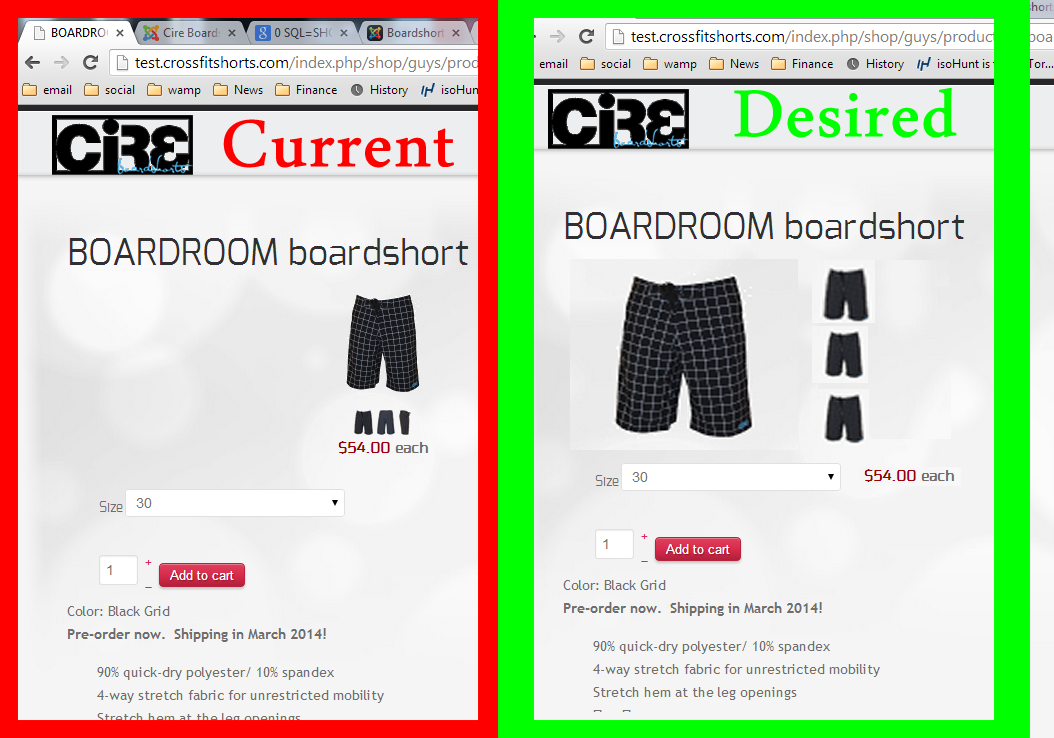
I've reviewed a few threads on here, but I haven't had any luck in finding a tutorial post that addresses these concerns. I found a few .css hacks, is that the only way or is it possible via the GUI?
Thanks,
Todd
HikaShop Essential: 2.2.3
Joomla! version, 3.2.1.
-- PHP version -- : 5.4.24
-- Browser(s) name and version -- : All
Hello Everyone,
I'm trying to do three different things.
1st. I want to enlarge all of the images associated with the product page. The thumbnails and the main image.
2nd, I want to align the entire image display (main and thumbnails) to the top left of the page.
3rd, move the price down and to the right of the Product Characteristics
I've reviewed a few threads on here, but I haven't had any luck in finding a tutorial post that addresses these concerns. I found a few .css hacks, is that the only way or is it possible via the GUI?
Thanks,
Todd
Please Log in or Create an account to join the conversation.

12 years 8 months ago #142046
by nicolas
Replied by nicolas on topic Enlarge the product image files and rearrange them
Hi,
1. The size of the main image can be changed in the Images section of the configuration, and for the thumbnails you can look here:
www.hikashop.com/support/support/documen...ling.html#thumbnails
2. 3. These will require more advanced CSS modifications. You'll need to know CSS for that :
www.hikashop.com/support/support/documen...ize-the-display.html
1. The size of the main image can be changed in the Images section of the configuration, and for the thumbnails you can look here:
www.hikashop.com/support/support/documen...ling.html#thumbnails
2. 3. These will require more advanced CSS modifications. You'll need to know CSS for that :
www.hikashop.com/support/support/documen...ize-the-display.html
Please Log in or Create an account to join the conversation.
Time to create page: 0.170 seconds