

- Posts: 31
- Thank you received: 1
Compare page without compare button
12 years 8 months ago #142100
by dannec
Compare page without compare button was created by dannec
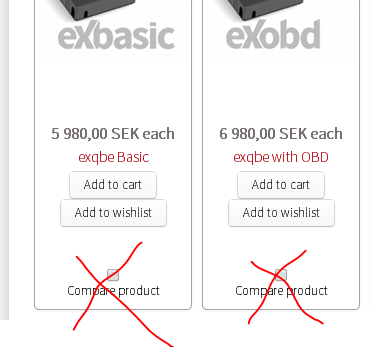
Can we have a comparison page without having a compare button on each product in the store? I am unable to find the code in the files...
Please Log in or Create an account to join the conversation.

12 years 8 months ago #142116
by nicolas
Replied by nicolas on topic Compare page without compare button
Yes. Create a new menu item of the type "comparison page" and in the options of the menu, select the products you want for the comparison page.
Then, when you click on the menu item, you'll get directly to the comparison page of these products.
Then, when you click on the menu item, you'll get directly to the comparison page of these products.
Please Log in or Create an account to join the conversation.
12 years 7 months ago #143181
by dannec
Replied by dannec on topic Compare page without compare button
That is what I have done. I have a link in the menu that directs the customer to a comparison page with 4 versions of our product. Where I am lost is how to remove the boxes from the store items. I am sure I am just missing something...
Please Log in or Create an account to join the conversation.
12 years 7 months ago #143234
by nicolas
Replied by nicolas on topic Compare page without compare button
You need to turn off the "Activate compare mode" option of the configuration.
Please Log in or Create an account to join the conversation.
12 years 7 months ago #143251
by dannec
Replied by dannec on topic Compare page without compare button
When I set Activate compare mode to no... I then get a Message-Product not found on the page when the menu item is selected.
Please Log in or Create an account to join the conversation.
12 years 7 months ago #143275
by nicolas
Replied by nicolas on topic Compare page without compare button
That's not normal.
Change the line:
if(empty($this->elements) || !$this->params->get('show_compare')){
to:
if(empty($this->elements)){
in the file "compare" of the view "product" via the menu display>views and that should fix that.
Change the line:
if(empty($this->elements) || !$this->params->get('show_compare')){
to:
if(empty($this->elements)){
in the file "compare" of the view "product" via the menu display>views and that should fix that.
Please Log in or Create an account to join the conversation.
12 years 7 months ago #143432
by dannec
Replied by dannec on topic Compare page without compare button
Perfect!
Thank you,
Tiffany
Thank you,
Tiffany
Please Log in or Create an account to join the conversation.
Time to create page: 0.184 seconds