
- Posts: 43
- Thank you received: 1
Broadly change the article layout page
- markespositi
-
 Topic Author
- Offline
Less
More
12 years 7 months ago #143017
by markespositi
Broadly change the article layout page was created by markespositi
I need to implement the page I attached here. 
1 - What do I need to change to have the result showed in the page. Particularly. TO HAVE articles on the right, options on the left, etc. ? I guess I need to work on View /product / and then ...
2 - is there a built-in option which allows to show the "category image" on the article page (as showed in my page)?
3 - consider that my page shows article page related to category "A". The page of the category "B" articles will have an other layout. So, this means I will need to work with overrides views, doesn't it ?
Thanks a lot ! Thanks a lot !
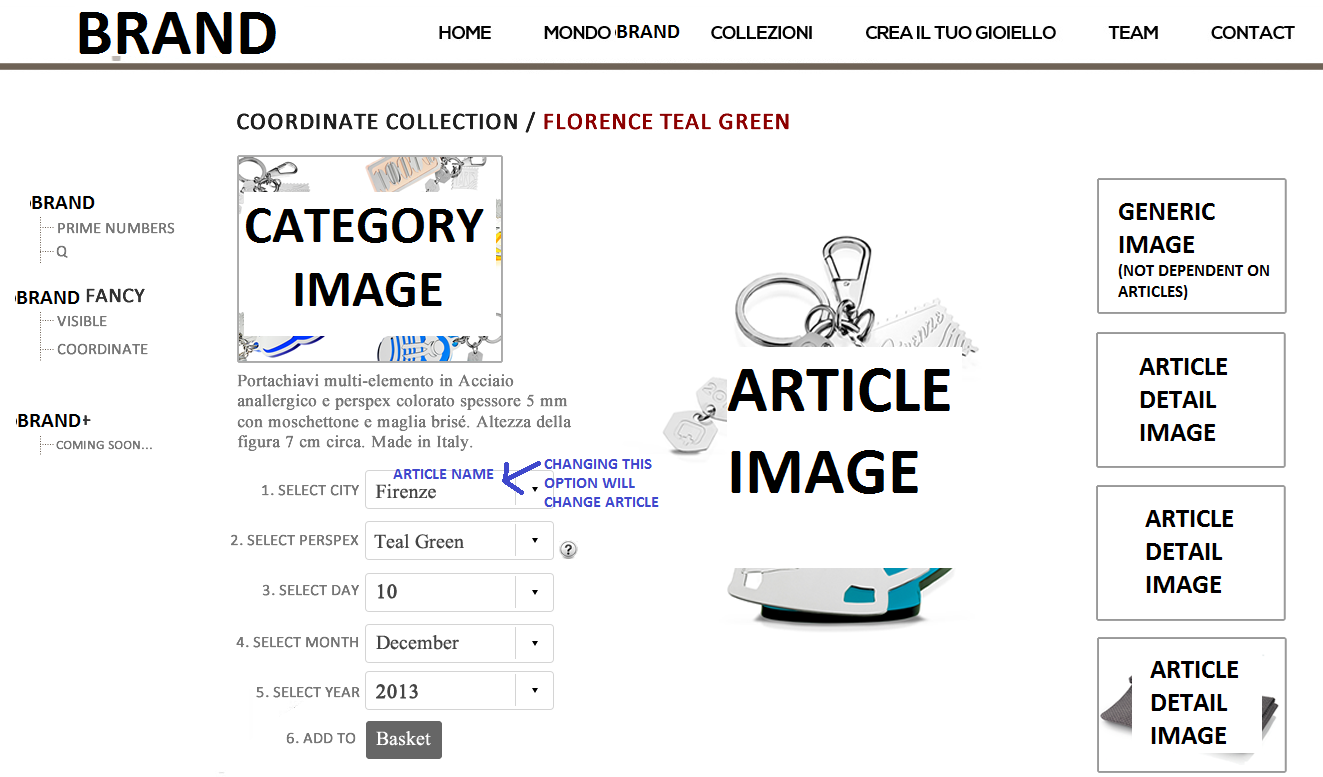
1 - What do I need to change to have the result showed in the page. Particularly. TO HAVE articles on the right, options on the left, etc. ? I guess I need to work on View /product / and then ...
2 - is there a built-in option which allows to show the "category image" on the article page (as showed in my page)?
3 - consider that my page shows article page related to category "A". The page of the category "B" articles will have an other layout. So, this means I will need to work with overrides views, doesn't it ?
Thanks a lot ! Thanks a lot !
Please Log in or Create an account to join the conversation.

12 years 7 months ago #143035
by nicolas
Replied by nicolas on topic Broadly change the article layout page
Hi,
1. use the "reserve" product page layout instead of the "default" or "inherited" one in your category settings and the right and left panels of the product page will swap.
2. There is no such build in option. It will require you to edit your product page layout (so show_default or show_reverse) and add custom code for that. To get you started, here is a thread about adding the category name on the product page:
www.hikashop.com/forum/4-how-to/64957-ca...-products-pages.html
3. Yes, you'll need to create several product page layouts (when you edit one of them, you can change the name of the file at the top and when you save it creates a new one that you can select in the "layout of product page" setting of your categories).
1. use the "reserve" product page layout instead of the "default" or "inherited" one in your category settings and the right and left panels of the product page will swap.
2. There is no such build in option. It will require you to edit your product page layout (so show_default or show_reverse) and add custom code for that. To get you started, here is a thread about adding the category name on the product page:
www.hikashop.com/forum/4-how-to/64957-ca...-products-pages.html
3. Yes, you'll need to create several product page layouts (when you edit one of them, you can change the name of the file at the top and when you save it creates a new one that you can select in the "layout of product page" setting of your categories).
Please Log in or Create an account to join the conversation.
- markespositi
-
Topic Author
- Offline
Less
More
- Posts: 43
- Thank you received: 1
12 years 7 months ago - 12 years 7 months ago #143122
by markespositi
Replied by markespositi on topic Broadly change the article layout page
Thanks. Your reply on point number 2 helps me so much.
Please, can you answer to the following question?
Suppose I have two characteristics for an article: color and size.
Suppose that for color red I have three size while for color black I have two size.
Then I manage "variants" and I delete the unavailable variants.
Unfortunately, the unavailable variants (color X combined with size Y) continue to appear in the product page (even if they are unorderable).
How can I avoid that?
An other help, please.
My articles have some characteristics and also have a "shape" which can be only a letter (one of 26) or a digit (one of 10).
If I use "characteristic" feature to implement "shape" I will be managing a huge number of "variants". Is there a better way to implement "shape" ?
Thanks!
Please, can you answer to the following question?
Suppose I have two characteristics for an article: color and size.
Suppose that for color red I have three size while for color black I have two size.
Then I manage "variants" and I delete the unavailable variants.
Unfortunately, the unavailable variants (color X combined with size Y) continue to appear in the product page (even if they are unorderable).
How can I avoid that?
An other help, please.
My articles have some characteristics and also have a "shape" which can be only a letter (one of 26) or a digit (one of 10).
If I use "characteristic" feature to implement "shape" I will be managing a huge number of "variants". Is there a better way to implement "shape" ?
Thanks!
Last edit: 12 years 7 months ago by markespositi.
Please Log in or Create an account to join the conversation.

12 years 7 months ago #143253
by Jerome
Jerome - Obsidev.com
HikaMarket & HikaSerial developer / HikaShop core dev team.
Replied by Jerome on topic Broadly change the article layout page
Hi,
To avoid that you have to remove the characteristic value itself.
You can also use another mode for the variant selection, not using dropdowns but using a table which will list all existing possibilities.
For "shape", depending if it can influence on the product quantity, the product price ; you might use a custom field instead of a variant.
The "item custom fields" is a feature of HikaShop Business, it allow the customer to put extra data while adding a product in the cart.
You can test the "item custom fields" thanks to our demo website.
Regards,
To avoid that you have to remove the characteristic value itself.
You can also use another mode for the variant selection, not using dropdowns but using a table which will list all existing possibilities.
For "shape", depending if it can influence on the product quantity, the product price ; you might use a custom field instead of a variant.
The "item custom fields" is a feature of HikaShop Business, it allow the customer to put extra data while adding a product in the cart.
You can test the "item custom fields" thanks to our demo website.
Regards,
Jerome - Obsidev.com
HikaMarket & HikaSerial developer / HikaShop core dev team.
Please Log in or Create an account to join the conversation.
- markespositi
-
Topic Author
- Offline
Less
More
- Posts: 43
- Thank you received: 1
12 years 7 months ago - 12 years 7 months ago #143289
by markespositi
Replied by markespositi on topic Broadly change the article layout page
Thanks. I use for suggestion for point number 2.
Regarding point number 1:
1.a) you suggested to remove the value, that is to remove the caracteristic couple of value (ie. color X combined with size Y) but, as I wrote, this variant comntinue to appear on the product page
1.b) How can I use "table" instead of "dropdowns" for characteristics? I can't see any options on that in the panel.
Thanks
Regarding point number 1:
1.a) you suggested to remove the value, that is to remove the caracteristic couple of value (ie. color X combined with size Y) but, as I wrote, this variant comntinue to appear on the product page
1.b) How can I use "table" instead of "dropdowns" for characteristics? I can't see any options on that in the panel.
Thanks
Last edit: 12 years 7 months ago by markespositi.
Please Log in or Create an account to join the conversation.

12 years 7 months ago - 12 years 7 months ago #143307
by condorazul
Replied by condorazul on topic Broadly change the article layout page
1b. You should go to System -- Configuration -- Main -- Product -- Characteristic Selection
1a. I have similar problems with characteristics, and i have to delete it all and create a new one. Hope you find a solution
1a. I have similar problems with characteristics, and i have to delete it all and create a new one. Hope you find a solution
Last edit: 12 years 7 months ago by condorazul.
Please Log in or Create an account to join the conversation.
Time to create page: 0.195 seconds