

- Posts: 41
- Thank you received: 1
Putting a min weight on products
12 years 7 months ago #144786
by signpost
Putting a min weight on products was created by signpost
A client has got now weights on approx 2000 products, but weight on 100, is there a quick way to put a minimum weight where it is zero??
Please Log in or Create an account to join the conversation.

12 years 7 months ago #144802
by Eliot
Replied by Eliot on topic Putting a min weight on products
Hi,
System>Mass Action.
Filter: product with weight = 0
Action: set a weight.
It should do the trick!
More info: www.hikashop.com/support/documentation/i...massaction-form.html
System>Mass Action.
Filter: product with weight = 0
Action: set a weight.
It should do the trick!
More info: www.hikashop.com/support/documentation/i...massaction-form.html
Please Log in or Create an account to join the conversation.
12 years 7 months ago #145532
by signpost
Thanks Eliot for the reply.
Tried to implement the above but there appears to more options such as Triggers, does this section need to be changed?
Also, in the Filters section there is a start and a value field, not sure what to put there? Is the start value what it is currently set at and the value field would be the new value?
What should be selected for the actions section?
Your help would be greatly appreciated.
Thanks
Replied by signpost on topic Putting a min weight on products
Eliot wrote: Hi,
System>Mass Action.
Filter: product with weight = 0
Action: set a weight.
It should do the trick!
More info: www.hikashop.com/support/documentation/i...massaction-form.html
Thanks Eliot for the reply.
Tried to implement the above but there appears to more options such as Triggers, does this section need to be changed?
Also, in the Filters section there is a start and a value field, not sure what to put there? Is the start value what it is currently set at and the value field would be the new value?
What should be selected for the actions section?
Your help would be greatly appreciated.
Thanks
Please Log in or Create an account to join the conversation.

Less
More
- Posts: 12953
- Thank you received: 1778
12 years 7 months ago - 12 years 7 months ago #145542
by Mohamed Thelji
Replied by Mohamed Thelji on topic Putting a min weight on products
Hi,
1. Note that regarding the Triggers and Filters options you'll probably find your answer by reading the documentation :
2. You should :
- Add a Filter on "product columns" where "product_weight" = 0
- Set "update values" for the Action where "product_weight" = 100 (for example)
1. Note that regarding the Triggers and Filters options you'll probably find your answer by reading the documentation :
Triggers : Triggers allows you to specify when the mass action should be processed. You can either use it to execute your mass action on a regular frequency (for example you can import a csv with your products every day, updating your data according to the modification you made in the file), or execute the defined action on a given trigger like after a product is created. This way, you will be able to define for example a weight for a newly created product if you didn't specified any, avoiding shipping method errors. If you use a time trigger or click on the process button, the system will use all the data available but if you choose a trigger like "after a product is create", the mass action will run only on the data of the trigger, so only on that product in that case.
Filters : Here you can add filters to your mass action. For instance, you can specifically select products which belong to a category or customers living in Europe. Thus, you can process actions only on the selected data. Note that the number of elements filtered will be displayed next to the dropdown, letting you know how for example much products will effectively be processed in the given category.
2. You should :
- Add a Filter on "product columns" where "product_weight" = 0
- Set "update values" for the Action where "product_weight" = 100 (for example)
Last edit: 12 years 7 months ago by Mohamed Thelji.
The following user(s) said Thank You: signpost
Please Log in or Create an account to join the conversation.
12 years 7 months ago #145570
by signpost
Thank you Muhamed
I have attached a screen shot of the settings I used because I still can't get it to work.
I can't see where I've gone wrong.
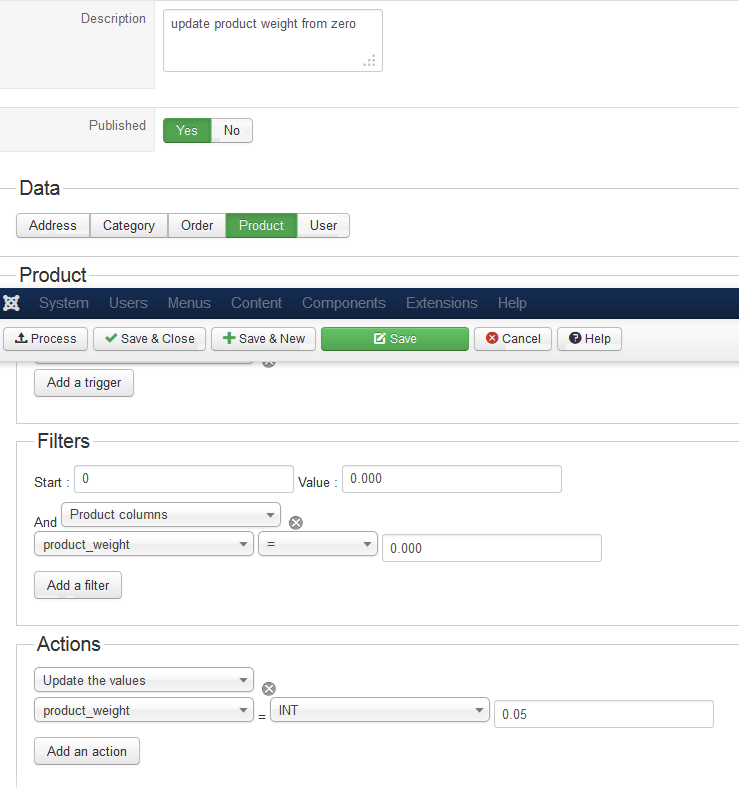
Replied by signpost on topic Putting a min weight on products
Mohamed Thelji wrote: Hi,
1. Note that regarding the Triggers and Filters options you'll probably find your answer by reading the documentation :Triggers : Triggers allows you to specify when the mass action should be processed. You can either use it to execute your mass action on a regular frequency (for example you can import a csv with your products every day, updating your data according to the modification you made in the file), or execute the defined action on a given trigger like after a product is created. This way, you will be able to define for example a weight for a newly created product if you didn't specified any, avoiding shipping method errors. If you use a time trigger or click on the process button, the system will use all the data available but if you choose a trigger like "after a product is create", the mass action will run only on the data of the trigger, so only on that product in that case.
Filters : Here you can add filters to your mass action. For instance, you can specifically select products which belong to a category or customers living in Europe. Thus, you can process actions only on the selected data. Note that the number of elements filtered will be displayed next to the dropdown, letting you know how for example much products will effectively be processed in the given category.
2. You should :
- Add a Filter on "product columns" where "product_weight" = 0
- Set "update values" for the Action where "product_weight" = 100 (for example)
Thank you Muhamed
I have attached a screen shot of the settings I used because I still can't get it to work.
I can't see where I've gone wrong.
Please Log in or Create an account to join the conversation.

12 years 7 months ago #145622
by nicolas
Replied by nicolas on topic Putting a min weight on products
In the "Value" field of the filters area, please enter a big number like 3000 so that is applies the actions on all the products.
The following user(s) said Thank You: signpost
Please Log in or Create an account to join the conversation.
12 years 7 months ago #146093
by signpost
Replied by signpost on topic Putting a min weight on products
I have entered a big number as suggested but it still doesn't appear to be working. I have checked the plugins are enabled yet it's not working.
Have I missed something?
Have I missed something?
Please Log in or Create an account to join the conversation.
12 years 7 months ago #146119
by Eliot
Replied by Eliot on topic Putting a min weight on products
I don't think you are missing anything.
What version of Hikashop are you using? Last version is 2.3.0, try to update and tell us if it solves the problem!
What version of Hikashop are you using? Last version is 2.3.0, try to update and tell us if it solves the problem!
The following user(s) said Thank You: signpost
Please Log in or Create an account to join the conversation.
12 years 7 months ago #146165
by signpost
Replied by signpost on topic Putting a min weight on products
Thanks Eliot.
We are curretly using version 2.2.3 HikaShop Business but the site is on a development server. We have not yet attached the subscription to the correct domain.
If we were to download the latest version and upgrade the development site, would that work?
We are curretly using version 2.2.3 HikaShop Business but the site is on a development server. We have not yet attached the subscription to the correct domain.
If we were to download the latest version and upgrade the development site, would that work?
Please Log in or Create an account to join the conversation.

12 years 7 months ago #146228
by Xavier
Replied by Xavier on topic Putting a min weight on products
Hi,
Yes that will work.
Yes that will work.
Please Log in or Create an account to join the conversation.
12 years 7 months ago #146314
by signpost
We upgraded and it still didn't work.
Could you possibly take a look if we were to provide you with access?
Not quite sure what else to do.
Replied by signpost on topic Putting a min weight on products
Xavier wrote: Hi,
Yes that will work.
We upgraded and it still didn't work.
Could you possibly take a look if we were to provide you with access?
Not quite sure what else to do.
Please Log in or Create an account to join the conversation.
Less
More
- Posts: 12953
- Thank you received: 1778
12 years 7 months ago #146323
by Mohamed Thelji
Replied by Mohamed Thelji on topic Putting a min weight on products
Ok,
Can you send it to me through a private message ?
Can you send it to me through a private message ?
Please Log in or Create an account to join the conversation.
12 years 7 months ago #146642
by signpost
Hi Mohamed
I sent you details via a private message on Friday, did you receive it?
Replied by signpost on topic Putting a min weight on products
Mohamed Thelji wrote: Ok,
Can you send it to me through a private message ?
Hi Mohamed
I sent you details via a private message on Friday, did you receive it?
Please Log in or Create an account to join the conversation.
12 years 7 months ago #146667
by Xavier
Replied by Xavier on topic Putting a min weight on products
Hi,
Thanks to try with the new config I made, and make a backup before (like an export of your products)
The problem was that you had to specify "FLOAT" instead of "INT" in the action part to allow the decimal numbers.
Thanks to try with the new config I made, and make a backup before
(like an export of your products)The problem was that you had to specify "FLOAT" instead of "INT" in the action part to allow the decimal numbers.
The following user(s) said Thank You: signpost
Please Log in or Create an account to join the conversation.
12 years 6 months ago #147278
by signpost
Replied by signpost on topic Putting a min weight on products
Thank you very much for your help, we finally got it to work.
Please Log in or Create an account to join the conversation.
Time to create page: 0.271 seconds