

- Posts: 19
- Thank you received: 1
How to setup Shop Structure
12 years 7 months ago #145300
by Kuro
How to setup Shop Structure was created by Kuro
- url of the page with the problem:
mywebsite.com/mypage
- HikaShop version: 2.3.0
- Joomla version: 3.2
We have to setup a new HikaShop structure like this:
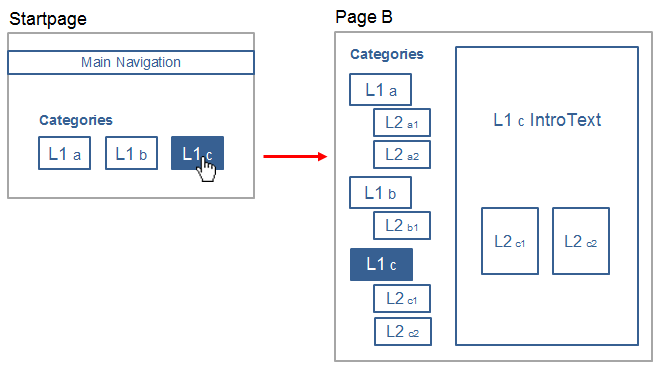
Our problem: We can't mark the selected category from startpage on the "Page B".
Any ideas?
- HikaShop version: 2.3.0
- Joomla version: 3.2
We have to setup a new HikaShop structure like this:
Our problem: We can't mark the selected category from startpage on the "Page B".
Any ideas?
Please Log in or Create an account to join the conversation.

12 years 7 months ago #145362
by nicolas
Replied by nicolas on topic How to setup Shop Structure
Hi,
In the "menu" option of the module of the start page, make sure that you selected the same "menu" that you have selected in the "menu" option of the module of the Page B and that should help. You can check that via the menu Display>Content modules of HikaShop.
In the "menu" option of the module of the start page, make sure that you selected the same "menu" that you have selected in the "menu" option of the module of the Page B and that should help. You can check that via the menu Display>Content modules of HikaShop.
The following user(s) said Thank You: Kuro
Please Log in or Create an account to join the conversation.
12 years 7 months ago #145400
by Kuro
Replied by Kuro on topic How to setup Shop Structure
Yeah, it works - thank you.
Please Log in or Create an account to join the conversation.
12 years 7 months ago - 12 years 7 months ago #145488
by Kuro
Replied by Kuro on topic How to setup Shop Structure
Now there is a problem with the generated links.
Level 1 Link "Agrar" looks like:
mysite.com/index.php/industrie/category/...orst#category_pane_0
(industrie is the alias menu name)
Why is 13-Forst in the link???
Level 2 Links: there is the menu name missing in the link url:
mysite.com/index.php/category/12-submenu1
Why is the menu segment "industrie" is missing???
Here is a printscreen of my left navigation ("Page B"):
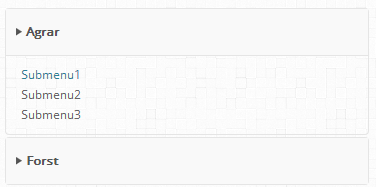
Level 1 Link "Agrar" looks like:
mysite.com/index.php/industrie/category/...orst#category_pane_0
(industrie is the alias menu name)
Why is 13-Forst in the link???
Level 2 Links: there is the menu name missing in the link url:
mysite.com/index.php/category/12-submenu1
Why is the menu segment "industrie" is missing???
Here is a printscreen of my left navigation ("Page B"):
Last edit: 12 years 7 months ago by Kuro.
Please Log in or Create an account to join the conversation.

Less
More
- Posts: 12953
- Thank you received: 1778
12 years 7 months ago #145491
by Mohamed Thelji
Replied by Mohamed Thelji on topic How to setup Shop Structure
Hi,
Can you show me some screenshots of how did you configured your module so that I can have more information about your issue ?
Thanks.
Can you show me some screenshots of how did you configured your module so that I can have more information about your issue ?
Thanks.
Please Log in or Create an account to join the conversation.
12 years 7 months ago #145695
by Kuro
Replied by Kuro on topic How to setup Shop Structure
Here it is:
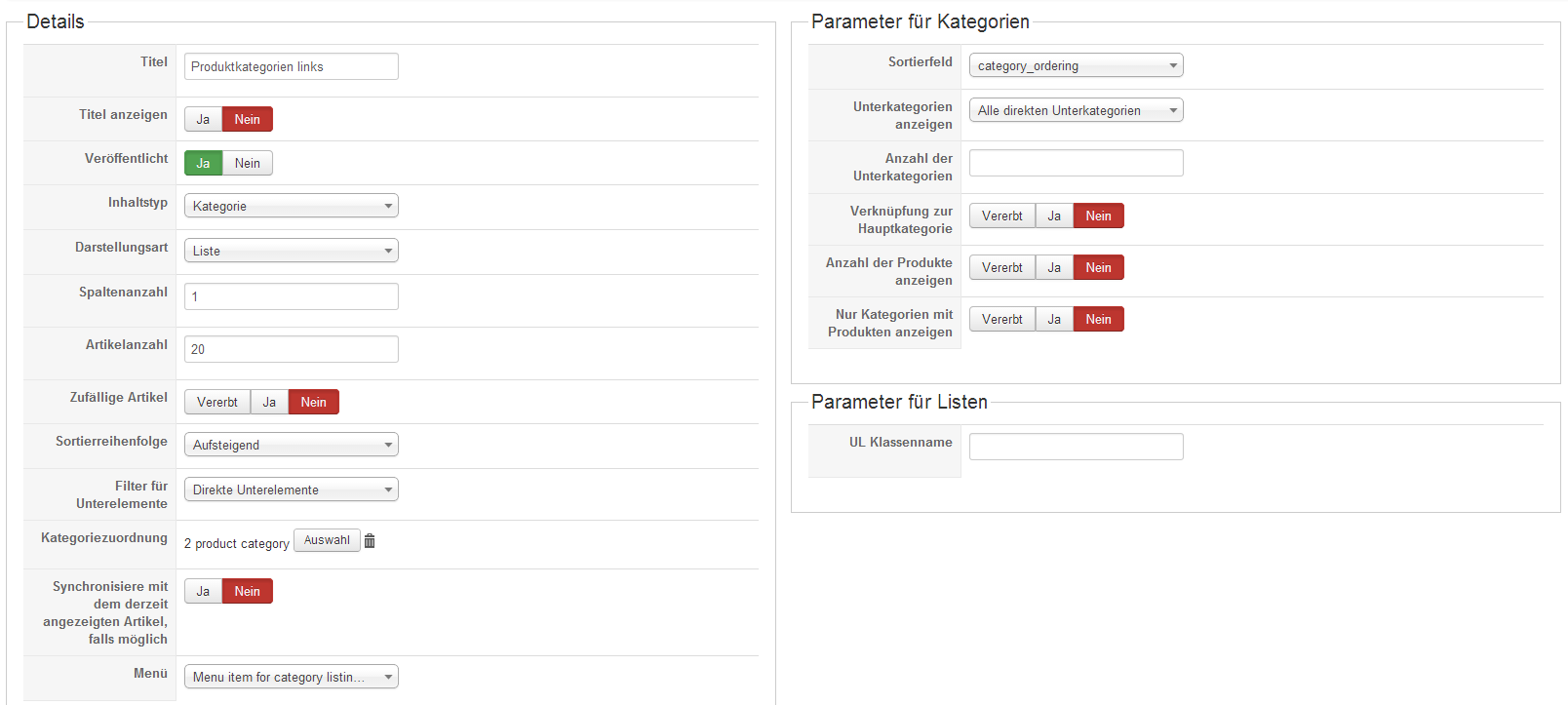
Please Log in or Create an account to join the conversation.

12 years 7 months ago #145764
by Xavier
Replied by Xavier on topic How to setup Shop Structure
Hi,
The configuration seems to be correct.
A link to your website could help us to solve the problem.
Actually it's difficult to know why it's not working the correct way.
The configuration seems to be correct.
A link to your website could help us to solve the problem.
Actually it's difficult to know why it's not working the correct way.
Please Log in or Create an account to join the conversation.
12 years 7 months ago #145829
by Kuro
Replied by Kuro on topic How to setup Shop Structure
The Website is still in progress. Click from the startpage the "Agrar" Category:
go.meier-elektronik.ch
go.meier-elektronik.ch
Please Log in or Create an account to join the conversation.
12 years 7 months ago #145877
by Xavier
Replied by Xavier on topic How to setup Shop Structure
Hi,
The level 1 links are fine, they just take the current url, if you visit that page:
go.meier-elektronik.ch/index.php/industrie/category/
You will see that the links are correct.
Regarding the level 2, thanks to try with another entry for the "menu" option.
If you have any sef component installed, that can bee too the source of the problem.
The level 1 links are fine, they just take the current url, if you visit that page:
go.meier-elektronik.ch/index.php/industrie/category/
You will see that the links are correct.
Regarding the level 2, thanks to try with another entry for the "menu" option.
If you have any sef component installed, that can bee too the source of the problem.
Please Log in or Create an account to join the conversation.
12 years 7 months ago - 12 years 7 months ago #146049
by Kuro
Replied by Kuro on topic How to setup Shop Structure
Hello,
I got it. The problem was the wrong menu assignment in the Hika Modul:
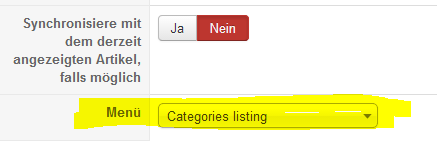
It should be "Categories listing"
But, now the next problem:
As you can see, we have special character like "ü", "ä" and so forth in the menu items.
But the genrated URL has replaced special characters. Thereby the page isn't found
false: go.meier-elektronik.ch/index.php/industr...egory/guellentechnik
It should be: go.meier-elektronik.ch/index.php/industr...tegory/güllentechnik
Where is the Link replaced??
I got it. The problem was the wrong menu assignment in the Hika Modul:
It should be "Categories listing"
But, now the next problem:
As you can see, we have special character like "ü", "ä" and so forth in the menu items.
But the genrated URL has replaced special characters. Thereby the page isn't found
false: go.meier-elektronik.ch/index.php/industr...egory/guellentechnik
It should be: go.meier-elektronik.ch/index.php/industr...tegory/güllentechnik
Where is the Link replaced??
Last edit: 12 years 7 months ago by Kuro.
Please Log in or Create an account to join the conversation.

12 years 7 months ago #146070
by Eliot
Replied by Eliot on topic How to setup Shop Structure
Pleas take a look at the joomla option concerning the transliteration.
It could be linked to this. System>Global Configuration>Unicode Aliases
It could be linked to this. System>Global Configuration>Unicode Aliases
Please Log in or Create an account to join the conversation.
12 years 7 months ago #146081
by Kuro
Replied by Kuro on topic How to setup Shop Structure
No, Unicode Aliase is switched off.
Please Log in or Create an account to join the conversation.
12 years 7 months ago #146097
by Eliot
Replied by Eliot on topic How to setup Shop Structure
Did you changed or updated anything recently?
Could you try to re-create this menu with the same setting?
Could you try to re-create this menu with the same setting?
Please Log in or Create an account to join the conversation.
Time to create page: 0.270 seconds