

- Posts: 208
- Thank you received: 10
How can I make products look like this
12 years 7 months ago #145808
by simmiepam
How can I make products look like this was created by simmiepam
-- url of the page with the problem -- :
mywebsite.com/mypage
-- HikaShop version -- : 2.3.0
-- Joomla version -- : 2.58
-- PHP version -- : x.x.x
-- Browser(s) name and version -- : Chrome
-- Error-message(debug-mod must be tuned on) -- : Error_message
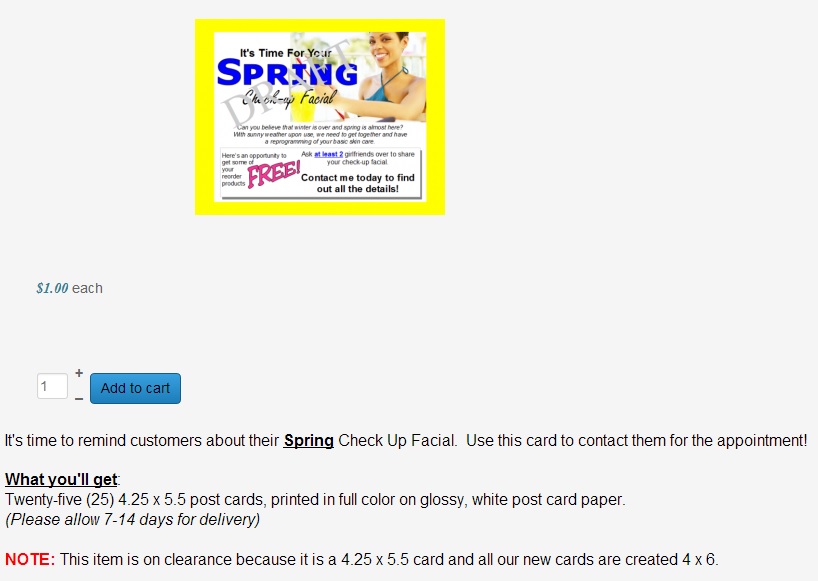
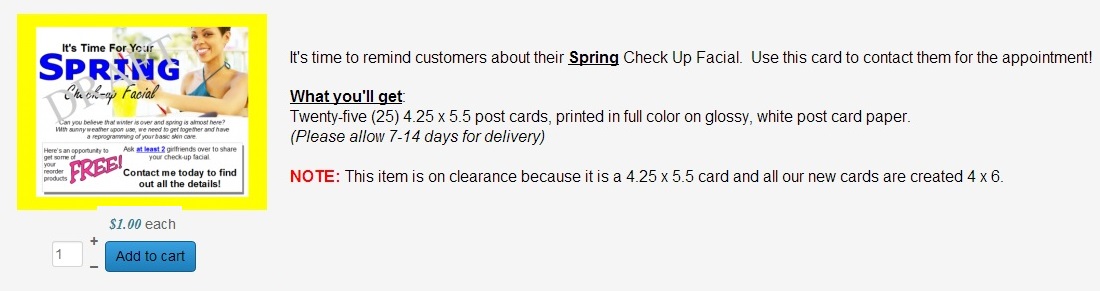
I'd like to make my product description display on the SIDE of the product...
AND I'd like to move the product price and add to cart button up under the product image.
Here's how it currently looks
I'd like it to look like this
I realize I'll have to alter some code or something....what I would need (because I'm not that familiar with CSS although I'm learning) is to know what code to copy and from where and where to copy it to.
Do I do this in my website's control panel (CPanel) or do I do this in Hikashop's views, etc.
Thanks
Pam
-- HikaShop version -- : 2.3.0
-- Joomla version -- : 2.58
-- PHP version -- : x.x.x
-- Browser(s) name and version -- : Chrome
-- Error-message(debug-mod must be tuned on) -- : Error_message
I'd like to make my product description display on the SIDE of the product...
AND I'd like to move the product price and add to cart button up under the product image.
Here's how it currently looks
I'd like it to look like this
I realize I'll have to alter some code or something....what I would need (because I'm not that familiar with CSS although I'm learning) is to know what code to copy and from where and where to copy it to.
Do I do this in my website's control panel (CPanel) or do I do this in Hikashop's views, etc.
Thanks
Pam
Please Log in or Create an account to join the conversation.

Less
More
- Posts: 12953
- Thank you received: 1778
12 years 7 months ago #145830
by Mohamed Thelji
Replied by Mohamed Thelji on topic How can I make products look like this
Hi,
The solution will be to use some CSS code, and to edit the "Show_default" file of the "product" view of your front-end template through "Hikashop->DIsplay->Views" and move the code :
Just after this line :
The solution will be to use some CSS code, and to edit the "Show_default" file of the "product" view of your front-end template through "Hikashop->DIsplay->Views" and move the code :
Code:
<div id="hikashop_product_description_main" class="hikashop_product_description_main">
<?php
//DISPLAY the product description
echo JHTML::_('content.prepare',preg_replace('#<hr *id="system-readmore" */>#i','',$this->element->product_description));
?>
</div>
Code:
<div id="hikashop_product_right_part" class="hikashop_product_right_part span6">
Please Log in or Create an account to join the conversation.
12 years 7 months ago - 12 years 7 months ago #145940
by simmiepam
Replied by simmiepam on topic How can I make products look like this
Thank you....I did it...and it's not working.
Here's what it looks like in my code. the underlined part is the part I copied and moved to right under the line you told me to. Yet in my site, the info is still under the image.
Here's what it looks like in my code. the underlined part is the part I copied and moved to right under the line you told me to. Yet in my site, the info is still under the image.
Code:
<div id="hikashop_product_right_part" class="hikashop_product_right_part span6">
//---------
<div id="hikashop_product_description_main" class="hikashop_product_description_main">
<?php
echo JHTML::_('content.prepare',preg_replace('#<hr *id="system-readmore" */>#i','',$this->element->product_description));
?>
</div>
//----------
<?php
if(!empty($this->element->extraData->rightBegin))
echo implode("\r\n",$this->element->extraData->rightBegin);
?>
<div id="hikashop_product_vote_mini" class="hikashop_product_vote_mini">
<?php
$config =& hikashop_config();
if($this->params->get('show_vote_product') == '-1'){
$this->params->set('show_vote_product',$config->get('show_vote_product'));
}
if($this->params->get('show_vote_product')){
$js = '';
$this->params->set('vote_type','product');
if(isset($this->element->main)){
$product_id = $this->element->main->product_id;
}else{
$product_id = $this->element->product_id;
}
$this->params->set('vote_ref_id',$product_id);
echo hikashop_getLayout('vote', 'mini', $this->params, $js);
}
?>
</div>
Last edit: 12 years 7 months ago by Jerome.
Please Log in or Create an account to join the conversation.

12 years 7 months ago #146052
by Xavier
Replied by Xavier on topic How can I make products look like this
Hi,
I think that you will have to set a width on the left and right part, you can set for example 45%.
You can follow this tutorial to make what you want:
www.hikashop.com/support/153-customize-the-display.html
I think that you will have to set a width on the left and right part, you can set for example 45%.
Code:
.hikashop_product_left_part{ width: 45%; }
.hikashop_product_right_part{ width: 45%; }
You can follow this tutorial to make what you want:
www.hikashop.com/support/153-customize-the-display.html
Please Log in or Create an account to join the conversation.
12 years 7 months ago #146187
by simmiepam
Replied by simmiepam on topic How can I make products look like this
Thank you...do I put that {width} par tin THIS code.... or do I have to go to the Front-end css file?
Please Log in or Create an account to join the conversation.
12 years 7 months ago #146246
by Xavier
Replied by Xavier on topic How can I make products look like this
It's better to go to the Front-end css file.
Please Log in or Create an account to join the conversation.
12 years 7 months ago #146360
by simmiepam
Replied by simmiepam on topic How can I make products look like this
Thank you Xavier
So.... I went into the front-end css and put the {width 45} in
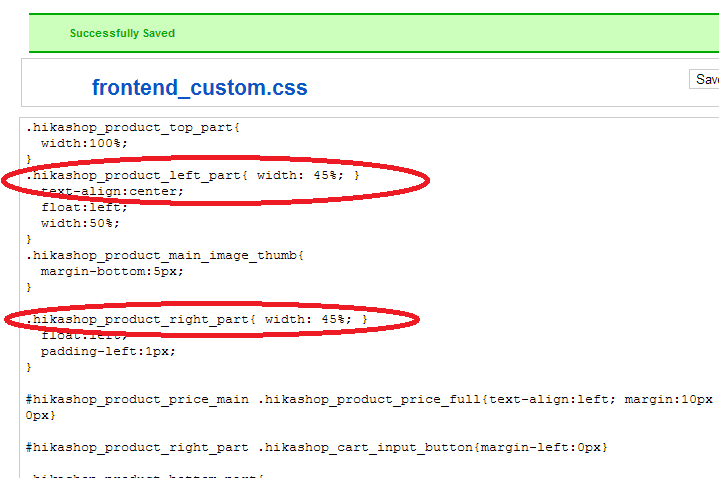
And the product page still has the content at the bottom of the image and not on the side
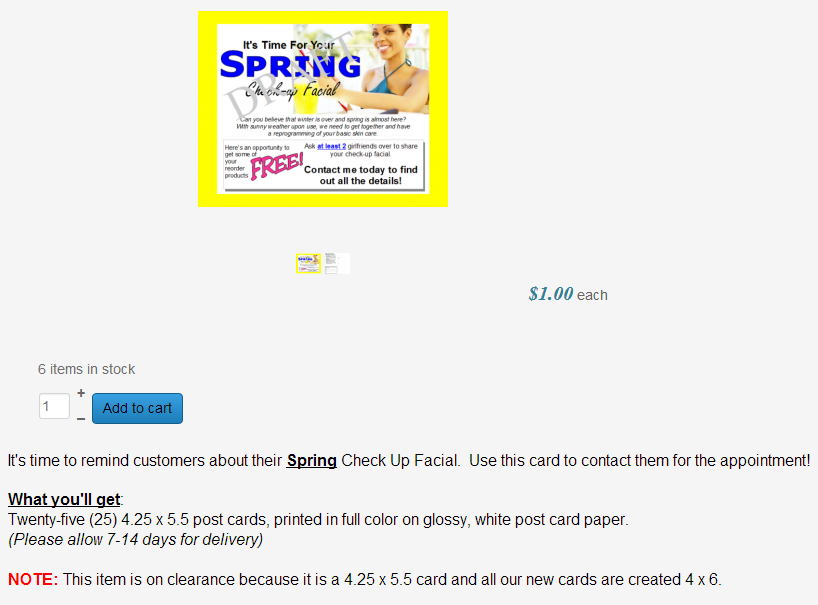
So.... I went into the front-end css and put the {width 45} in
And the product page still has the content at the bottom of the image and not on the side
Please Log in or Create an account to join the conversation.
12 years 7 months ago - 12 years 7 months ago #146383
by lionel75
Replied by lionel75 on topic How can I make products look like this
@xavier
This post is relative to layout for hikashop component . does all the layout ll be documented or does all users with css problem ll have to go to the css code file ( browser debug) or BackEnd Web GUI ( setting layout ) to find by themselves the way to resolve the problem ?
i think with the great suport this forum has , people ( i have ) ll learn more on joomla and css than the official joomla forum ....
@simmiepam
a direct link to the page instead the main page ll be usefull . It take time to study css (some mpeople ll say debug ) ..........
I think the problem must come from the layout see how behave the box each other !
Seem that this link goes to publicity web page ?
regard's
This post is relative to layout for hikashop component . does all the layout ll be documented or does all users with css problem ll have to go to the css code file ( browser debug) or BackEnd Web GUI ( setting layout ) to find by themselves the way to resolve the problem ?
i think with the great suport this forum has , people ( i have ) ll learn more on joomla and css than the official joomla forum ....
@simmiepam
a direct link to the page instead the main page ll be usefull . It take time to study css (some mpeople ll say debug ) ..........
I think the problem must come from the layout see how behave the box each other !
Seem that this link goes to publicity web page ?
regard's
Last edit: 12 years 7 months ago by lionel75.
Please Log in or Create an account to join the conversation.

12 years 7 months ago #146388
by Jerome
Jerome - Obsidev.com
HikaMarket & HikaSerial developer / HikaShop core dev team.
Replied by Jerome on topic How can I make products look like this
Hi,
@simmiepam
The CSS your wrote is not correct.
What Xavier recommend you is to change the width of the two elements by adding new CSS rules.
You replaced the previous rules without the right syntax so now your CSS file is "broken".
If you see your screenshot, you close the "}" on the first line, so the rest of the CSS rule can't be process correctly.
@lionel75
I don't understand your message or what you are trying to explain/ask.
More than that, we are working on new product page layouts in order to propose more choice and more designs. Hope that the new layouts will be appreciated by the users. We are also thinking of new way to propose "easier" customization on product page or HikaShop in general but it ask for time and development.
Regards,
@simmiepam
The CSS your wrote is not correct.
What Xavier recommend you is to change the width of the two elements by adding new CSS rules.
You replaced the previous rules without the right syntax so now your CSS file is "broken".
If you see your screenshot, you close the "}" on the first line, so the rest of the CSS rule can't be process correctly.
@lionel75
I don't understand your message or what you are trying to explain/ask.
More than that, we are working on new product page layouts in order to propose more choice and more designs. Hope that the new layouts will be appreciated by the users. We are also thinking of new way to propose "easier" customization on product page or HikaShop in general but it ask for time and development.
Regards,
Jerome - Obsidev.com
HikaMarket & HikaSerial developer / HikaShop core dev team.
Please Log in or Create an account to join the conversation.
12 years 6 months ago #148597
by simmiepam
Replied by simmiepam on topic How can I make products look like this
OK...
I've managed to get the description moved to the right of the image.
However....I cannot seem to get the text to be the rest of the width of the page.
I've been using inspect element to try to find it, but I guess I'm not too good at this yet.
Is the place to make the margin for the description in the front-end .css
or in one of the views under display?
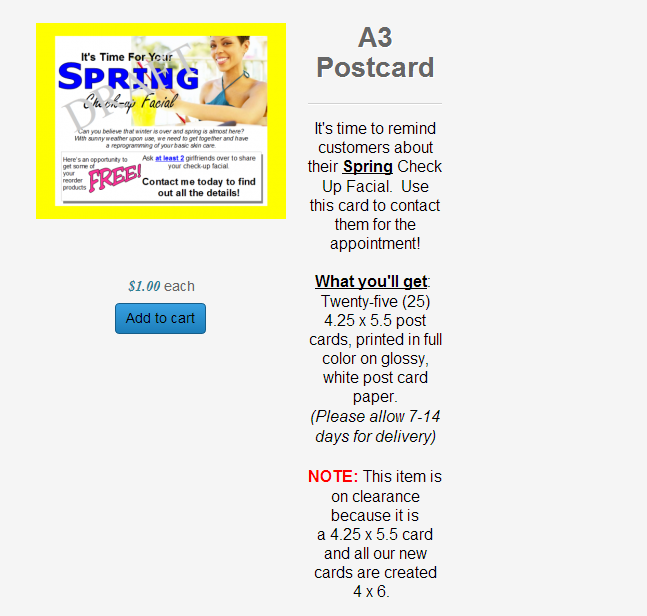
I've managed to get the description moved to the right of the image.
However....I cannot seem to get the text to be the rest of the width of the page.
I've been using inspect element to try to find it, but I guess I'm not too good at this yet.
Is the place to make the margin for the description in the front-end .css
or in one of the views under display?
Please Log in or Create an account to join the conversation.
Less
More
- Posts: 12953
- Thank you received: 1778
12 years 6 months ago #148670
by Mohamed Thelji
Replied by Mohamed Thelji on topic How can I make products look like this
Hello,
Can you give us a link to your website so that we can directly test it ?
Thanks.
Can you give us a link to your website so that we can directly test it ?
Thanks.
Please Log in or Create an account to join the conversation.
12 years 6 months ago #148689
by simmiepam
Replied by simmiepam on topic How can I make products look like this
Please Log in or Create an account to join the conversation.
Less
More
- Posts: 12953
- Thank you received: 1778
12 years 6 months ago #148714
by Mohamed Thelji
Replied by Mohamed Thelji on topic How can I make products look like this
Using this kind of CSS code will probably do the job :
Code:
.hikashop_product_item_right_part .hikashop_product_desc {
width: 560px;
}
Please Log in or Create an account to join the conversation.
12 years 6 months ago #148864
by lionel75
Replied by lionel75 on topic How can I make products look like this
@simmiepan
refer to what you want the #hikashop_category_information_module_114 div.hikashop_container position the text to center !!
regard's
refer to what you want the #hikashop_category_information_module_114 div.hikashop_container position the text to center !!
regard's
Please Log in or Create an account to join the conversation.
Time to create page: 0.301 seconds