
- Posts: 19
- Thank you received: 0
Mapping product/category anchors to specific pages
- Helveticus
-
 Topic Author
- Offline
Less
More
12 years 7 months ago - 12 years 7 months ago #145983
by Helveticus
Mapping product/category anchors to specific pages was created by Helveticus
-- url of the page with the problem -- localhost
-- HikaShop version -- : 2.2.3
-- Joomla version -- :2.5.17
-- PHP version -- : 5.3.13
-- Browser(s) name and version -- : FreFox 27.0.1
-- Error-message(debug-mod must be tuned on) -- : Error_message
Hi, Is there a HK remapping utility that would enable category/product items that appear in a HK category module on the default page to be directly linked to detailed category/product pages in the shop section?
For instance, the items that appear in the category listing module on the home page (see img) have their urls set to:
The urls should be mapped to these specific associated sub-pages inside the HK E-Shop menu:
The menu structure is depicted below..
TIA for any hints. MS
Simplified menu structure:

HK category listing module attached to the Home page:
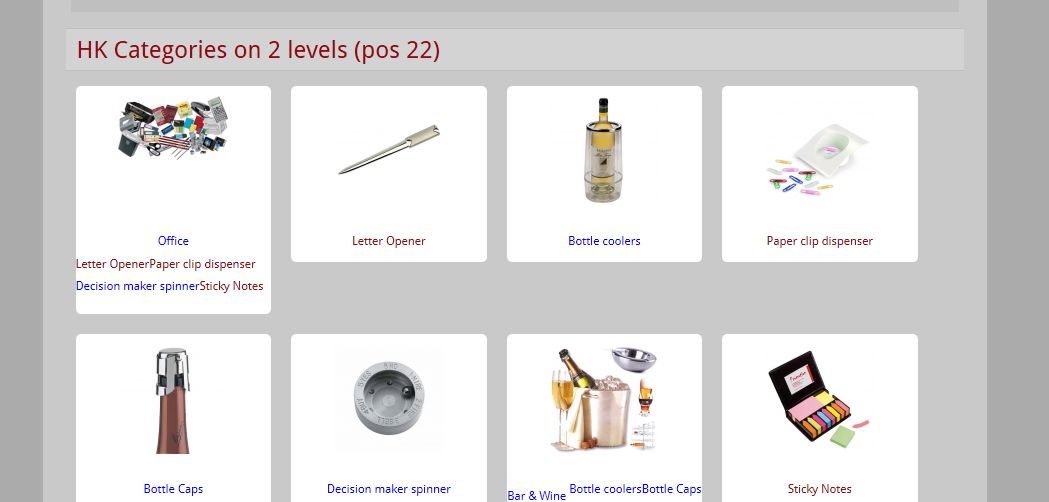
-- HikaShop version -- : 2.2.3
-- Joomla version -- :2.5.17
-- PHP version -- : 5.3.13
-- Browser(s) name and version -- : FreFox 27.0.1
-- Error-message(debug-mod must be tuned on) -- : Error_message
Hi, Is there a HK remapping utility that would enable category/product items that appear in a HK category module on the default page to be directly linked to detailed category/product pages in the shop section?
For instance, the items that appear in the category listing module on the home page (see img) have their urls set to:
Code:
<li class="hikashop_category_list_item">
<a href="/Joomla2/falconmedia/index.php/en/component/hikashop/category/15-decision-maker-spinner"> Decision maker spinner </a></li>
The urls should be mapped to these specific associated sub-pages inside the HK E-Shop menu:
Code:
<li class="hikashop_category_list_item">
<a href="/Joomla2/falconmedia/index.php/en/shop/category/15-decision-maker-spinner"> Decision maker spinner (2) </a>
</li>
The menu structure is depicted below..
TIA for any hints. MS
Simplified menu structure:
HK category listing module attached to the Home page:
Last edit: 12 years 7 months ago by Helveticus.
Please Log in or Create an account to join the conversation.

12 years 7 months ago #145995
by nicolas
Replied by nicolas on topic Mapping product/category anchors to specific pages
Hi,
The text component/hikashop in the URLs is replaced automatically by the Joomla SEF system to the alias of the menu item of the URL. If you see component/hikashop, it means that there is no menu item set in your module.
Go in the menu Display->Content modules, edit your module and set the "menu" option to "shop" and you should get the URL you want.
Then, for more complex cases where you really what to change an arbitrary URL by another one, you can use a third party SEF extension with URL alias support like sh404sef in order to enter the correspondence between the URLs you have and the URLs you want instead and the SEF extension will do the replacement.
The text component/hikashop in the URLs is replaced automatically by the Joomla SEF system to the alias of the menu item of the URL. If you see component/hikashop, it means that there is no menu item set in your module.
Go in the menu Display->Content modules, edit your module and set the "menu" option to "shop" and you should get the URL you want.
Then, for more complex cases where you really what to change an arbitrary URL by another one, you can use a third party SEF extension with URL alias support like sh404sef in order to enter the correspondence between the URLs you have and the URLs you want instead and the SEF extension will do the replacement.
Please Log in or Create an account to join the conversation.
- Helveticus
-
Topic Author
- Offline
Less
More
- Posts: 19
- Thank you received: 0
12 years 7 months ago - 12 years 7 months ago #146083
by Helveticus
Replied by Helveticus on topic Mapping product/category anchors to specific pages
Thanks for your reply. I was able to map the category items to the proper page (Shop). Thus my question regarding category mapping has been answered. (Please ignore image legend)
Now, I would like also to map products items displayed on the Home/Shop2 page to their corresponding entries on menu page "Product listings", a "Shop" submenu page. This does not work: no product articles appear on the Home page despite the fact that the module "Associated products listing for category listing menu 325" is enabled. Note that these items appear correctly on the page "shop/products-listing"
TIA for any hints. MS
Default page:
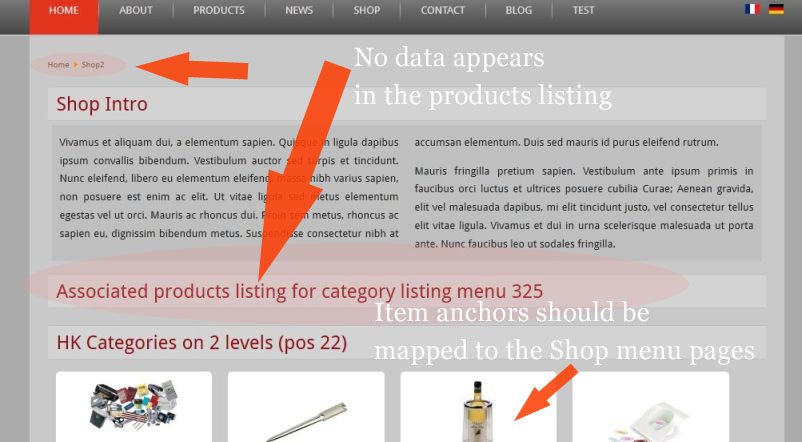
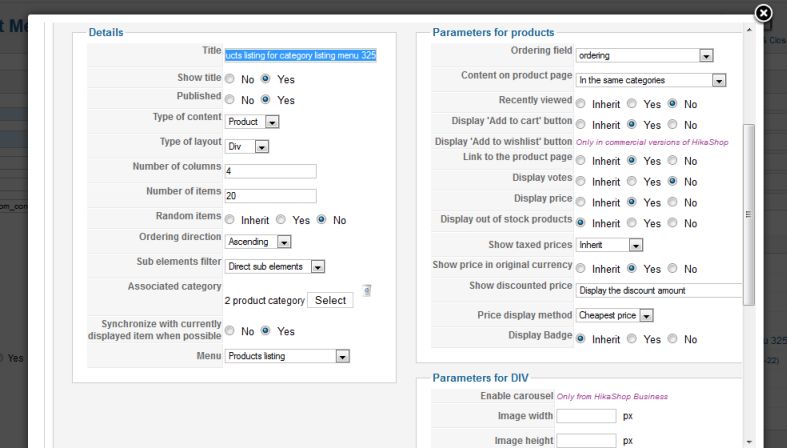
Module "Associated products listing for category listing menu 325" settings:
Product items appear correctly on menu page "Product listings" using the same HK module.
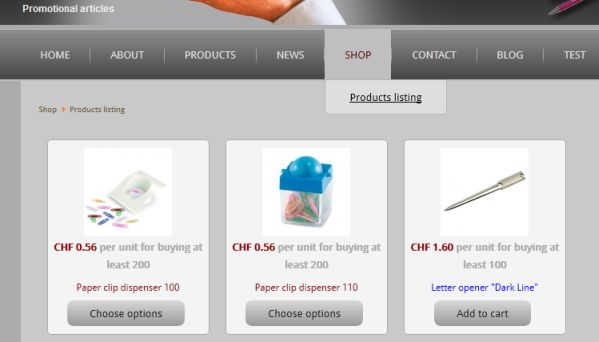
Now, I would like also to map products items displayed on the Home/Shop2 page to their corresponding entries on menu page "Product listings", a "Shop" submenu page. This does not work: no product articles appear on the Home page despite the fact that the module "Associated products listing for category listing menu 325" is enabled. Note that these items appear correctly on the page "shop/products-listing"
TIA for any hints. MS
Default page:
Module "Associated products listing for category listing menu 325" settings:
Product items appear correctly on menu page "Product listings" using the same HK module.
Last edit: 12 years 7 months ago by Helveticus.
Please Log in or Create an account to join the conversation.
- Helveticus
-
Topic Author
- Offline
Less
More
- Posts: 19
- Thank you received: 0
12 years 7 months ago #146153
by Helveticus
Replied by Helveticus on topic Mapping product/category anchors to specific pages
Never mind, issue solved.
Product items would not show up because the "Sub elements filter" entry was set to: "Direct sub-elements".
Product items would not show up because the "Sub elements filter" entry was set to: "Direct sub-elements".
Please Log in or Create an account to join the conversation.

12 years 7 months ago #146156
by Eliot
Replied by Eliot on topic Mapping product/category anchors to specific pages
Thanks for sharing the solution!
It will definitely help our customers
It will definitely help our customers
Please Log in or Create an account to join the conversation.
Time to create page: 0.198 seconds