

- Posts: 155
- Thank you received: 4
white border ?
12 years 6 months ago - 12 years 6 months ago #150857
by Cattelan
white border ? was created by Cattelan
Hallo .
I updated my business edition and now i have a white border around my images in all modules and product pages.
Where can i set this to transparent ? Also there is an issue with the arrows to go next and back (there are 4 in the image ?)
Thanks for reply
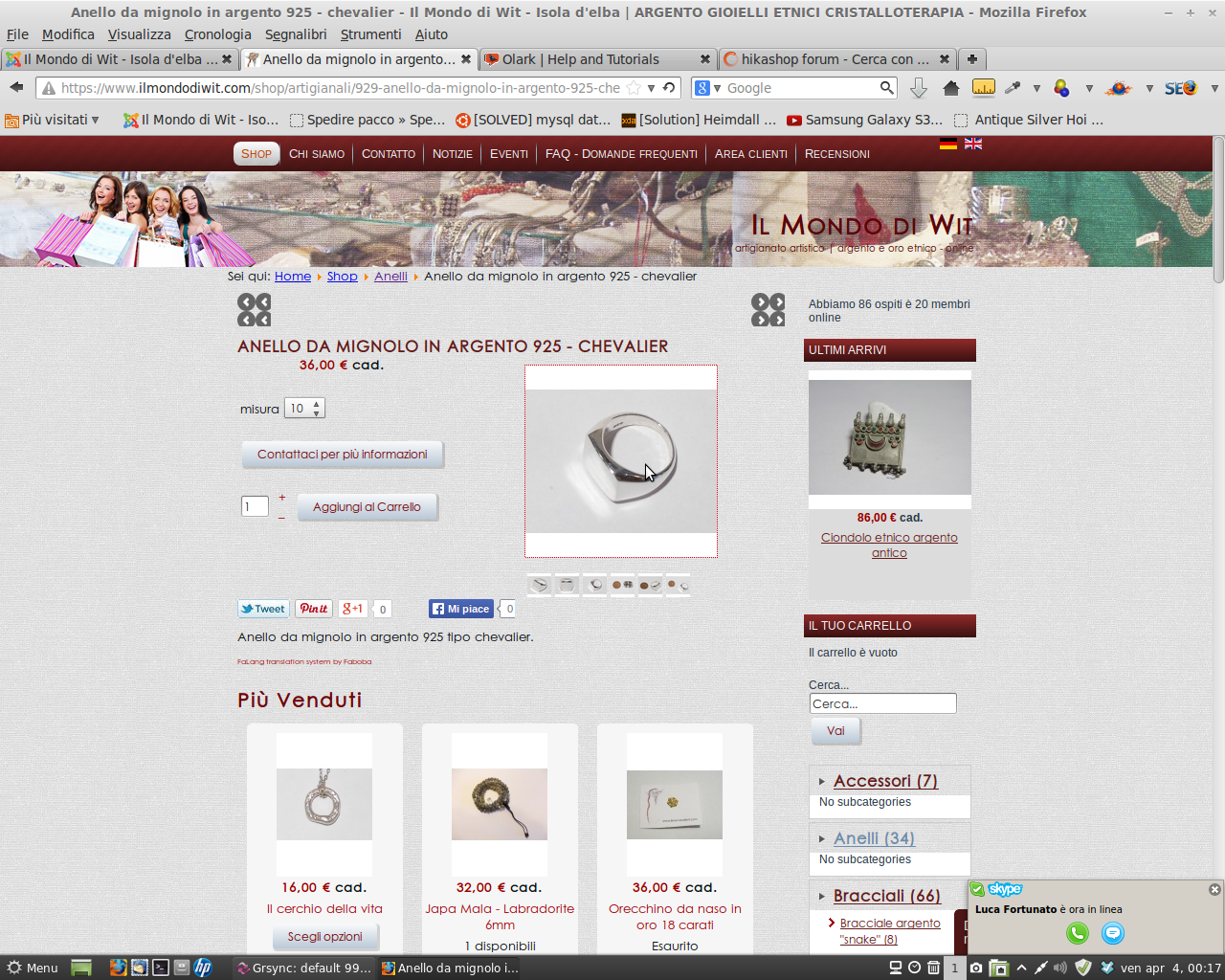
I updated my business edition and now i have a white border around my images in all modules and product pages.
Where can i set this to transparent ? Also there is an issue with the arrows to go next and back (there are 4 in the image ?)
Thanks for reply
Last edit: 12 years 6 months ago by Cattelan.
Please Log in or Create an account to join the conversation.

12 years 5 months ago #150897
by Xavier
Replied by Xavier on topic white border ?
Hi,
For the white borders, you have to change the settings in Configuration > Main > Images.
The previous and next button are displayed many times certainly because of a css override by your template.
You have to reduce the size of the span/div containing the image.
www.hikashop.com/support/support/documen...ize-the-display.html
For the white borders, you have to change the settings in Configuration > Main > Images.
The previous and next button are displayed many times certainly because of a css override by your template.
You have to reduce the size of the span/div containing the image.
www.hikashop.com/support/support/documen...ize-the-display.html
The following user(s) said Thank You: Cattelan
Please Log in or Create an account to join the conversation.
12 years 5 months ago #150963
by Cattelan
Replied by Cattelan on topic white border ?
Thanks for you kind reply.
I set the force size to "off". and it works. This is what i don't want. i would like to keep the ratio on and set the background to transparent. also in the module of hikashop.
I tried to have a look in the view tabs but i cannot find where i have to set
I set the force size to "off". and it works. This is what i don't want. i would like to keep the ratio on and set the background to transparent. also in the module of hikashop.
I tried to have a look in the view tabs but i cannot find where i have to set
Code:
background-color: transparent
Please Log in or Create an account to join the conversation.

Less
More
- Posts: 12953
- Thank you received: 1778
12 years 5 months ago #150968
by Mohamed Thelji
Replied by Mohamed Thelji on topic white border ?
Hello,
If you want to keep the ratio the of your product thumbnails, the best solution will probably be to directly set the width and height of your product thumbnails by using the image tab options of the page : "Hikashop->System->Configuration->Main".
If you want to keep the ratio the of your product thumbnails, the best solution will probably be to directly set the width and height of your product thumbnails by using the image tab options of the page : "Hikashop->System->Configuration->Main".
Please Log in or Create an account to join the conversation.
Time to create page: 0.192 seconds