
modify layout
- nico.van.leeuwen
-
 Topic Author
- Offline
Less
More
12 years 5 months ago - 12 years 5 months ago #151301
by nico.van.leeuwen
modify layout was created by nico.van.leeuwen
Hi,
I´m trying to modify the layout of my product listing (see attached image).
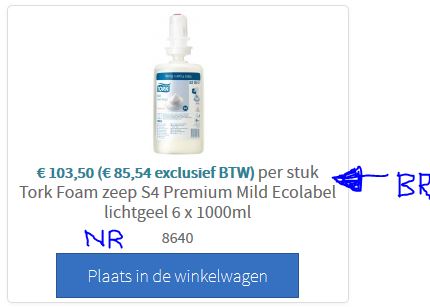
I also wanted tot switch the ex and the incl prices.
If I'm correct I should modify the price in the view "listing_price" and the extra text in the view "listing_img_title"
Can anyone confirm if this is correct and give me a tip on how to make these modifications because php is not my best quality
-- url of the page with the problem -- : local
-- HikaShop version -- : 2.3.0
-- Joomla version -- : 3.2.3
I´m trying to modify the layout of my product listing (see attached image).
I also wanted tot switch the ex and the incl prices.
If I'm correct I should modify the price in the view "listing_price" and the extra text in the view "listing_img_title"
Can anyone confirm if this is correct and give me a tip on how to make these modifications because php is not my best quality
-- url of the page with the problem -- : local
-- HikaShop version -- : 2.3.0
-- Joomla version -- : 3.2.3
Last edit: 12 years 5 months ago by nico.van.leeuwen. Reason: forgot something
Please Log in or Create an account to join the conversation.

Less
More
- Posts: 12953
- Thank you received: 1778
12 years 5 months ago #151307
by Mohamed Thelji
Replied by Mohamed Thelji on topic modify layout
Hello,
1.
2.
1.
What do you exactly mean by switch the ex and the incl prices ?I also wanted tot switch the ex and the incl prices.
2.
You'll probably be able to do that just by using some CSS code.If I'm correct I should modify the price in the view "listing_price" and the extra text in the view "listing_img_title"
Can anyone confirm if this is correct and give me a tip on how to make these modifications because php is not my best quality
Please Log in or Create an account to join the conversation.
- nico.van.leeuwen
-
Topic Author
- Offline
12 years 5 months ago #151454
by nico.van.leeuwen
Replied by nico.van.leeuwen on topic modify layout
Hi,
What I mean with the change in the prices is that I would like the price without Tax to be in front of the price with Tax, sorry for not being clear. :blush:
About adding a bit of text in from of the articlenumber with CSS sounds a bit strange to me because I keep CSS for styling and think that, if possible, it should stay like that. (that is what it was designed for). But I'm curious on how you could add some text with CSS in front of the articlenumber. But in the end I want to try adding the extra text in one of the views if that's the other option.
After I added the extra text I'm going to make more changes in this view but I want to learn Hikashop step by step, that's why I start with just one thing so I can try the other mods without any tips (if possible )
)
Thanks for your replies,
Nico
What I mean with the change in the prices is that I would like the price without Tax to be in front of the price with Tax, sorry for not being clear. :blush:
About adding a bit of text in from of the articlenumber with CSS sounds a bit strange to me because I keep CSS for styling and think that, if possible, it should stay like that. (that is what it was designed for). But I'm curious on how you could add some text with CSS in front of the articlenumber. But in the end I want to try adding the extra text in one of the views if that's the other option.
After I added the extra text I'm going to make more changes in this view but I want to learn Hikashop step by step, that's why I start with just one thing so I can try the other mods without any tips (if possible
)Thanks for your replies,
Nico
Please Log in or Create an account to join the conversation.
Less
More
- Posts: 12953
- Thank you received: 1778
12 years 5 months ago #151470
by Mohamed Thelji
Replied by Mohamed Thelji on topic modify layout
Hello,
As you said, the solution will be to edit the code of the "listing_price" file of the "product" view of your front-end template through "Hikashop->Display->Views" .
.
As you said, the solution will be to edit the code of the "listing_price" file of the "product" view of your front-end template through "Hikashop->Display->Views"
. Please Log in or Create an account to join the conversation.
- nico.van.leeuwen
-
Topic Author
- Offline
12 years 5 months ago #152035
by nico.van.leeuwen
Replied by nico.van.leeuwen on topic modify layout
Hi, just a little update for everyone who is looking for something simmilar.
I added this code to add some text in front of the product code :
This was added to the file under Display > Views > listing_img_title
Hope this can be of use to anybody
Regards,
Nico
I added this code to add some text in front of the product code :
Code:
<!-- PRODUCT CODE -->
<?php echo 'Artikelnummer : '.$this->element->product_code; ?>
This was added to the file under Display > Views > listing_img_title
Hope this can be of use to anybody
Regards,
Nico
The following user(s) said Thank You: Mohamed Thelji
Please Log in or Create an account to join the conversation.
Time to create page: 0.264 seconds