

- Posts: 30
- Thank you received: 1
Categories module dissapears
12 years 5 months ago #151609
by jdponce
Categories module dissapears was created by jdponce
-- url of the page with the problem -- :
mywebsite.com/mypage
-- HikaShop version -- : Starter 2.3.0
-- Joomla version -- : 3.2
-- PHP version -- : 5.3.28
-- Browser(s) name and version -- : Chromium Versión 33.0.1750.152 (256984)
Hi, the thing is that I have created a joomla mode type Hikashop content, in order to show a category listing in left position, and everything seems to be fine. But when I click on any category in that list, the module itself dissapears.
Please help me.
-- HikaShop version -- : Starter 2.3.0
-- Joomla version -- : 3.2
-- PHP version -- : 5.3.28
-- Browser(s) name and version -- : Chromium Versión 33.0.1750.152 (256984)
Hi, the thing is that I have created a joomla mode type Hikashop content, in order to show a category listing in left position, and everything seems to be fine. But when I click on any category in that list, the module itself dissapears.
Please help me.
Please Log in or Create an account to join the conversation.

12 years 5 months ago #151624
by Xavier
Replied by Xavier on topic Categories module dissapears
Hi,
That's probably a problem in the Joomla options of this module, regarding the menu assignment.
The module seems to be restricted to certain menus, so you have to add the desired menu in the options.
That's probably a problem in the Joomla options of this module, regarding the menu assignment.
The module seems to be restricted to certain menus, so you have to add the desired menu in the options.
Please Log in or Create an account to join the conversation.
12 years 5 months ago #151740
by jdponce
Replied by jdponce on topic Categories module dissapears
Hi Xavier, thanks for answer.
But is not an issue regarding to menu option in Joomla module settings. Even thought I have created a manual subcategory option in main menu, and after that, I have assigned this menu option to the Hikashop category list module, and it dissapears as well, if I click on any element on it.
I would aprreciate your help with this issue.
But is not an issue regarding to menu option in Joomla module settings. Even thought I have created a manual subcategory option in main menu, and after that, I have assigned this menu option to the Hikashop category list module, and it dissapears as well, if I click on any element on it.
I would aprreciate your help with this issue.
Please Log in or Create an account to join the conversation.

12 years 5 months ago #151742
by Jerome
Jerome - Obsidev.com
HikaMarket & HikaSerial developer / HikaShop core dev team.
Replied by Jerome on topic Categories module dissapears
Hi,
Having a link to your website will help us to understand the problem.
Regards,
Having a link to your website will help us to understand the problem.
Regards,
Jerome - Obsidev.com
HikaMarket & HikaSerial developer / HikaShop core dev team.
Please Log in or Create an account to join the conversation.
12 years 5 months ago #151882
by jdponce
Replied by jdponce on topic Categories module dissapears
Sure, you can test if you click on one of the categories to the left, you will see that the categories module disspears.
www.dadatecnologia.com/products
www.dadatecnologia.com/products
Please Log in or Create an account to join the conversation.
12 years 5 months ago #151895
by Jerome
Jerome - Obsidev.com
HikaMarket & HikaSerial developer / HikaShop core dev team.
Replied by Jerome on topic Categories module dissapears
Hi,
Well, your module use another menu.
"/products" is menu 803.
"/hikashop-menu-for-categories-listing/" is menu 789.
You have two different url and two different menus.
Because they are not configured the same, you have different display.
Regards,
Well, your module use another menu.
"/products" is menu 803.
"/hikashop-menu-for-categories-listing/" is menu 789.
You have two different url and two different menus.
Because they are not configured the same, you have different display.
Regards,
Jerome - Obsidev.com
HikaMarket & HikaSerial developer / HikaShop core dev team.
Please Log in or Create an account to join the conversation.
12 years 5 months ago #151967
by jdponce
Replied by jdponce on topic Categories module dissapears
Hi, I found your answer a kind of confusing, and is not your fault. The thing is that I don't know how to resolve the issue.
I have deleted the Joomla modules, and content module in order to start from scratch. Even I have followed this tutorial: www.joomtemp.com/index.php/tutorials/hik...duct-categories-menu
But I have the same result!, the same problem, the menu dissapears when I click on it, I almost lost my mind please tell me what can I do to fix this.
Thanks in advance
I have deleted the Joomla modules, and content module in order to start from scratch. Even I have followed this tutorial: www.joomtemp.com/index.php/tutorials/hik...duct-categories-menu
But I have the same result!, the same problem, the menu dissapears when I click on it, I almost lost my mind
please tell me what can I do to fix this.Thanks in advance
Please Log in or Create an account to join the conversation.
12 years 5 months ago - 12 years 5 months ago #152169
by jdponce
Replied by jdponce on topic Categories module dissapears
Nop, it doesn't work, even I have deleted the module 789, I have unpublished the menu hikashop-menu-for-categories-listing and I have the same issue.
Edited.
Now I understand you, I have deleted the 789 menu item:
hikashop-menu-for-categories-listing
And the issue is still there, so, this is not causing the issue.
Please help me with this, is important.
Thanks in advance
Edited.
Now I understand you, I have deleted the 789 menu item:
hikashop-menu-for-categories-listing
And the issue is still there, so, this is not causing the issue.
Please help me with this, is important.
Thanks in advance
Last edit: 12 years 5 months ago by jdponce. Reason: I did another thing
Please Log in or Create an account to join the conversation.
12 years 5 months ago #152365
by jdponce
Replied by jdponce on topic Anything else?
Hi
Are there anything else that should I do in order to get some help?, do I have to pay or something? Tell me because this is quite important for me.
With my best regards,
David
Are there anything else that should I do in order to get some help?, do I have to pay or something? Tell me because this is quite important for me.
With my best regards,
David
Please Log in or Create an account to join the conversation.
12 years 5 months ago #152452
by Xavier
Replied by Xavier on topic Anything else?
Hi,
I will try to explain it clearly, the category listing module is enabled on the menu you gave us.
When you click on a category, it open the menu specified in the category listing module (last option on the left side).
So you have to edit the module assignment on that menu, in order to enable the category listing module.
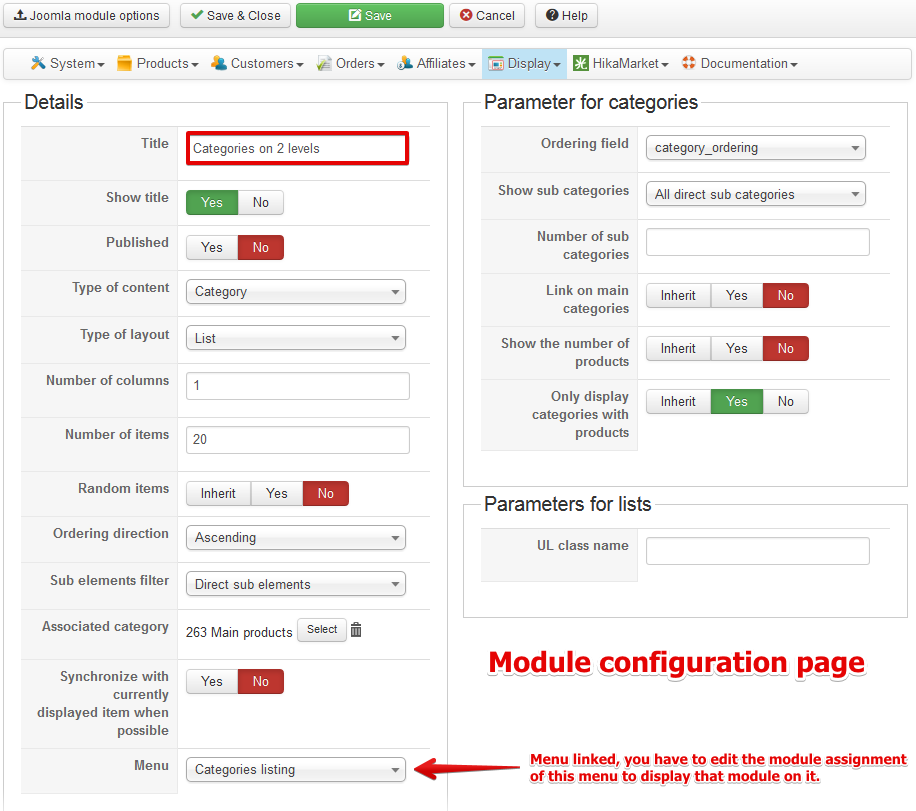
I will try to explain it clearly, the category listing module is enabled on the menu you gave us.
When you click on a category, it open the menu specified in the category listing module (last option on the left side).
So you have to edit the module assignment on that menu, in order to enable the category listing module.
Please Log in or Create an account to join the conversation.
12 years 5 months ago #153590
by jdponce
Replied by jdponce on topic Anything else?
Thanks, but I don't have any Jooma menu with the name "Categories Listing". I have the same settings of that image. Also, in products menu and sub menues, I have published that module. Even more, I have entered to your demo site and I have compared the settings and are the same... I almost lost my mind believe me.
Please Log in or Create an account to join the conversation.

12 years 5 months ago #153593
by nicolas
Replied by nicolas on topic Anything else?
You don't see that "Categories listing" menu because you probably deleted it at one point.
Simply select there a menu item which is of the type "HikaShop category listing". If you don't have such menu item, you can create one via the menu manager of Joomla as explained in this documentation:
www.hikashop.com/support/support/documen...html#categories_menu
Simply select there a menu item which is of the type "HikaShop category listing". If you don't have such menu item, you can create one via the menu manager of Joomla as explained in this documentation:
www.hikashop.com/support/support/documen...html#categories_menu
Please Log in or Create an account to join the conversation.
12 years 5 months ago #154014
by jdponce
Replied by jdponce on topic Anything else?
No man, I did everything here:
www.hikashop.com/support/documentation/6...html#categories_menu
Regarding to the menu and the category module, and as a result, is a mess, take a look at this:
www.dadatecnologia.com/com-issuetracker-...nu-people/categorias
I don't know what to do.
www.hikashop.com/support/documentation/6...html#categories_menu
Regarding to the menu and the category module, and as a result, is a mess, take a look at this:
www.dadatecnologia.com/com-issuetracker-...nu-people/categorias
I don't know what to do.
Please Log in or Create an account to join the conversation.
12 years 5 months ago #154016
by jdponce
Replied by jdponce on topic Anything else?
Hi
Here are the screenshots of module and menu settings I have.
Thanks in advance :S
Here are the screenshots of module and menu settings I have.
Thanks in advance :S
Please Log in or Create an account to join the conversation.
12 years 5 months ago #154033
by nicolas
Replied by nicolas on topic Anything else?
Hi,
In your categories listing module's "menu" option you have the "Categories listing" menu item selected, while your second screenshot of your categories listing menu item has the name "Categorias". So you didn't select the menu item you created in your module's "menu" option.
So even though your "Categorias" menu item is properly configured, your module is not using it, and thus you still have the same problem.
In your categories listing module's "menu" option you have the "Categories listing" menu item selected, while your second screenshot of your categories listing menu item has the name "Categorias". So you didn't select the menu item you created in your module's "menu" option.
So even though your "Categorias" menu item is properly configured, your module is not using it, and thus you still have the same problem.
The following user(s) said Thank You: jdponce
Please Log in or Create an account to join the conversation.
12 years 5 months ago #154055
by jdponce
Replied by jdponce on topic Anything else?
Uuuuuf, now I understand!, thanks for your patience, but why I don't have the categories in a dropdown menu each?
Please Log in or Create an account to join the conversation.
12 years 5 months ago #154129
by jdponce
Is done, everything work fine now!
With dropdown I have set the same settings of demo site and is fine now. But let me tell you that I couln't imagine how to do that reading the option labels only, not at all.
But this extension is out of the box!
I want to say thank you for your help!
With dropdown I have set the same settings of demo site and is fine now. But let me tell you that I couln't imagine how to do that reading the option labels only, not at all.
But this extension is out of the box!
I want to say thank you for your help!
Please Log in or Create an account to join the conversation.
Time to create page: 0.343 seconds