

- Posts: 37
- Thank you received: 0
donation problem
12 years 5 months ago #152969
by cpntnat
donation problem was created by cpntnat
-- url of the page with the problem -- :
absdwebsite.fr/index.php/adherer-faire-un-don
-- HikaShop version -- : HikaShop Business: 2.3.0
-- Joomla version -- : Joomla! 2.5.19
I bought the business version for the donation option.
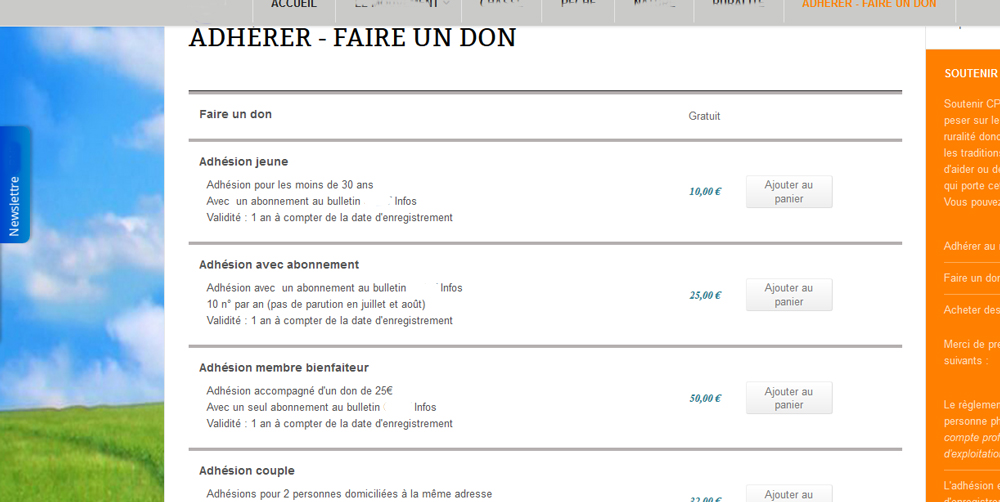
I have searched in the forum about it, and I've set my product "donation" as you indicate (creating the product, category, insert the field "amount", validated plugin, etc.). The product is listed but with "Free" mention (why ???) and that's all. No field to enter the amount of donation. On your demo site ( demo.hikashop.com ), the donation option (whose explanations are not clear at all) named "Delete your money". It seems to be a product of which you change quantities for a counter that corresponds to the final amount. Am i right or not ? If yes why this plugin ! if no, can you tell me how display the amount field in my product list.
Thank you for your help
Regard
Alain
-- HikaShop version -- : HikaShop Business: 2.3.0
-- Joomla version -- : Joomla! 2.5.19
I bought the business version for the donation option.
I have searched in the forum about it, and I've set my product "donation" as you indicate (creating the product, category, insert the field "amount", validated plugin, etc.). The product is listed but with "Free" mention (why ???) and that's all. No field to enter the amount of donation. On your demo site ( demo.hikashop.com ), the donation option (whose explanations are not clear at all) named "Delete your money". It seems to be a product of which you change quantities for a counter that corresponds to the final amount. Am i right or not ? If yes why this plugin ! if no, can you tell me how display the amount field in my product list.
Thank you for your help
Regard
Alain
Please Log in or Create an account to join the conversation.

12 years 5 months ago #152971
by nicolas
Replied by nicolas on topic donation problem
Hi,
No the product on the demo website has two fields. A custom field for the amount of money to delete and the quantity field.
The custom item fields will only display by default on the product page, not on the listings.
If you want to display the custom item fields on products listings, you need first to make sure that the "frontend" option of your custom field is enabled (should be the case by default). Then, you also need to turn on the "show custom item fields" option of your products listing menu/module via the menu Display>Content menus/modules.
Finally, also make sure that the "Display add to cart button for free products" option of the configuration is turned on. Otherwise, you won't see any add to cart button for these products (and thus no custom field either).
Regarding the "Free" text being displayed, that's because you didn't enter any price in the product, and thus it displays that text by default. But you can easily change that text to whatever you want (even nothing) with a translation override:
hikashop.com/download/languages.html#modify
No the product on the demo website has two fields. A custom field for the amount of money to delete and the quantity field.
The custom item fields will only display by default on the product page, not on the listings.
If you want to display the custom item fields on products listings, you need first to make sure that the "frontend" option of your custom field is enabled (should be the case by default). Then, you also need to turn on the "show custom item fields" option of your products listing menu/module via the menu Display>Content menus/modules.
Finally, also make sure that the "Display add to cart button for free products" option of the configuration is turned on. Otherwise, you won't see any add to cart button for these products (and thus no custom field either).
Regarding the "Free" text being displayed, that's because you didn't enter any price in the product, and thus it displays that text by default. But you can easily change that text to whatever you want (even nothing) with a translation override:
hikashop.com/download/languages.html#modify
Please Log in or Create an account to join the conversation.
12 years 5 months ago #153052
by cpntnat
Replied by cpntnat on topic donation problem
Bonjour Nicolas,
Il semble que l'on peut parler en Français, ce sera plus facile pour moi :
J'ai bien paramétré l'affichage des champs spéciaux (ils l'étaient déjà)...toujours le même problème : pas d'affichage du champs "amount" dans le tableau des produits !
Par contre, je n'ai pas trouvé le "Display add to cart button for free products", j'ai eu beau reprendre toute la config sans trouver cet élément !
I have set the display of special fields (they were already) ... always the same problem: no display fields "amount" in the product table!
I did not find the "Display add to cart button for free products" anywhere in the config ! Where is it hiding?
Merc ià vous
Alain
Il semble que l'on peut parler en Français, ce sera plus facile pour moi :
J'ai bien paramétré l'affichage des champs spéciaux (ils l'étaient déjà)...toujours le même problème : pas d'affichage du champs "amount" dans le tableau des produits !
Par contre, je n'ai pas trouvé le "Display add to cart button for free products", j'ai eu beau reprendre toute la config sans trouver cet élément !
I have set the display of special fields (they were already) ... always the same problem: no display fields "amount" in the product table!
I did not find the "Display add to cart button for free products" anywhere in the config ! Where is it hiding?
Merc ià vous
Alain
Please Log in or Create an account to join the conversation.

12 years 5 months ago #153055
by Xavier
Replied by Xavier on topic donation problem
Bonjour,
L'option est dans Configuration > Main > Product "Display 'add to cart' button for free products".
L'option est dans Configuration > Main > Product "Display 'add to cart' button for free products".
Please Log in or Create an account to join the conversation.
12 years 5 months ago #153194
by cpntnat
Replied by cpntnat on topic donation problem
bonjour,
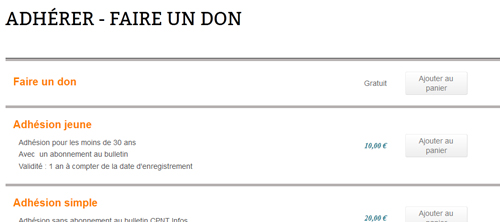
C'est fait mais je n'ai toujours pas le champs affiché
Je précise que j'ai rajouté aussi une case à cocher dans le formulaire d'adresse. Le nom et la description apparaissent bien mais pas la case.
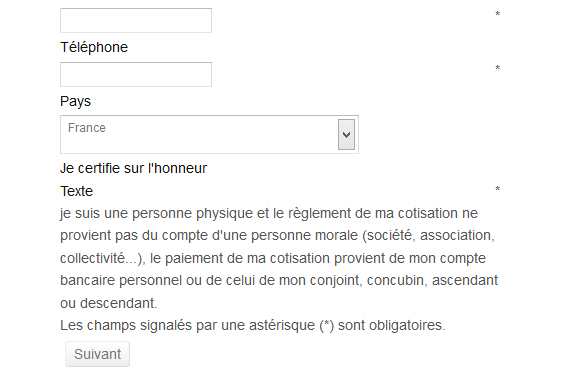
Problèmes liés à un mauvais paramétrage ?
Cordialement
Alain
C'est fait mais je n'ai toujours pas le champs affiché
Je précise que j'ai rajouté aussi une case à cocher dans le formulaire d'adresse. Le nom et la description apparaissent bien mais pas la case.
Problèmes liés à un mauvais paramétrage ?
Cordialement
Alain
Please Log in or Create an account to join the conversation.

Less
More
- Posts: 12953
- Thank you received: 1778
12 years 5 months ago #153202
by Mohamed Thelji
Replied by Mohamed Thelji on topic donation problem
Bonjour Alain,
Pouvez vous me montrer comment vous avez configuré votre champs personnalisé via quelques capture d'écran ?
Merci.
Pouvez vous me montrer comment vous avez configuré votre champs personnalisé via quelques capture d'écran ?
Merci.
Please Log in or Create an account to join the conversation.
12 years 5 months ago #153328
by cpntnat
Replied by cpntnat on topic donation problem
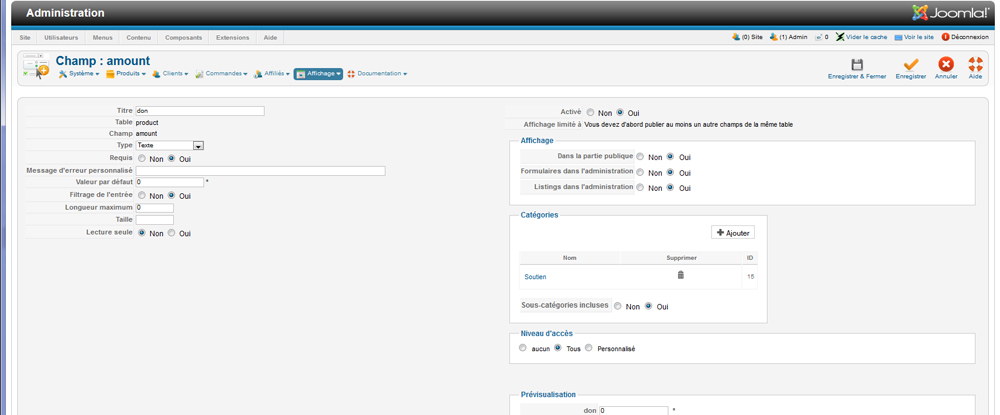
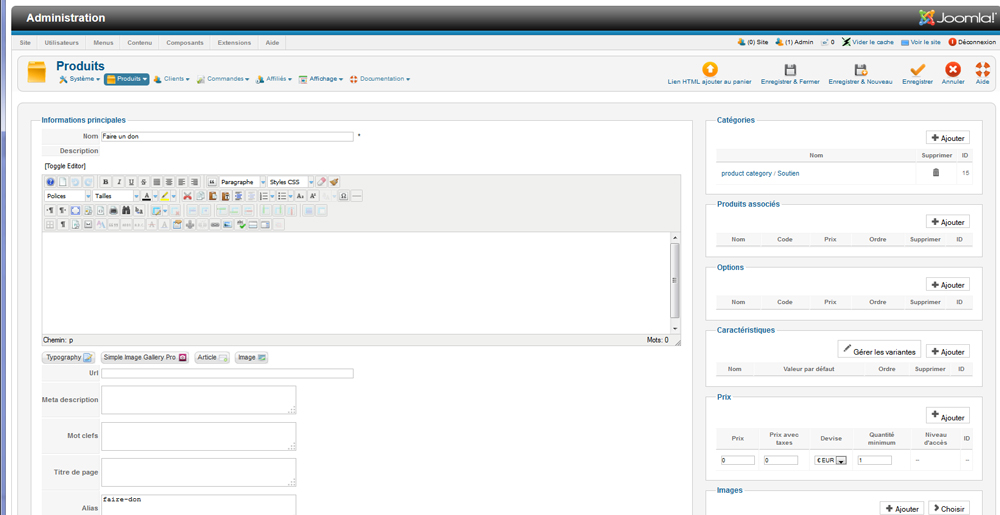
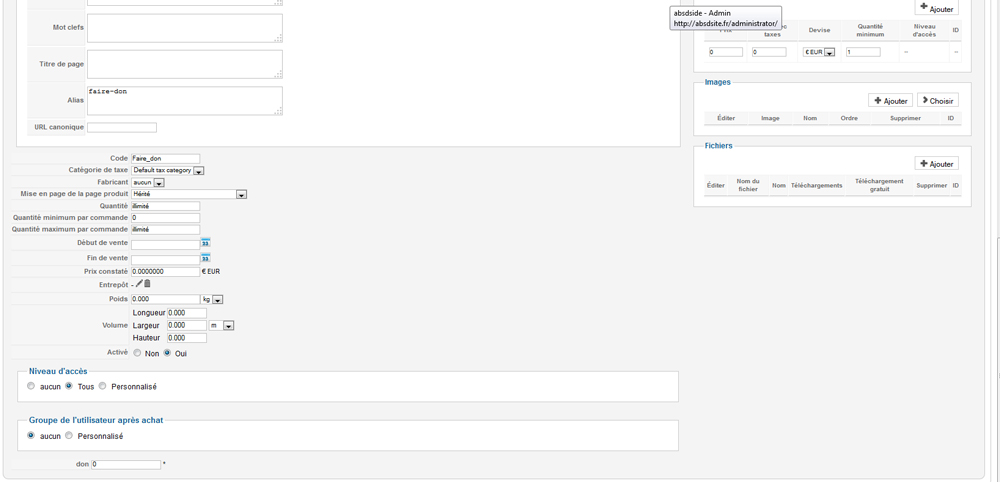
2 champs personalisés : Don (dans produit) et Attestation (Case à cocher dans adresse) :

Détail don :
Détail Attestation :
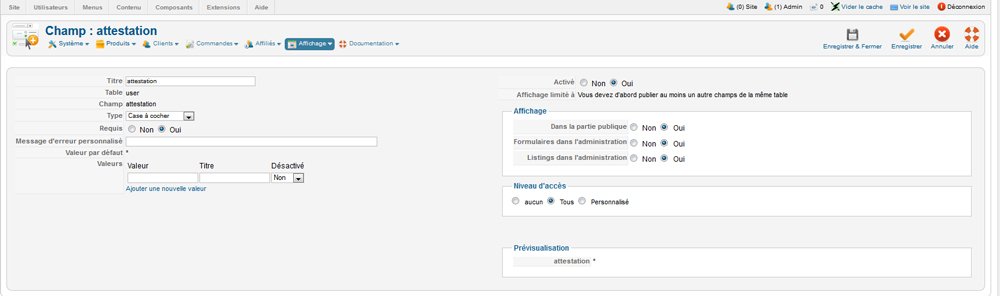
Détails déclaration produit don :
Cordialement
Alain
Détail don :
Détail Attestation :
Détails déclaration produit don :
Cordialement
Alain
Please Log in or Create an account to join the conversation.
Less
More
- Posts: 12953
- Thank you received: 1778
12 years 5 months ago #153418
by Mohamed Thelji
Replied by Mohamed Thelji on topic donation problem
Bonjour Alain,
Comme expliqué via ce sujet :
Il ne faut pas initialiser le champs "table" à "product" mais à "item".
Comme expliqué via ce sujet :
You'll find it through your plug-in manager with the name "HikaShop Donation plugin".
If you want to configure it you'll just have to :
create a category named "donation" for example
- create a product named "donation" set the price to 0 and the category to "donation"
- go to "Hikashop -> Display -> Custom fields"
- create a new field
- set the "label" field to amount
- set the "table" field to item
- set the "Column name" field to amount
- set the "field type" to text
- set the "default value" to 0
- add the donation category
- enable the "HikaShop Donation plugin".
Il ne faut pas initialiser le champs "table" à "product" mais à "item".
Please Log in or Create an account to join the conversation.
12 years 5 months ago #153443
by cpntnat
Replied by cpntnat on topic donation problem
C'est rectifié, merci ! La case don apparaît bien.... mais à chaque article d'une autre catégorie !!!
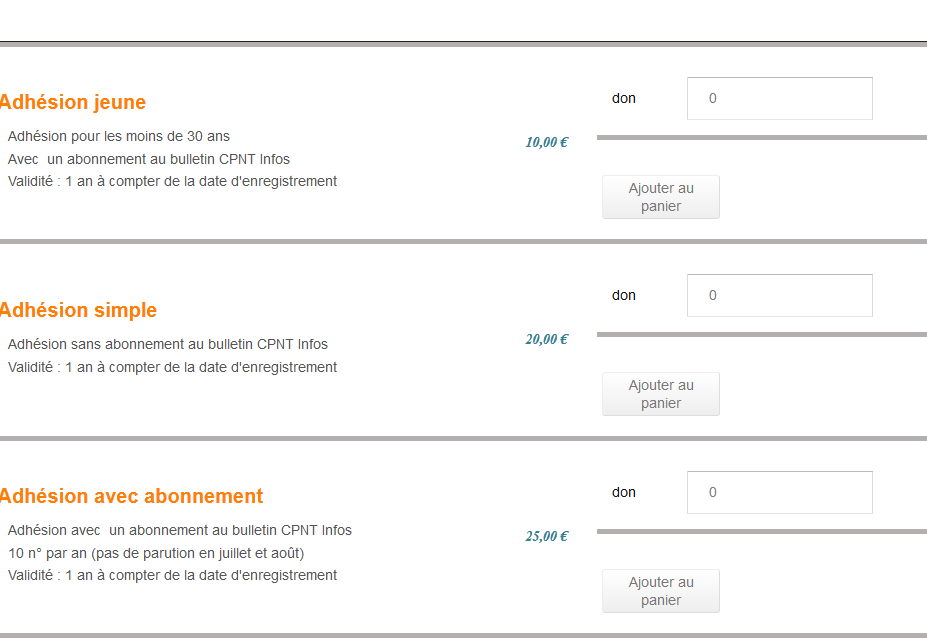
Une solution ?
Alain
Une solution ?
Alain
Please Log in or Create an account to join the conversation.
Less
More
- Posts: 12953
- Thank you received: 1778
12 years 5 months ago #153449
by Mohamed Thelji
Replied by Mohamed Thelji on topic donation problem
Bonjour Alain,
La solution sera simplement :
- De créer une catégorie dé-publiée
- d'y ajouter les produits ou vous voulez que le champs apparaît
- d'ajouter la catégorie dans l'option de restriction de votre champs personnalisé "catégorie"
La solution sera simplement :
- De créer une catégorie dé-publiée
- d'y ajouter les produits ou vous voulez que le champs apparaît
- d'ajouter la catégorie dans l'option de restriction de votre champs personnalisé "catégorie"
Please Log in or Create an account to join the conversation.
12 years 5 months ago #153536
by cpntnat
Replied by cpntnat on topic donation problem
Bonjour,
vous me dites :
- d'ajouter la catégorie dans l'option de restriction de votre champs personnalisé "catégorie"
Je n'ai pas trouvé ce paramétrage ni dans la gestion des champs personnalisés ni dans celle des catégories !
Je fais comment ?
Cordialement
Alain
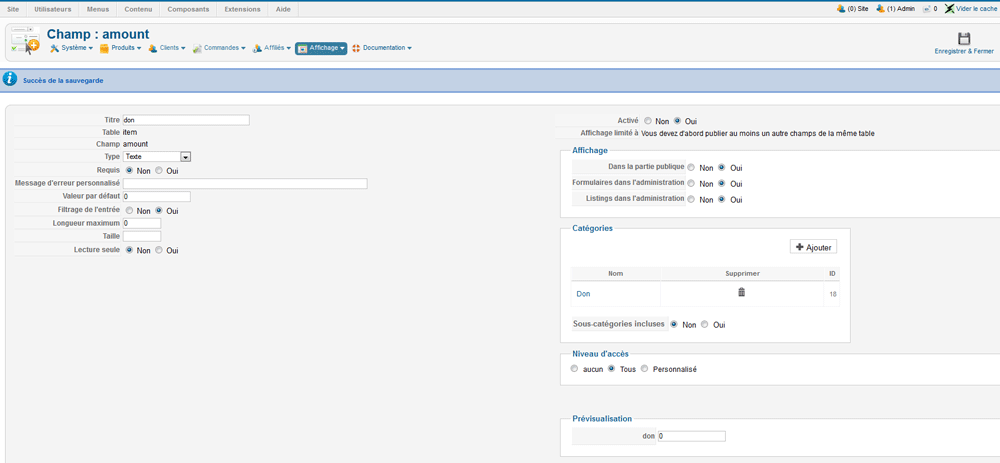
vous me dites :
- d'ajouter la catégorie dans l'option de restriction de votre champs personnalisé "catégorie"
Je n'ai pas trouvé ce paramétrage ni dans la gestion des champs personnalisés ni dans celle des catégories !
Je fais comment ?
Cordialement
Alain
Please Log in or Create an account to join the conversation.
Less
More
- Posts: 12953
- Thank you received: 1778
12 years 5 months ago #153538
by Mohamed Thelji
Replied by Mohamed Thelji on topic donation problem
Bonjour,
L'option de "restriction de votre champs personnalisé "catégories" " est présent dans votre capture d'écran, cette option est la table "Catégories" ou vous avez déjà ajouté la catégorie "Don".
L'option de "restriction de votre champs personnalisé "catégories" " est présent dans votre capture d'écran, cette option est la table "Catégories" ou vous avez déjà ajouté la catégorie "Don".
Please Log in or Create an account to join the conversation.
12 years 5 months ago #153745
by cpntnat
Replied by cpntnat on topic donation problem
A priori ça marche ! pas évident de mettre tout ça en place !
Merci de votre aide.
Cordialement
Alain
Merci de votre aide.
Cordialement
Alain
Please Log in or Create an account to join the conversation.
12 years 4 months ago #154577
by cpntnat
Replied by cpntnat on topic donation display problem
Bonjour,
Je reviens à la charge car je n'arrive pas à afficher les items (champs supplémentaires) comme les produits (voir pièce jointe).
Pouvez-vous me dire où se trouve le template de l'affichage des items en liste et celui des produits enliste également pour que je puisse avoir un affichage homogène en liste ?
Cordialement
Alain
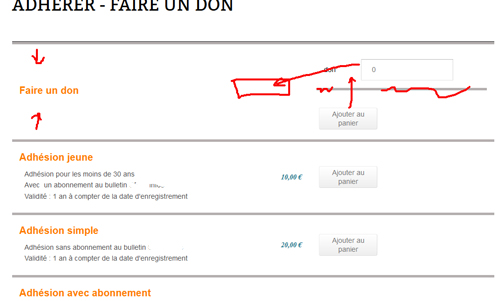
Je reviens à la charge car je n'arrive pas à afficher les items (champs supplémentaires) comme les produits (voir pièce jointe).
Pouvez-vous me dire où se trouve le template de l'affichage des items en liste et celui des produits enliste également pour que je puisse avoir un affichage homogène en liste ?
Cordialement
Alain
Please Log in or Create an account to join the conversation.
12 years 4 months ago #154609
by nicolas
Replied by nicolas on topic donation display problem
Bonjour,
Vu que vous utilisez la mise en page "tableau" pour votre listing de produits, c'est le fichier "listing_table" que vous voulez éditer via le menu Affichage>Vues.
Pour l'affichage des champs personnalisés, c'est le fichier "add_to_cart_listing".
Vu que vous utilisez la mise en page "tableau" pour votre listing de produits, c'est le fichier "listing_table" que vous voulez éditer via le menu Affichage>Vues.
Pour l'affichage des champs personnalisés, c'est le fichier "add_to_cart_listing".
Please Log in or Create an account to join the conversation.
Time to create page: 0.329 seconds