
- Posts: 214
- Thank you received: 7
"Quick Shop" modal window feature
- conticreative
-
 Topic Author
- Offline
Less
More
12 years 5 months ago #154368
by conticreative
"Quick Shop" modal window feature was created by conticreative
-- url of the page with the problem -- :
mywebsite.com/mypage
-- HikaShop version -- :2.3.0 business edition
-- Joomla version -- .2.3
.2.3
-- PHP version -- : n/a
-- Browser(s) name and version -- : n/a
-- Error-message(debug-mod must be tuned on) -- : n/a
My client showed this page to me: www.jcrew.com/womens_category/shirtsandtops.jsp and asked me if I can replicate it.
All that I see is a modal popup with the product display in the popup, but I have to be honest, I lost track on how to do that in Joomla 3.0.
Is it possible to do that in Hikashop and Joomla 3.0? Is the functionality built in someplace or would I need to write it myself?
Thank you very much for your help.
-- HikaShop version -- :2.3.0 business edition
-- Joomla version --
.2.3-- PHP version -- : n/a
-- Browser(s) name and version -- : n/a
-- Error-message(debug-mod must be tuned on) -- : n/a
My client showed this page to me: www.jcrew.com/womens_category/shirtsandtops.jsp and asked me if I can replicate it.
All that I see is a modal popup with the product display in the popup, but I have to be honest, I lost track on how to do that in Joomla 3.0.
Is it possible to do that in Hikashop and Joomla 3.0? Is the functionality built in someplace or would I need to write it myself?
Thank you very much for your help.
Please Log in or Create an account to join the conversation.

12 years 5 months ago #154371
by nicolas
Replied by nicolas on topic "Quick Shop" modal window feature
Hi,
This is just an image with a close button in a popup. So it's not something you would see in HikaShop, but something that you can do with a popup notice extension for joomla.
extensions.joomla.org/extensions/style-a...pups-a-iframes/11693
extensions.joomla.org/extensions/style-a...ign/popups-a-iframes
This is just an image with a close button in a popup. So it's not something you would see in HikaShop, but something that you can do with a popup notice extension for joomla.
extensions.joomla.org/extensions/style-a...pups-a-iframes/11693
extensions.joomla.org/extensions/style-a...ign/popups-a-iframes
Please Log in or Create an account to join the conversation.
- conticreative
-
Topic Author
- Offline
Less
More
- Posts: 214
- Thank you received: 7
12 years 4 months ago #154592
by conticreative
Replied by conticreative on topic "Quick Shop" modal window feature
Thank you for the reply.
I am not sure why you think the example I included is "just an image". It's actually a modal window that lets customers interact with the product as well as the regular page can.
The customer can change the quantity, size, etc. In the product.
I am actually aware of the modal extensions you suggested.I already use the NoNumber extensions for other purposes, and maybe one of them will do the job, I haven't tried. But I wanted to make sure to clarify that the modal window in my example, while it does contain an image, is not one. It's a full product view.
I am not sure why you think the example I included is "just an image". It's actually a modal window that lets customers interact with the product as well as the regular page can.
The customer can change the quantity, size, etc. In the product.
I am actually aware of the modal extensions you suggested.I already use the NoNumber extensions for other purposes, and maybe one of them will do the job, I haven't tried. But I wanted to make sure to clarify that the modal window in my example, while it does contain an image, is not one. It's a full product view.
Please Log in or Create an account to join the conversation.
12 years 4 months ago #154613
by nicolas
Replied by nicolas on topic "Quick Shop" modal window feature
Then we must not be talking about the same thing.
When I arrive on the page of your link, I'm seeing that popup:
take.ms/aNbfU
The popup doesn't let me interact with the product at all.
But you can have interactive popups too. Simply tell the popup system you're using to load the product page that you want with the added parameter ?tmpl=component in the URL of the product page and you can get an interactive product page in a popup.
When I arrive on the page of your link, I'm seeing that popup:
take.ms/aNbfU
The popup doesn't let me interact with the product at all.
But you can have interactive popups too. Simply tell the popup system you're using to load the product page that you want with the added parameter ?tmpl=component in the URL of the product page and you can get an interactive product page in a popup.
Please Log in or Create an account to join the conversation.
- conticreative
-
Topic Author
- Offline
Less
More
- Posts: 214
- Thank you received: 7
12 years 4 months ago #154768
by conticreative
Replied by conticreative on topic "Quick Shop" modal window feature
Indeed what you are seeing is not what I mean. You must be getting some sort of advert for first time users.
This is what the page looks like below. You'll notice that some products (those with variants) have a button named "Quickshop".
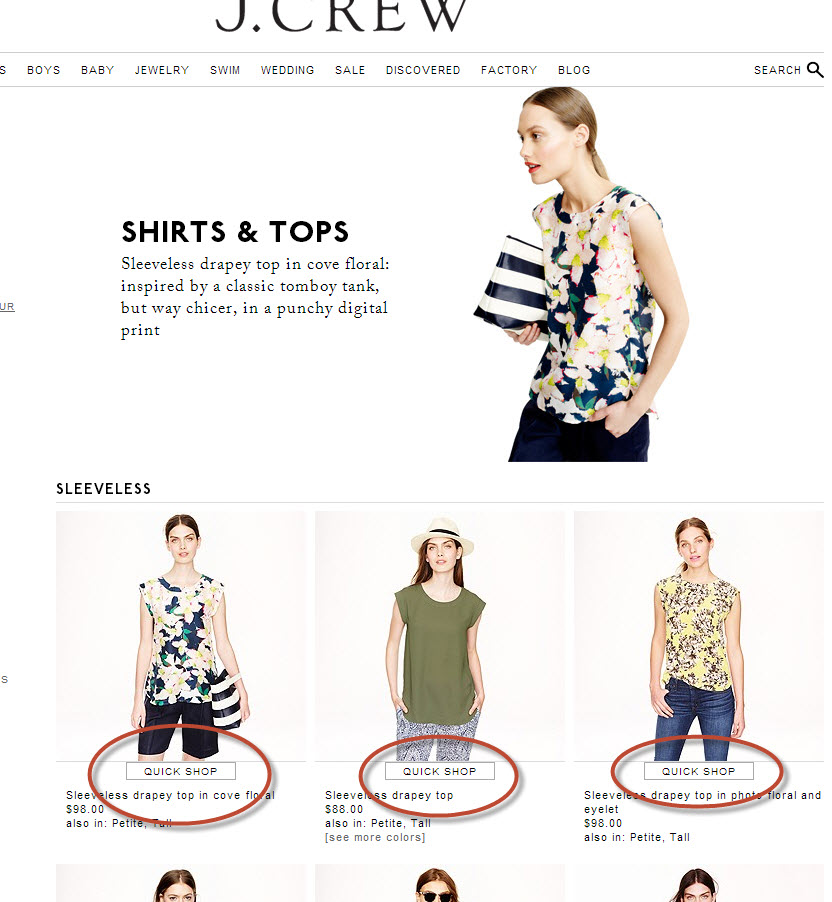
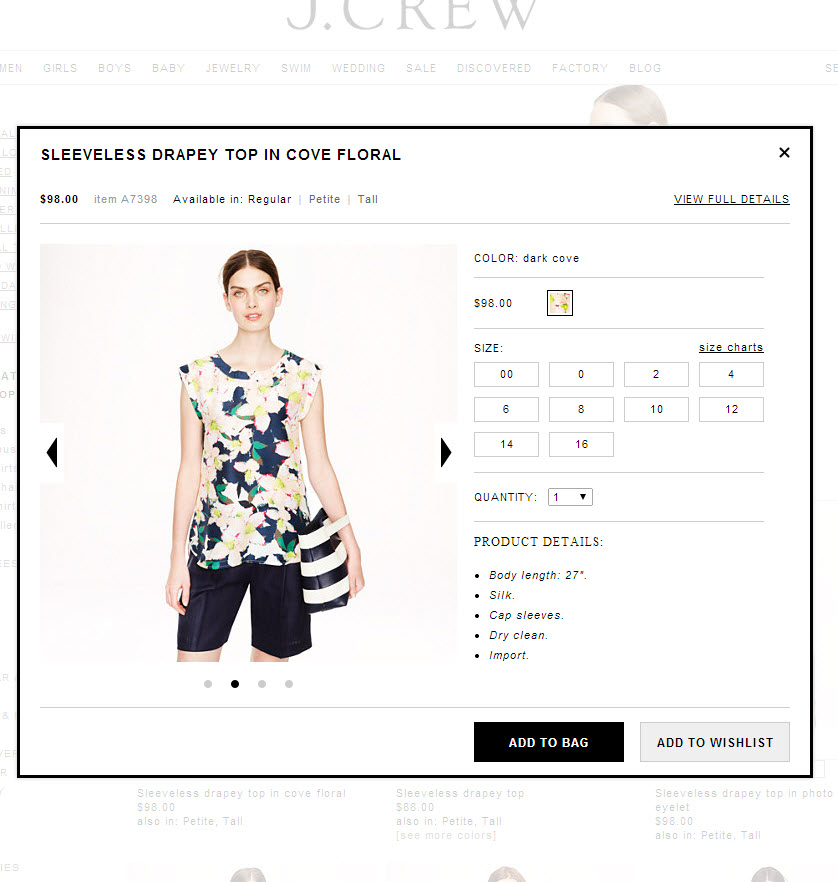
Clicking on that button, spawns a modal window with the product view in it. It is basically no different than navigating to the page in question, but it gives the customer the impression that they are not leaving the browsing page and that they can buy the product with fewer page loads.
Here is what it looks like:
Essentially, in Hikashop we have products that can be purchased directly from the category view. Those that have variants like "size", "Color" etc. Have a button that says "Choose Options".
In the JCrew example, instead of "Choose Options" it displays the wording "Quickshop" and when clicked it opens a modal window with the product view in it.
I don't think this would be too hard to do, but I wanted it to run it by you guys first in case there are resources I can leverage already built in.
This is what the page looks like below. You'll notice that some products (those with variants) have a button named "Quickshop".
Clicking on that button, spawns a modal window with the product view in it. It is basically no different than navigating to the page in question, but it gives the customer the impression that they are not leaving the browsing page and that they can buy the product with fewer page loads.
Here is what it looks like:
Essentially, in Hikashop we have products that can be purchased directly from the category view. Those that have variants like "size", "Color" etc. Have a button that says "Choose Options".
In the JCrew example, instead of "Choose Options" it displays the wording "Quickshop" and when clicked it opens a modal window with the product view in it.
I don't think this would be too hard to do, but I wanted it to run it by you guys first in case there are resources I can leverage already built in.
Please Log in or Create an account to join the conversation.
12 years 4 months ago #154792
by nicolas
Replied by nicolas on topic "Quick Shop" modal window feature
Hi,
Ah ok, I see what you're talking about.
In that case, you can do something like that on products listings with some code customization of the corresponding view file. You can see an example of such modification, where the image and name links to the product page for each product are replaced with a popup opening:
www.hikashop.com/forum/2-general-talk-ab...n-popup-product.html
Ah ok, I see what you're talking about.
In that case, you can do something like that on products listings with some code customization of the corresponding view file. You can see an example of such modification, where the image and name links to the product page for each product are replaced with a popup opening:
www.hikashop.com/forum/2-general-talk-ab...n-popup-product.html
Please Log in or Create an account to join the conversation.
- conticreative
-
Topic Author
- Offline
Less
More
- Posts: 214
- Thank you received: 7
12 years 3 months ago - 12 years 3 months ago #159528
by conticreative
Replied by conticreative on topic "Quick Shop" modal window feature
I have tried to follow your instructions in regard to this issue here, but I am unable to find where the "View" file is located for the "add to cart/choose options" button.
The example you provided is relative to the product picture and I have found where that is. But I need to change the "Choose Options" Button, not the image.
I first have to find where that code is located and I am starting to think it is not available for customization.
Could you be so kind to look into it and let me know if I am wasting my time trying to find it?
Thanks
EDIT: I forgot to specify that the "choose options" button is an input field. It's not a URL like with the images.
So even if I were able to find the code, the way I would make the button open a modal window is going to likely be very different.
The example you provided is relative to the product picture and I have found where that is. But I need to change the "Choose Options" Button, not the image.
I first have to find where that code is located and I am starting to think it is not available for customization.
Could you be so kind to look into it and let me know if I am wasting my time trying to find it?
Thanks
EDIT: I forgot to specify that the "choose options" button is an input field. It's not a URL like with the images.
So even if I were able to find the code, the way I would make the button open a modal window is going to likely be very different.
Last edit: 12 years 3 months ago by conticreative.
Please Log in or Create an account to join the conversation.
12 years 3 months ago #159529
by nicolas
Replied by nicolas on topic "Quick Shop" modal window feature
Hi,
You can find it in the "quantity" view file:
You can just remove it and display instead your HTML "a" tag with the CSS needed for it to look like a button.
You can find it in the "quantity" view file:
Code:
echo $this->cart->displayButton(JText::_('CHOOSE_OPTIONS'),'choose_options',$this->params,hikashop_completeLink('product&task=show&product_id='.$this->row->product_id.'&name='.$this->row->alias.$url_itemid.$this->category_pathway),'window.location = \''.str_replace("'","\'",hikashop_completeLink('product&task=show&product_id='.$this->row->product_id.'&name='.$this->row->alias.$url_itemid.$this->category_pathway)).'\';return false;','');
Please Log in or Create an account to join the conversation.
- conticreative
-
Topic Author
- Offline
Less
More
- Posts: 214
- Thank you received: 7
12 years 3 months ago #159668
by conticreative
Replied by conticreative on topic "Quick Shop" modal window feature
Thanks, I'll try and let you know how it goes.
Please Log in or Create an account to join the conversation.
Time to create page: 0.222 seconds