
- Posts: 128
- Thank you received: 0
Alignment of the product title in the category
- sergiobertini
-
 Topic Author
- Offline
Less
More
12 years 5 months ago #154396
by sergiobertini
Alignment of the product title in the category was created by sergiobertini
HI!
I come to this forum once again humbly request the help of partners!
Previously had problems with Wishilist, my friend Xavier resolved.
Now I have another little problem, which is the display of products in the categories of securities.
By default, the title is left-aligned, but the product code is centralized. I want the title of the product also be centralized.
Note: I make the display of the product title in the categories, not on the actual product page. On the product page, the title can be aligned to the left!
Ah! remembering that the price is too centralized, only the title of the product that is not!
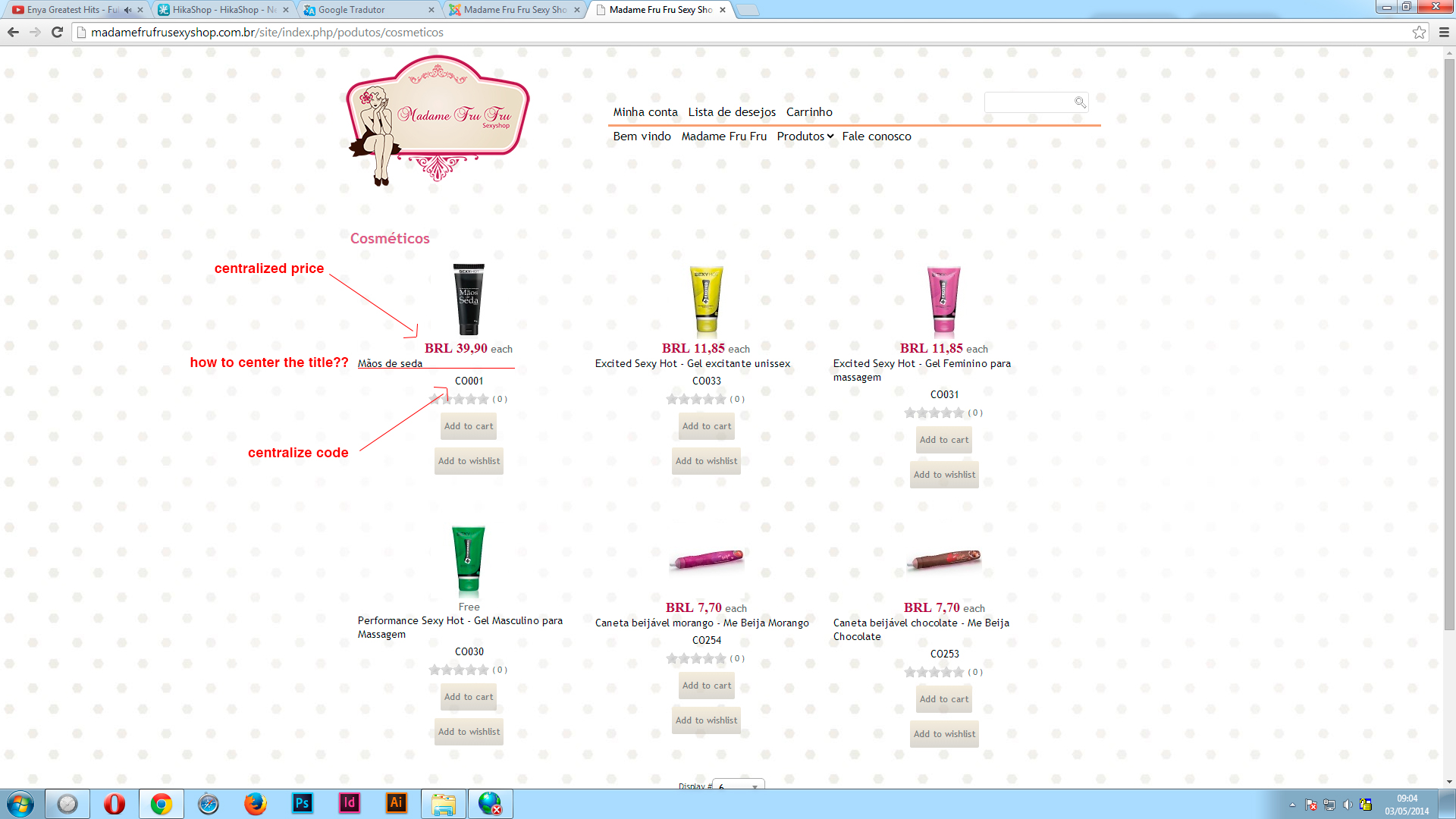
I come to this forum once again humbly request the help of partners!
Previously had problems with Wishilist, my friend Xavier resolved.
Now I have another little problem, which is the display of products in the categories of securities.
By default, the title is left-aligned, but the product code is centralized. I want the title of the product also be centralized.
Note: I make the display of the product title in the categories, not on the actual product page. On the product page, the title can be aligned to the left!
Ah! remembering that the price is too centralized, only the title of the product that is not!
Please Log in or Create an account to join the conversation.

12 years 5 months ago #154413
by nicolas
Replied by nicolas on topic Alignment of the product title in the category
Hi,
That's because the CSS of your template forces that text to be left centered. You'll have to add such CSS in the frontend CSS of HikaShop via the Display tab of the configuration:
That's because the CSS of your template forces that text to be left centered. You'll have to add such CSS in the frontend CSS of HikaShop via the Display tab of the configuration:
Code:
div.hikashop_subcontainer span {
text-align: center !important;
}
Please Log in or Create an account to join the conversation.
- sergiobertini
-
Topic Author
- Offline
Less
More
- Posts: 128
- Thank you received: 0
12 years 4 months ago #154590
by sergiobertini
Replied by sergiobertini on topic Alignment of the product title in the category
Hi!
You could specify the file path I should edit more specifically?
I want to edit the file directly:
"com_hikashop_business_2.3.0_2014-04-07.tar.gz".
Why the administration of the site I could not!
You could specify the file path I should edit more specifically?
I want to edit the file directly:
"com_hikashop_business_2.3.0_2014-04-07.tar.gz".
Why the administration of the site I could not!
Please Log in or Create an account to join the conversation.
12 years 4 months ago #154612
by nicolas
Replied by nicolas on topic Alignment of the product title in the category
Hi,
Then you can directly add it to:
media/com_hikashop/css/frontend_custom.css
Then you can directly add it to:
media/com_hikashop/css/frontend_custom.css
Please Log in or Create an account to join the conversation.
- sergiobertini
-
Topic Author
- Offline
Less
More
- Posts: 128
- Thank you received: 0
12 years 4 months ago #154694
by sergiobertini
Replied by sergiobertini on topic Alignment of the product title in the category
HI!
Well, I went on my FTP, so I went to the path:
media / com_hikashop / css / frontend_custom.css
I inserted the code that informed me:
div.hikashop_subcontainer span {
text-align: center important;!
}
Only it did not work!
If you can help me!
Well, I went on my FTP, so I went to the path:
media / com_hikashop / css / frontend_custom.css
I inserted the code that informed me:
div.hikashop_subcontainer span {
text-align: center important;!
}
Only it did not work!
If you can help me!
Please Log in or Create an account to join the conversation.

Less
More
- Posts: 12953
- Thank you received: 1778
12 years 4 months ago #154697
by Mohamed Thelji
Replied by Mohamed Thelji on topic Alignment of the product title in the category
Hello,
1. Note that you should add the CSS code that Nicolas gave you through the "Front-end CSS File" option of the page "Hikashop->System->Configuration->Display"
2. If it still don't work, can you give me a link to the pag where you are having your issue so that I can directly test it ?
Thanks.
1. Note that you should add the CSS code that Nicolas gave you through the "Front-end CSS File" option of the page "Hikashop->System->Configuration->Display"
2. If it still don't work, can you give me a link to the pag where you are having your issue so that I can directly test it ?
Thanks.
Please Log in or Create an account to join the conversation.
- sergiobertini
-
Topic Author
- Offline
Less
More
- Posts: 128
- Thank you received: 0
12 years 4 months ago #155007
by sergiobertini
Replied by sergiobertini on topic Alignment of the product title in the category
OK
But I think you have misunderstood my question!
I do not want to edit the css file in the administration of my site.
I want to edit the root, ie, inside the zip file:
"com_hikashop_business_2.3.0_2014-04-07.tar.gz".
For the next facilities do not act the same problem.
Do you understand?
But I think you have misunderstood my question!
I do not want to edit the css file in the administration of my site.
I want to edit the root, ie, inside the zip file:
"com_hikashop_business_2.3.0_2014-04-07.tar.gz".
For the next facilities do not act the same problem.
Do you understand?
Please Log in or Create an account to join the conversation.
12 years 4 months ago #155014
by nicolas
Replied by nicolas on topic Alignment of the product title in the category
Hi,
The code that you wrote in your message:
is not the same as the code that I wrote in my message (the ! is not at the same place). Because of that, the CSS is not valid, so it's normal that it doesn't work.
Please follow precisely my instructions and it should work. Also, flush your browser cache if you have any and turn off any Joomla caching/compression you might have or you might not see the change on your website after doing it.
The code that you wrote in your message:
Code:
HI!
Well, I went on my FTP, so I went to the path:
media / com_hikashop / css / frontend_custom.css
I inserted the code that informed me:
div.hikashop_subcontainer span {
text-align: center important;!
}
Only it did not work!
If you can help me!
Please follow precisely my instructions and it should work. Also, flush your browser cache if you have any and turn off any Joomla caching/compression you might have or you might not see the change on your website after doing it.
Please Log in or Create an account to join the conversation.
Time to create page: 0.236 seconds