
- Posts: 100
- Thank you received: 1
using custom date field with date picker plugin
- paddyrolls
-
 Topic Author
- Offline
Less
More
12 years 3 months ago - 12 years 3 months ago #159229
by paddyrolls
using custom date field with date picker plugin was created by paddyrolls
-- HikaShop version -- : 2.3.1
-- Joomla version -- : 3.3
-- PHP version -- : 5X
Hi
I am using a custom field and applying advance date picker plugin with field type "advance date picker" for table "product". I am setting format as "D d M Y".
When I select 30 June 2014, it writes the value in the database as "20140630000000".
I am using this custom date field by using $row->course_start_date. However it prints out the string 20140630000000, rather than the Mon 30 Jun 2014.
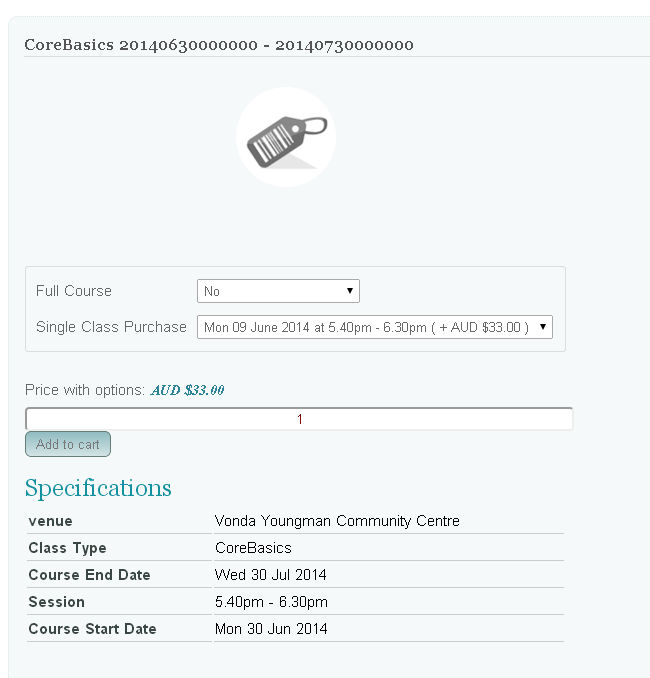
Could you advise how you are formatting this?
Thanks
-- Joomla version -- : 3.3
-- PHP version -- : 5X
Hi
I am using a custom field and applying advance date picker plugin with field type "advance date picker" for table "product". I am setting format as "D d M Y".
When I select 30 June 2014, it writes the value in the database as "20140630000000".
I am using this custom date field by using $row->course_start_date. However it prints out the string 20140630000000, rather than the Mon 30 Jun 2014.
Could you advise how you are formatting this?
Thanks
Last edit: 12 years 3 months ago by paddyrolls.
Please Log in or Create an account to join the conversation.

12 years 3 months ago #159237
by Jerome
Jerome - Obsidev.com
HikaMarket & HikaSerial developer / HikaShop core dev team.
Replied by Jerome on topic using custom date field with date picker plugin
Hi,
To display the custom field, you have to use the HikaShop field class and call the "show" function with the field object.
You can't use a raw value like that with the custom fields.
The date is stored in a fixed format in order to be displayed dynamically.
The other date custom field store the pre-formated date in the database, so it does not allow you to sort or filter easily (depending the format you use).
The "pro" is that you can display the raw value from the database, the "con" is that you can't change the format or use it in code/sql.
Regards,
To display the custom field, you have to use the HikaShop field class and call the "show" function with the field object.
You can't use a raw value like that with the custom fields.
The date is stored in a fixed format in order to be displayed dynamically.
The other date custom field store the pre-formated date in the database, so it does not allow you to sort or filter easily (depending the format you use).
The "pro" is that you can display the raw value from the database, the "con" is that you can't change the format or use it in code/sql.
Regards,
Jerome - Obsidev.com
HikaMarket & HikaSerial developer / HikaShop core dev team.
Please Log in or Create an account to join the conversation.
- paddyrolls
-
Topic Author
- Offline
Less
More
- Posts: 100
- Thank you received: 1
12 years 3 months ago #159371
by paddyrolls
Replied by paddyrolls on topic using custom date field with date picker plugin
HI Jerome
Thank you for your response. Could you please give me an example of how to use this show function.
Thanks
Patrick
Thank you for your response. Could you please give me an example of how to use this show function.
Thanks
Patrick
Please Log in or Create an account to join the conversation.

12 years 3 months ago - 10 years 7 months ago #159385
by nicolas
Replied by nicolas on topic using custom date field with date picker plugin
Like that:
Code:
$fieldsClass = hikashop_get('class.field');
$fields = $fieldsClass->getFields('frontcomp',$this->row,'product','checkout&task=state');
echo $fieldsClass->show($fields['course_start_date'],$this->row->course_start_date);
Last edit: 10 years 7 months ago by nicolas.
Please Log in or Create an account to join the conversation.
- paddyrolls
-
Topic Author
- Offline
Less
More
- Posts: 100
- Thank you received: 1
12 years 3 months ago #159451
by paddyrolls
Replied by paddyrolls on topic using custom date field with date picker plugin
Hi Nicolas and Jerome
This worked.
Thanks for your assistance.
Patrick
This worked.
Thanks for your assistance.
Patrick
Please Log in or Create an account to join the conversation.
Time to create page: 0.171 seconds