

- Posts: 36
- Thank you received: 0
Custom field - image, I don't need resizing
12 years 3 months ago #161431
by janos
Custom field - image, I don't need resizing was created by janos
-- url of the page with the problem -- : localhost
-- HikaShop version -- : Business: 2.3.1
-- Joomla version -- :2.5.22
-- PHP version -- : 5.3.13
-- Browser(s) name and version -- : FireFox 30.0
I've just bought HS Business running still on localhost.
I added custom product field - image as 'On Stock' 76px × 35px .gif
In the product editor it appears as it is , but frontend it appears resized: 100px × 46px.
It should be as original.
-- HikaShop version -- : Business: 2.3.1
-- Joomla version -- :2.5.22
-- PHP version -- : 5.3.13
-- Browser(s) name and version -- : FireFox 30.0
I've just bought HS Business running still on localhost.
I added custom product field - image as 'On Stock' 76px × 35px .gif
In the product editor it appears as it is , but frontend it appears resized: 100px × 46px.
It should be as original.
Please Log in or Create an account to join the conversation.

12 years 3 months ago #161433
by Xavier
Replied by Xavier on topic Custom field - image, I don't need resizing
Hi,
This is because in the configuration > images you have set the size for the thumbnails to "100".
So you can change this option in order to have "76px", or upload your images in the media/com_hikashop/thumbnail/100x46 in order to keep them not resized.
This is because in the configuration > images you have set the size for the thumbnails to "100".
So you can change this option in order to have "76px", or upload your images in the media/com_hikashop/thumbnail/100x46 in order to keep them not resized.
Please Log in or Create an account to join the conversation.
12 years 3 months ago #161548
by janos
Replied by janos on topic Custom field - image, I don't need resizing
Negative.
The tumbnails size has been set to 140px earlier.
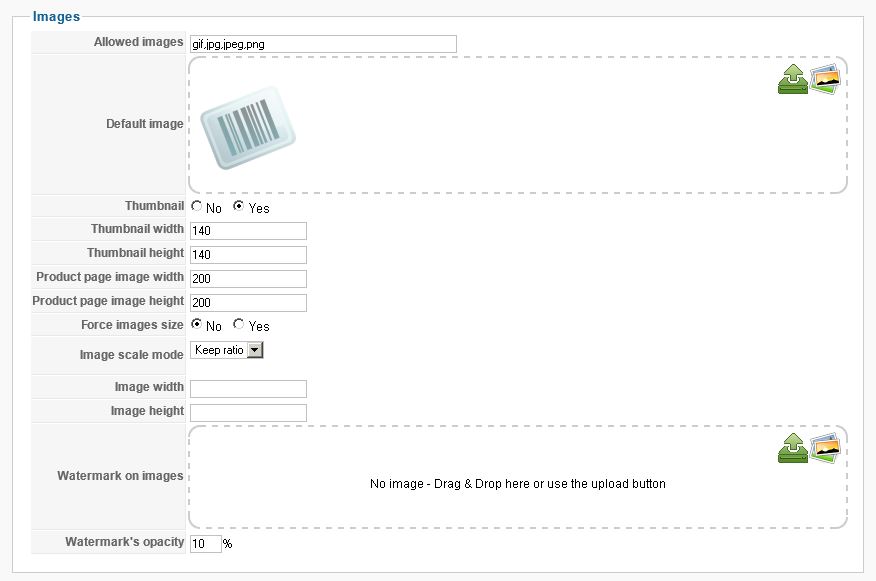
The tumbnails size has been set to 140px earlier.
Please Log in or Create an account to join the conversation.
12 years 3 months ago #161960
by Xavier
Replied by Xavier on topic Custom field - image, I don't need resizing
Hi,
Thanks to check if the image is not just resized by some css properties with your browser console.
It's maybe not resized by HikaShop, but a template css property.
hikashop.com/support/support/documentati...ize-the-display.html
Thanks to check if the image is not just resized by some css properties with your browser console.
It's maybe not resized by HikaShop, but a template css property.
hikashop.com/support/support/documentati...ize-the-display.html
Please Log in or Create an account to join the conversation.
12 years 3 months ago #161970
by janos
Replied by janos on topic Custom field - image, I don't need resizing
Xavier,
It has been set by Hikashop's 'frontend_default.css' file:
.hikashop_custom_image_link{
width: 100px;
}
...although it is not a link at all...
It has been set by Hikashop's 'frontend_default.css' file:
.hikashop_custom_image_link{
width: 100px;
}
...although it is not a link at all...
Please Log in or Create an account to join the conversation.

12 years 3 months ago #162036
by nicolas
Replied by nicolas on topic Custom field - image, I don't need resizing
Yes, that's what we do do avoid deforming the layout of the website with people uploading wallpapers where there is only the space for a small image on the screen.
You can modify that CSS in order to have what you want.
You can modify that CSS in order to have what you want.
Please Log in or Create an account to join the conversation.
Time to create page: 0.220 seconds