

- Posts: 36
- Thank you received: 0
Different layouts for characteristics
12 years 3 months ago #162308
by svanschu
Different layouts for characteristics was created by svanschu
-- url of the page with the problem -- :
mywebsite.com/mypage
-- HikaShop version -- : x.x.x
-- Joomla version -- : x.x
-- PHP version -- : x.x.x
-- Browser(s) name and version -- : XXXXX x.x.x
-- Error-message(debug-mod must be tuned on) -- : Error_message
When I load a product the characteristics are loaded with "show_block_costum_main.php" but when I choose a characteristic it get's loaded with "show.php". Why?
Additionally when the characteristics table gets loaded with "show_block_costum_main.php" empty characteristics get displayed
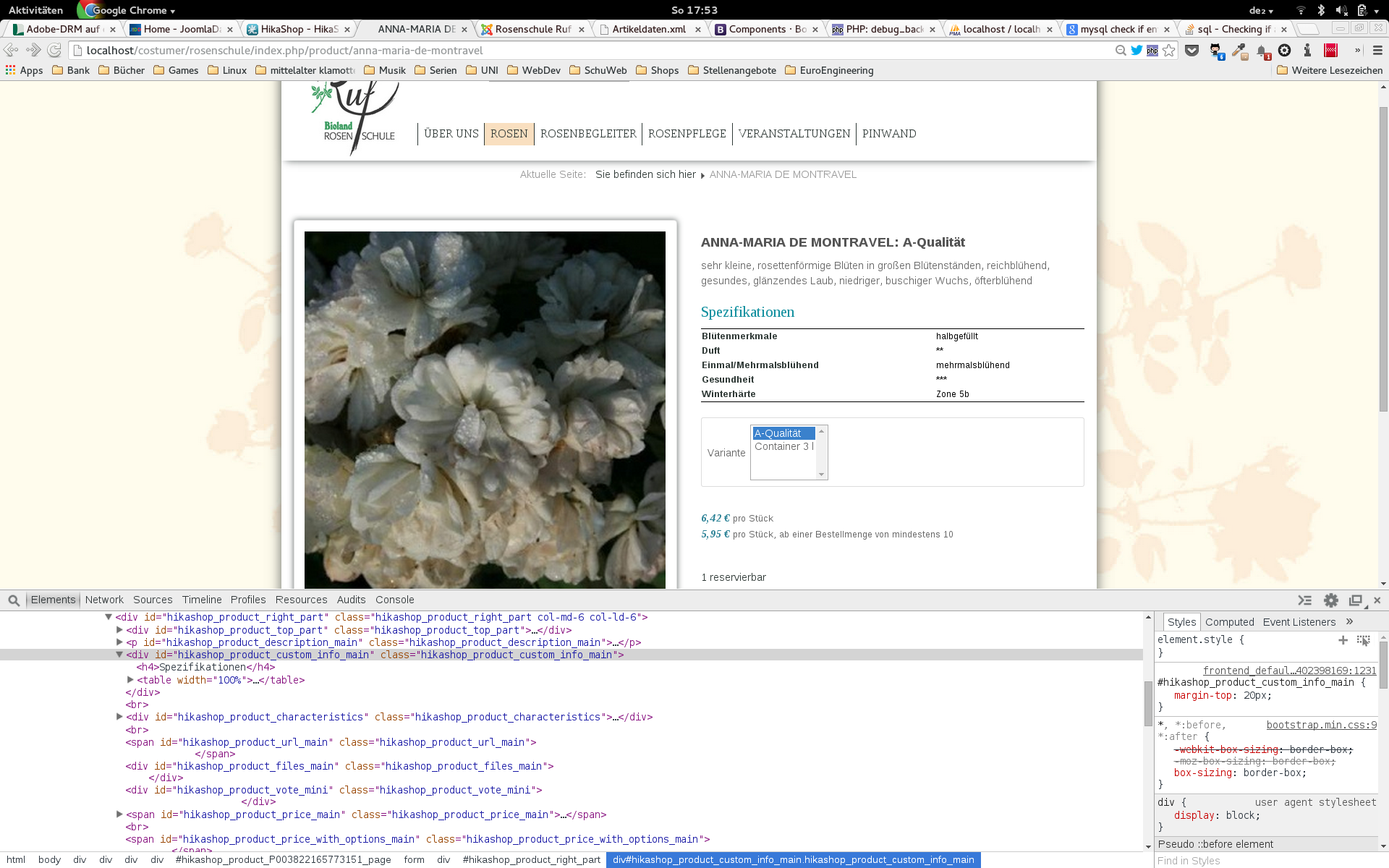
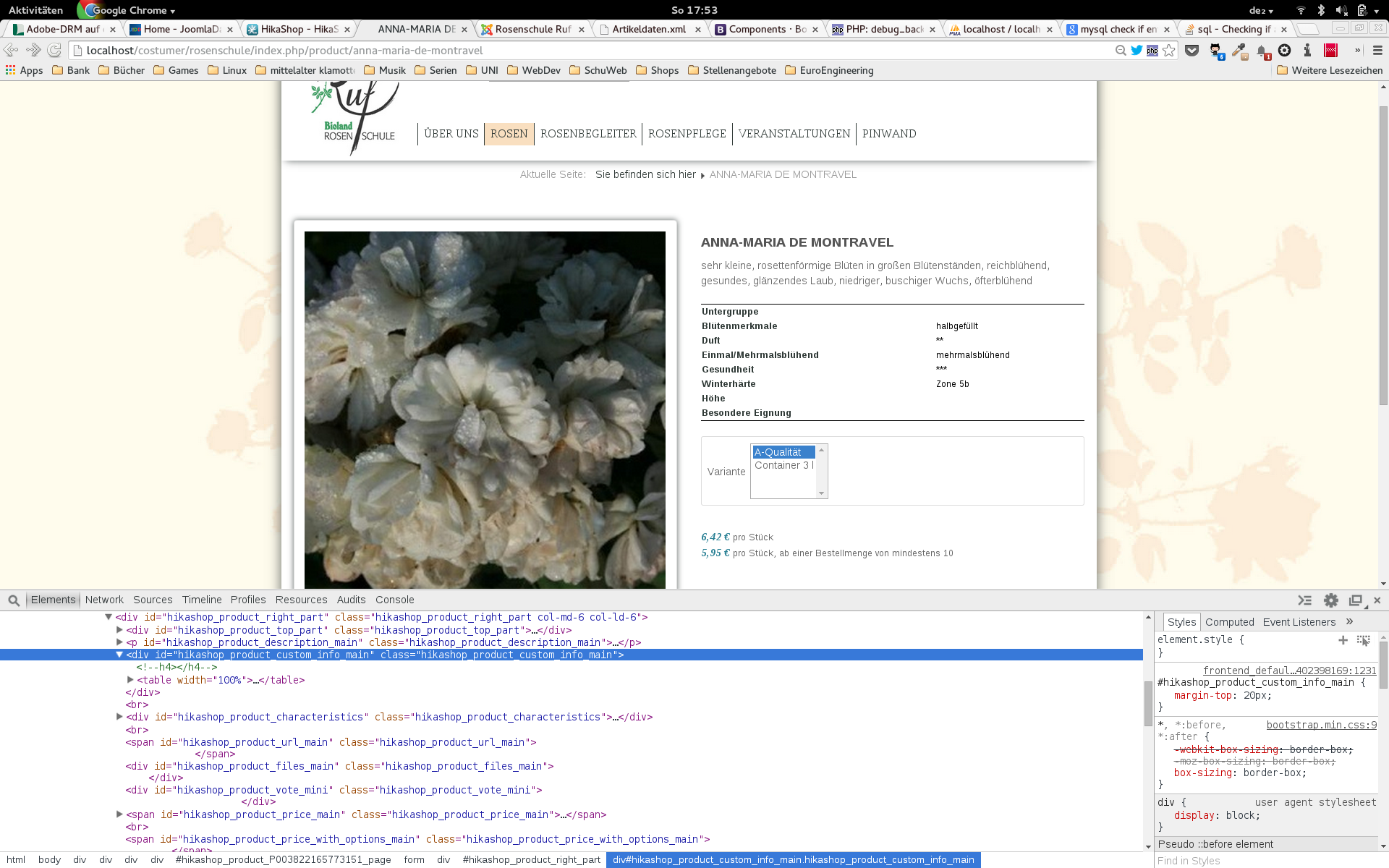 when I choose a characteristic and it's load with "show.php" then the empty characteritics won't be displayed.
-- HikaShop version -- : x.x.x
-- Joomla version -- : x.x
-- PHP version -- : x.x.x
-- Browser(s) name and version -- : XXXXX x.x.x
-- Error-message(debug-mod must be tuned on) -- : Error_message
When I load a product the characteristics are loaded with "show_block_costum_main.php" but when I choose a characteristic it get's loaded with "show.php". Why?
Additionally when the characteristics table gets loaded with "show_block_costum_main.php" empty characteristics get displayed
Please Log in or Create an account to join the conversation.

12 years 3 months ago #162309
by nicolas
Replied by nicolas on topic Different layouts for characteristics
Hi,
Empty values of custom product fields for the default variant should also not be displayed, unless you're using an old version of HikaShop.
The layout of the page in constructed with the default variant data in the show_default view file, which loads all the different sub view files like show_block_custom_main
Then, all the variants data's HTML is added hidde on the page via the show view file so that it can be swapped when you change the selection of the characteristics.
That way, you can have different prices, images, quantities, custom product fields, etc displayed on the product page and that it updates dynamically and instantaneously when you select another variant.
Empty values of custom product fields for the default variant should also not be displayed, unless you're using an old version of HikaShop.
The layout of the page in constructed with the default variant data in the show_default view file, which loads all the different sub view files like show_block_custom_main
Then, all the variants data's HTML is added hidde on the page via the show view file so that it can be swapped when you change the selection of the characteristics.
That way, you can have different prices, images, quantities, custom product fields, etc displayed on the product page and that it updates dynamically and instantaneously when you select another variant.
Please Log in or Create an account to join the conversation.
12 years 3 months ago #162416
by svanschu
Replied by svanschu on topic Different layouts for characteristics
It's clear so far. I wondered because I had to uncomment the "Spezifikation" h4 tag in two areas.
But the both screenshots are from a hikashop "You have the latest stable version of HikaShop Business: 2.3.1"
show_block_costum_main.php shows empty values
show.php shows not empty values
But the both screenshots are from a hikashop "You have the latest stable version of HikaShop Business: 2.3.1"
show_block_costum_main.php shows empty values
show.php shows not empty values
Please Log in or Create an account to join the conversation.
12 years 3 months ago #162424
by nicolas
Replied by nicolas on topic Different layouts for characteristics
Then maybe you edited the files from an older version which had that problem and thus you're not using the code of the 2.3.1 for these view files ?
If you edit them via the menu Display>Views, you'll see the version number at the top which will tell you if that's the case.
If you edit them via the menu Display>Views, you'll see the version number at the top which will tell you if that's the case.
Please Log in or Create an account to join the conversation.
12 years 3 months ago #162678
by svanschu
Replied by svanschu on topic Different layouts for characteristics
Nope I started with 2.3.1 so it's the first version I used.
Please Log in or Create an account to join the conversation.
12 years 3 months ago #162703
by nicolas
Replied by nicolas on topic Different layouts for characteristics
I'm really not able to reproduce the problem so it's strange that you have it.
Could you provide a copy/paste of the code in the file show_block_custom_main.php on your website ?
Could you provide a copy/paste of the code in the file show_block_custom_main.php on your website ?
Please Log in or Create an account to join the conversation.
12 years 3 months ago #162885
by svanschu
Replied by svanschu on topic Different layouts for characteristics
Code:
<?php
/**
* @package HikaShop for Joomla!
* @version 2.3.1
* @author hikashop.com
* @copyright (C) 2010-2014 HIKARI SOFTWARE. All rights reserved.
* @license GNU/GPLv3 http://www.gnu.org/licenses/gpl-3.0.html
*/
defined('_JEXEC') or die('Restricted access');
?><?php
$this->fieldsClass->prefix = '';
$displayTitle = false;
ob_start();
foreach ($this->fields as $fieldName => $oneExtraField) {
$value = '';
if(empty($this->element->$fieldName) && !empty($this->element->main->$fieldName))$this->element->$fieldName = $this->element->main->$fieldName;
if(isset($this->element->$fieldName))
$value = trim($this->element->$fieldName);
if (!empty ($value) || $value == 0) {
$displayTitle = true;
?>
<tr class="hikashop_product_custom_<?php echo $oneExtraField->field_namekey;?>_line">
<td class="key">
<span id="hikashop_product_custom_name_<?php echo $oneExtraField->field_id;?>" class="hikashop_product_custom_name">
<?php echo $this->fieldsClass->getFieldName($oneExtraField);?>
</span>
</td>
<td>
<span id="hikashop_product_custom_value_<?php echo $oneExtraField->field_id;?>" class="hikashop_product_custom_value">
<?php echo $this->fieldsClass->show($oneExtraField,$value); ?>
</span>
</td>
</tr>
<?php
}
}
$specifFields = ob_get_clean();
if($displayTitle){
?>
<div id="hikashop_product_custom_info_main" class="hikashop_product_custom_info_main">
<!--h4><?php //echo JText::_('SPECIFICATIONS');?></h4-->
<table width="100%">
<?php echo $specifFields; ?>
</table>
</div>
<?php }
Please Log in or Create an account to join the conversation.

12 years 2 months ago #163893
by Jerome
Jerome - Obsidev.com
HikaMarket & HikaSerial developer / HikaShop core dev team.
Replied by Jerome on topic Different layouts for characteristics
Hi,
Can you just remove the line with the h4 title ?
The way you commented the line is not very appropriate. Removing the line will be easier.
Regards,
Can you just remove the line with the h4 title ?
The way you commented the line is not very appropriate. Removing the line will be easier.
Regards,
Jerome - Obsidev.com
HikaMarket & HikaSerial developer / HikaShop core dev team.
Please Log in or Create an account to join the conversation.
Time to create page: 0.212 seconds