

- Posts: 60
- Thank you received: 0
DIsplay (space) article and own fields
12 years 2 months ago #163145
by Swib
DIsplay (space) article and own fields was created by Swib
-- url of the page with the problem -- :
www.swib.nl/nieuw/index.php/component/hi...untersteijn?Itemid=1
-- HikaShop version -- : Busines
-- Joomla version -- : 3.3.1
-- PHP version -- : x.x.x
-- Browser(s) name and version -- : XXXXX x.x.x
-- Error-message(debug-mod must be tuned on) -- : Error_message
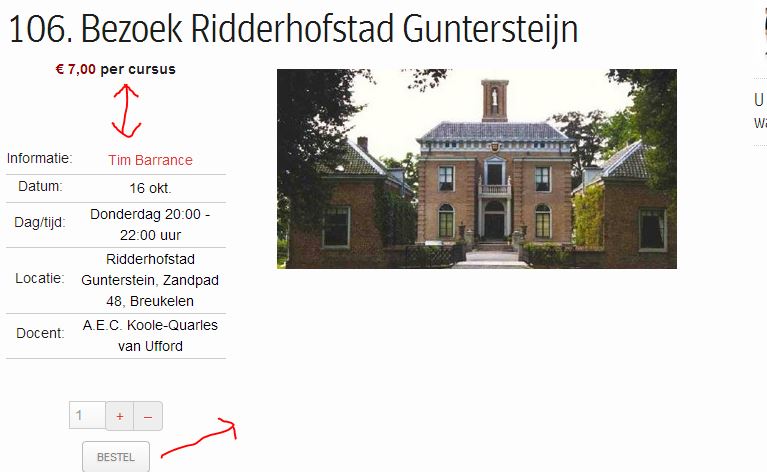
1. How can I make the space between € 7.00 per cursus and Informatie smaller?
2. How can I place the button BESTEL next to 1 + -?
-- HikaShop version -- : Busines
-- Joomla version -- : 3.3.1
-- PHP version -- : x.x.x
-- Browser(s) name and version -- : XXXXX x.x.x
-- Error-message(debug-mod must be tuned on) -- : Error_message
1. How can I make the space between € 7.00 per cursus and Informatie smaller?
2. How can I place the button BESTEL next to 1 + -?
Please Log in or Create an account to join the conversation.

12 years 2 months ago #163172
by nicolas
Replied by nicolas on topic DIsplay (space) article and own fields
The link you provided doesn't work.
Could you double check it so that we can analyze the CSS on your website in order to provide the necessary CSS changes ?
Could you double check it so that we can analyze the CSS on your website in order to provide the necessary CSS changes ?
Please Log in or Create an account to join the conversation.
12 years 2 months ago #163219
by Swib
Replied by Swib on topic DIsplay (space) article and own fields
I am sorry I chamged it:
www.swib.nl/qqppa12/
Please Log in or Create an account to join the conversation.
12 years 2 months ago #163313
by Swib
Replied by Swib on topic DIsplay (space) article and own fields
I had some problems with the databaseconnection. :evil: This is solved, so now you can see the website 
Please Log in or Create an account to join the conversation.

12 years 2 months ago #163375
by Xavier
Replied by Xavier on topic DIsplay (space) article and own fields
Hi,
Thanks to try these properties:
Here is a tutorial to learn how to customize the display:
hikashop.com/support/support/documentati...ize-the-display.html
Thanks to try these properties:
Code:
#hikashop_product_custom_info_main{margin-top: -30px !important;}
#hikashop_product_left_part .hikashop_product_quantity_div{display: inline-block !important;}
Here is a tutorial to learn how to customize the display:
hikashop.com/support/support/documentati...ize-the-display.html
Please Log in or Create an account to join the conversation.
12 years 2 months ago #164256
by Swib
Replied by Swib on topic DIsplay (space) article and own fields
It is all at this url:
www.swib.nl/qqppa12/index.php/component/...java-eiland?Itemid=1
The link you gave me doesn't work.
I want to change 3 things:
1. the space (which I already told). I can not find this: #hikashop_product_custom_info_main{margin-top: -30px !important;}
#hikashop_product_left_part .hikashop_product_quantity_div{display: inline-block !important;} In which file can I find it?
I have looked in
media/com_hikashop/css/frontend_old.css
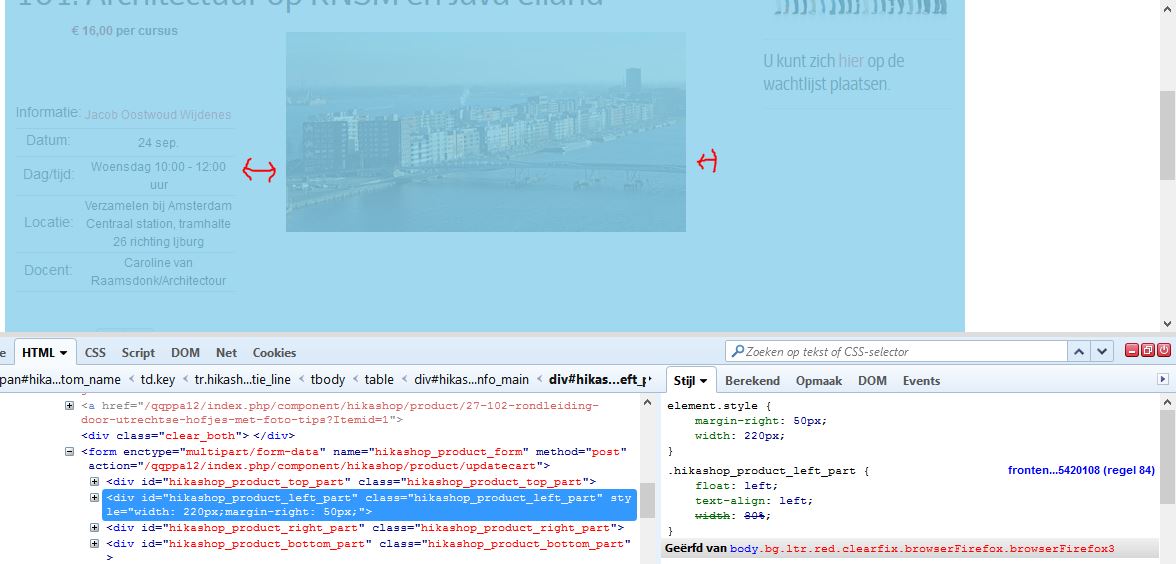
2. the product left part.
This:
<div id="hikashop_product_left_part" class="hikashop_product_left_part" style="width: 220px;margin-right: 50px;">
I want to change in
<div id="hikashop_product_left_part" class="hikashop_product_left_part" style="width: 280px;margin-right: 20px;"
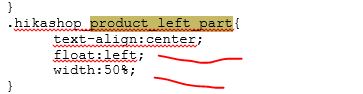
But I cannot find it in this file: media/com_hikashop/css/frontend_old.css
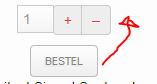
3.The bullet "Order (bestel)" next to 1 + -
I hope you can help me, because it took a long time and I still cannot solve it.........................
Thank you.
The link you gave me doesn't work.
I want to change 3 things:
1. the space (which I already told). I can not find this: #hikashop_product_custom_info_main{margin-top: -30px !important;}
#hikashop_product_left_part .hikashop_product_quantity_div{display: inline-block !important;} In which file can I find it?
I have looked in
media/com_hikashop/css/frontend_old.css
2. the product left part.
This:
<div id="hikashop_product_left_part" class="hikashop_product_left_part" style="width: 220px;margin-right: 50px;">
I want to change in
<div id="hikashop_product_left_part" class="hikashop_product_left_part" style="width: 280px;margin-right: 20px;"
But I cannot find it in this file: media/com_hikashop/css/frontend_old.css
3.The bullet "Order (bestel)" next to 1 + -
I hope you can help me, because it took a long time and I still cannot solve it.........................
Thank you.
Please Log in or Create an account to join the conversation.
12 years 2 months ago #164257
by Xavier
Replied by Xavier on topic DIsplay (space) article and own fields
Hi,
I just tried and the given link is working fine.
The given properties don't exist, so you have to add them to the used css file.
To change inline css, you have to edit the view, in that case the view "product / show_default" and proceed as explained in the given link.
Regarding the button, one of the given properties should handle that.
If not, so you have to try different property. You can maybe ask to your template provider to help you.
I just tried and the given link is working fine.
The given properties don't exist, so you have to add them to the used css file.
To change inline css, you have to edit the view, in that case the view "product / show_default" and proceed as explained in the given link.
Regarding the button, one of the given properties should handle that.
If not, so you have to try different property. You can maybe ask to your template provider to help you.
Please Log in or Create an account to join the conversation.
Time to create page: 0.201 seconds