
How to add an "Add to cart button" for related pro
- PolishedGeek
-
 Topic Author
- Offline
- Official HikaShop Development Partner
Less
More
12 years 2 months ago #164889
by PolishedGeek
~ Deb Cinkus, CEO
Polished Geek: more with monday․com
eCommerce Business Process Automation Experts
How to add an "Add to cart button" for related pro was created by PolishedGeek
-- url of the page with the problem -- :
import.polishedgeekdev.com/fabric-catego...0311589-pastis-ebony
-- HikaShop version -- : 2.3.2
-- Joomla version -- : 2.5
-- PHP version -- : 5.3.28
-- Browser(s) name and version -- : any
Hi - I would like to make a small customization to my product display if the product has a related item. Instead and/ or in addition to the "Related Products" module shown on the bottom of the page, I would like to have a little "Add to Cart" button for the related product in the product's main "hikashop_product_right_part" div id. In this case the related product
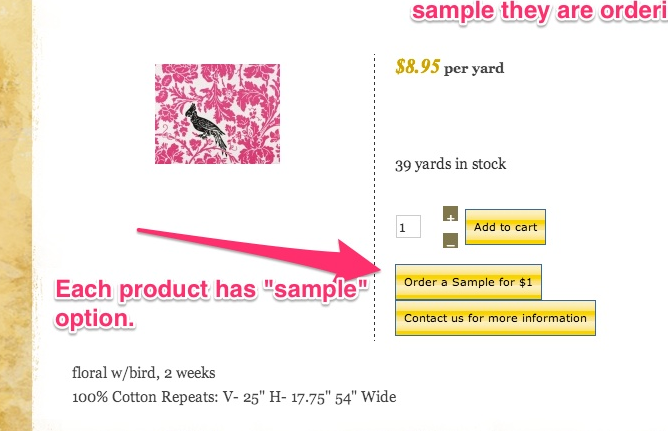
Can you give me a simple piece of code to stick into (I think)
components/com_hikashop/views/product/tmpl/show_default.php?
Thanks!
-- HikaShop version -- : 2.3.2
-- Joomla version -- : 2.5
-- PHP version -- : 5.3.28
-- Browser(s) name and version -- : any
Hi - I would like to make a small customization to my product display if the product has a related item. Instead and/ or in addition to the "Related Products" module shown on the bottom of the page, I would like to have a little "Add to Cart" button for the related product in the product's main "hikashop_product_right_part" div id. In this case the related product
Can you give me a simple piece of code to stick into (I think)
components/com_hikashop/views/product/tmpl/show_default.php?
Thanks!
~ Deb Cinkus, CEO
Polished Geek: more with monday․com
eCommerce Business Process Automation Experts
Please Log in or Create an account to join the conversation.

12 years 2 months ago #164936
by Xavier
Replied by Xavier on topic How to add an "Add to cart button" for related pro
Hi,
The easiest way to do that will be to create a custom field in the table "product".
Then create your sample product, click on "Add to cart HTML link" in the toolbar, copy the code.
In the main product edition page, paste the link in the custom field.
Finally edit the view show_default, and display the custom field content with the code:
The easiest way to do that will be to create a custom field in the table "product".
Then create your sample product, click on "Add to cart HTML link" in the toolbar, copy the code.
In the main product edition page, paste the link in the custom field.
Finally edit the view show_default, and display the custom field content with the code:
Code:
<?php echo $element->CUSTOMFIELD_NAME; ?>
Please Log in or Create an account to join the conversation.
- PolishedGeek
-
Topic Author
- Offline
- Official HikaShop Development Partner
12 years 2 months ago #165812
by PolishedGeek
~ Deb Cinkus, CEO
Polished Geek: more with monday․com
eCommerce Business Process Automation Experts
Replied by PolishedGeek on topic How to add an "Add to cart button" for related pro
Thanks! I'll try this and let you know how it goes.
~ Deb Cinkus, CEO
Polished Geek: more with monday․com
eCommerce Business Process Automation Experts
Please Log in or Create an account to join the conversation.
Time to create page: 0.183 seconds