

- Posts: 228
- Thank you received: 8
Small product page modifications
12 years 1 month ago #168763
by theguy
Small product page modifications was created by theguy
-- url of the page with the problem -- :
gurtech.guywalderonline.com/index.php/%D...A7%D7%95%D7%99%D7%9C
-- HikaShop version -- : 2.3.2
-- Joomla version -- : 3.3.3
-- PHP version -- : 5.4.30
-- Browser(s) name and version -- : Chrome
Hi all,
I'm building a site for a client with some unique requests which I would like to provide. This is the first time I've been using HikaShop and so far so good. I've attached an image to make life easier. This are the changes I was asked to make:
1. Add a small text box with short product description in area 1.
2. Completely hide the price tab from products with no price - number 2.
3. Add another tab with more product images. Should I just do this with WYSIWYG custom field? No option to add a custom field for images? Number 3.
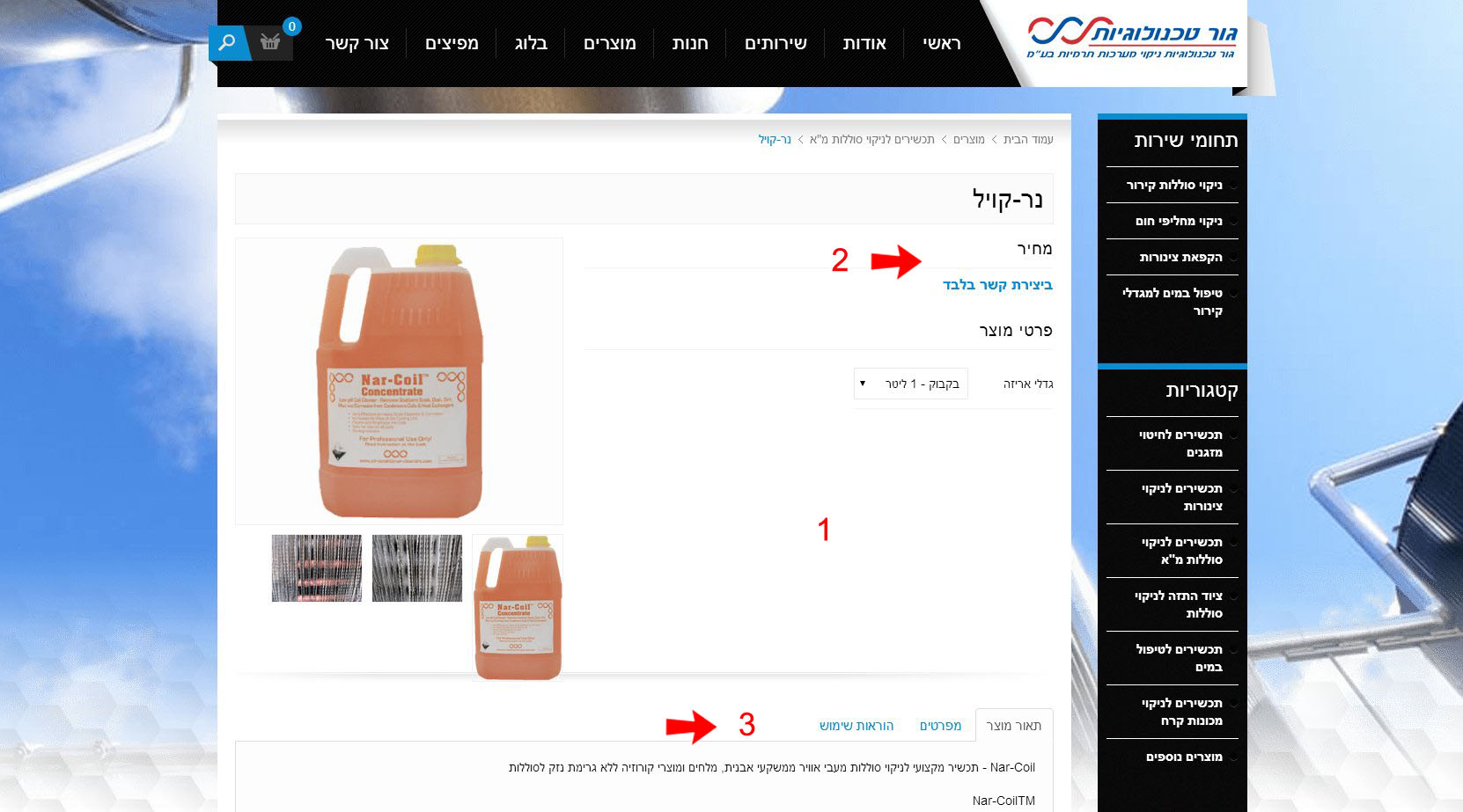
Thank you in advance,
Guy.
-- HikaShop version -- : 2.3.2
-- Joomla version -- : 3.3.3
-- PHP version -- : 5.4.30
-- Browser(s) name and version -- : Chrome
Hi all,
I'm building a site for a client with some unique requests which I would like to provide. This is the first time I've been using HikaShop and so far so good. I've attached an image to make life easier. This are the changes I was asked to make:
1. Add a small text box with short product description in area 1.
2. Completely hide the price tab from products with no price - number 2.
3. Add another tab with more product images. Should I just do this with WYSIWYG custom field? No option to add a custom field for images? Number 3.
Thank you in advance,
Guy.
Please Log in or Create an account to join the conversation.

12 years 1 month ago #168771
by Xavier
Replied by Xavier on topic Small product page modifications
Hi,
1. You will have to edit the view "product / show_tabular" and add some PHP code to display the a short description, something like:
You can replace "250" by the desired value.
2. Add this kind of code:
Just after:
3. You can use custom fields to display images. To add a tab, you have to add a tab entry, a "li" and a "div" for the content.
Thanks to look how it is made, and just duplicate an entry and edit it as you wish.
Here is global documentation for all the css layout customizations:
hikashop.com/support/support/documentati...ize-the-display.html
1. You will have to edit the view "product / show_tabular" and add some PHP code to display the a short description, something like:
Code:
echo JHTML::_('content.prepare',preg_replace('#<hr *id="system-readmore" */>#i','',substr($this->element->product_description,0,250)));
2. Add this kind of code:
Code:
if($this->element->prices[0] != 0)
Code:
$this->setLayout('listing_price');
3. You can use custom fields to display images. To add a tab, you have to add a tab entry, a "li" and a "div" for the content.
Thanks to look how it is made, and just duplicate an entry and edit it as you wish.
Here is global documentation for all the css layout customizations:
hikashop.com/support/support/documentati...ize-the-display.html
Please Log in or Create an account to join the conversation.
12 years 1 month ago #168924
by theguy
Replied by theguy on topic Small product page modifications
Hi Xavier,
Thank you for your help. The price solution was perfect and worked like a charm. Had to edit show_default.php (I guess it's a template override).
As for the pictures, I'm using the essential package so my custom fields are added automatically to the tabs. I will add the images in a WYSIWYG field.
As for the product short description, I've added the code right after the "characteristic_display" block and it works just fine. But, my client would like to add a text by himself and not have a subtext of the main product description. Can that be done?
Thank you again for your great help,
Guy.
Thank you for your help. The price solution was perfect and worked like a charm. Had to edit show_default.php (I guess it's a template override).
As for the pictures, I'm using the essential package so my custom fields are added automatically to the tabs. I will add the images in a WYSIWYG field.
As for the product short description, I've added the code right after the "characteristic_display" block and it works just fine. But, my client would like to add a text by himself and not have a subtext of the main product description. Can that be done?
Thank you again for your great help,
Guy.
Please Log in or Create an account to join the conversation.
12 years 1 month ago #168927
by Xavier
Replied by Xavier on topic Small product page modifications
Hi,
Yes, you can create a custom field in the "product" table, this way the client can fill the desired informations in this field.
And in the view use:
Yes, you can create a custom field in the "product" table, this way the client can fill the desired informations in this field.
And in the view use:
Code:
<?php echo $this->element->CUSTOMFIELD_NAME; ?>
Please Log in or Create an account to join the conversation.
Time to create page: 0.187 seconds