

- Posts: 62
- Thank you received: 0
Why do subcategories display when turned off?
11 years 11 months ago #175060
by ninjab
Why do subcategories display when turned off? was created by ninjab
-- HikaShop version -- : 2.3.3
-- Joomla version -- : 3.3
HI there, I am trying to create this structure:
iPad > Sleeves > Leather and then product.
So when I create the product I have the associated categories in each one.
However I want to just have the products listed and not the subcategories when I click the menu link. So when I click on iPad it will show all of the products linked with iPad, but not the subcategories. I think the submodules can do the product side, is this correct?
However the issue I am having is I have 'Show sub-categories' to 'No Children' in the categories settings I turn off, but the sub categories still display. Why does it do this?
So then I took a look closer at the and changed 'Type of Content' from Category to 'Products', and it seems to do what I think it is supposed to do, but there is now no header title for the category. I believe the template is using the default Hikashop template as there is no override file on 'listing.php' in my template override directory on the server which I think it is referring/using to.
Am I not understanding something?
Many thanks
-- Joomla version -- : 3.3
HI there, I am trying to create this structure:
iPad > Sleeves > Leather and then product.
So when I create the product I have the associated categories in each one.
However I want to just have the products listed and not the subcategories when I click the menu link. So when I click on iPad it will show all of the products linked with iPad, but not the subcategories. I think the submodules can do the product side, is this correct?
However the issue I am having is I have 'Show sub-categories' to 'No Children' in the categories settings I turn off, but the sub categories still display. Why does it do this?
So then I took a look closer at the and changed 'Type of Content' from Category to 'Products', and it seems to do what I think it is supposed to do, but there is now no header title for the category.
I believe the template is using the default Hikashop template as there is no override file on 'listing.php' in my template override directory on the server which I think it is referring/using to.Am I not understanding something?
Many thanks
Please Log in or Create an account to join the conversation.

11 years 11 months ago #175069
by Xavier
Replied by Xavier on topic Why do subcategories display when turned off?
Hi,
To not display the sub categories, it's the option of the category listing menu which need to be changed and not the settings of the associated module
If you choose "product" for the type of content, you can set the category title in the category description part, and enable the option "category description" in the options.
To not display the sub categories, it's the option of the category listing menu which need to be changed and not the settings of the associated module
If you choose "product" for the type of content, you can set the category title in the category description part, and enable the option "category description" in the options.
Please Log in or Create an account to join the conversation.
11 years 11 months ago #175413
by ninjab
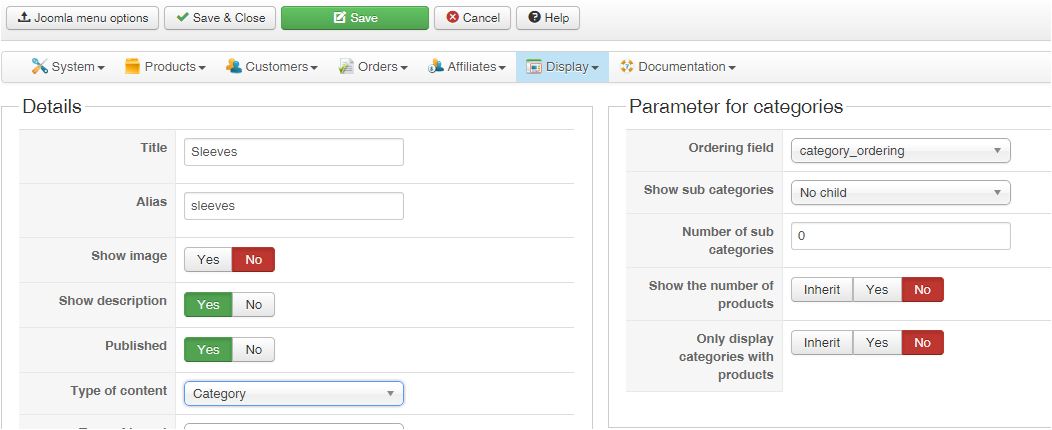
Thanks for the reply Xavier. I had turned off the settings in the 'Sleeves' by going to the menu item 'Sleeves' and then clicking on the Hikashop Options tab and then clicking on the button to view the options for the category. The settings I have is in the first attached file.
But it still shows the subcategories. I had deleted the templte override files to make sure its not something I did but still the same result, they still display.
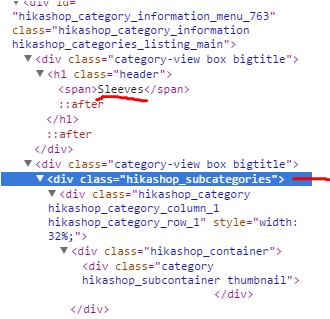
2nd attached file shows the html source branch to show that it still outputs subcats
Only way I can get it to not do it, is if I select display as 'Products' listing instead of Category.
Thanks.
Replied by ninjab on topic Why do subcategories display when turned off?
Xavier wrote: Hi,
To not display the sub categories, it's the option of the category listing menu which need to be changed and not the settings of the associated module
If you choose "product" for the type of content, you can set the category title in the category description part, and enable the option "category description" in the options.
Thanks for the reply Xavier. I had turned off the settings in the 'Sleeves' by going to the menu item 'Sleeves' and then clicking on the Hikashop Options tab and then clicking on the button to view the options for the category. The settings I have is in the first attached file.
But it still shows the subcategories. I had deleted the templte override files to make sure its not something I did but still the same result, they still display.
2nd attached file shows the html source branch to show that it still outputs subcats
Only way I can get it to not do it, is if I select display as 'Products' listing instead of Category.
Thanks.
Please Log in or Create an account to join the conversation.

Less
More
- Posts: 12953
- Thank you received: 1778
11 years 11 months ago #175508
by Mohamed Thelji
Replied by Mohamed Thelji on topic Why do subcategories display when turned off?
Hello,
If you don't want to display your subcategories the solution will just be to set the "Sub elements filter" option of the configuration page of your "Sleeves" category listing content menu.
If you don't want to display your subcategories the solution will just be to set the "Sub elements filter" option of the configuration page of your "Sleeves" category listing content menu.
Please Log in or Create an account to join the conversation.
11 years 11 months ago #175521
by ninjab
Thanks for the reply.
Unfortunately that has no effect at all changing the sub element filter to any of the options it has. It was on inherit but I tried each of the others and it doesnt change anything
Replied by ninjab on topic Why do subcategories display when turned off?
Mohamed Thelji wrote: Hello,
If you don't want to display your subcategories the solution will just be to set the "Sub elements filter" option of the configuration page of your "Sleeves" category listing content menu.
Thanks for the reply.
Unfortunately that has no effect at all changing the sub element filter to any of the options it has. It was on inherit but I tried each of the others and it doesnt change anything
Please Log in or Create an account to join the conversation.
11 years 11 months ago #175528
by Xavier
Replied by Xavier on topic Why do subcategories display when turned off?
Hi,
And what about the second suggestion I gave:
And what about the second suggestion I gave:
Code:
If you choose "product" for the type of content, you can set the category title in the category description part, and enable the option "category description" in the options.
Please Log in or Create an account to join the conversation.
11 years 11 months ago #175641
by ninjab
Hi Xavier, yes thats the way I am doing it. But I am still wanting to know why its not doing what I was originally trying to do. Thanks.
Replied by ninjab on topic Why do subcategories display when turned off?
Xavier wrote: Hi,
And what about the second suggestion I gave:Code:If you choose "product" for the type of content, you can set the category title in the category description part, and enable the option "category description" in the options.
Hi Xavier, yes thats the way I am doing it. But I am still wanting to know why its not doing what I was originally trying to do. Thanks.
Please Log in or Create an account to join the conversation.
11 years 10 months ago #178910
by phil2010
Replied by phil2010 on topic Why do subcategories display when turned off?
Did you get a responce to this problem that worked. I have the same problem but I think I might have something to do with the catorgory structure
Please Log in or Create an account to join the conversation.
11 years 10 months ago #178911
by phil2010
Replied by phil2010 on topic Why do subcategories display when turned off?
I changed the Associated products listing for category content typwe to brand "which I have as empty" to solve the issue... messy but it worked
Please Log in or Create an account to join the conversation.
11 years 10 months ago #179715
by ninjab
Replied by ninjab on topic Why do subcategories display when turned off?
I just ended up changing the type to a Product Listing type since I couldnt work it out. It's doing what I need it to do so it doesnt matter too much.
Please Log in or Create an account to join the conversation.
Time to create page: 0.281 seconds