

- Posts: 24
- Thank you received: 0
Product options with 2 prices
11 years 11 months ago #175491
by ketsh
Product options with 2 prices was created by ketsh
-- url of the page with the problem -- :
teszt2.honlapkeszitespecs.hu/
-- HikaShop version -- : 2.3.3
-- Joomla version -- : 2.3.5
Hi!
I have a problem setting up the options of the product. When a product has only one price, it is ok, the problem is when it has a reatil price as well, both prices are shown in the select field.
How can I avoid it?
Here is the link:
teszt2.honlapkeszitespecs.hu/hikashop-me...-kombinacio-infinity
Thank you!
-- HikaShop version -- : 2.3.3
-- Joomla version -- : 2.3.5
Hi!
I have a problem setting up the options of the product. When a product has only one price, it is ok, the problem is when it has a reatil price as well, both prices are shown in the select field.
How can I avoid it?
Here is the link:
teszt2.honlapkeszitespecs.hu/hikashop-me...-kombinacio-infinity
Thank you!
Please Log in or Create an account to join the conversation.

Less
More
- Posts: 12953
- Thank you received: 1778
11 years 11 months ago - 11 years 11 months ago #175497
by Mohamed Thelji
Replied by Mohamed Thelji on topic Product options with 2 prices
Hello,
Using that kind of CSS code will probably do the job : www.hikashop.com/support/documentation/1...ize-the-display.html
Using that kind of CSS code will probably do the job : www.hikashop.com/support/documentation/1...ize-the-display.html
Code:
span.hikashop_product_msrp_price.hikashop_product_price_full {
display: none !important;
}
Last edit: 11 years 11 months ago by Mohamed Thelji.
Please Log in or Create an account to join the conversation.
11 years 11 months ago #175646
by ketsh
Replied by ketsh on topic Product options with 2 prices
Hi, Mohamed Thelji!
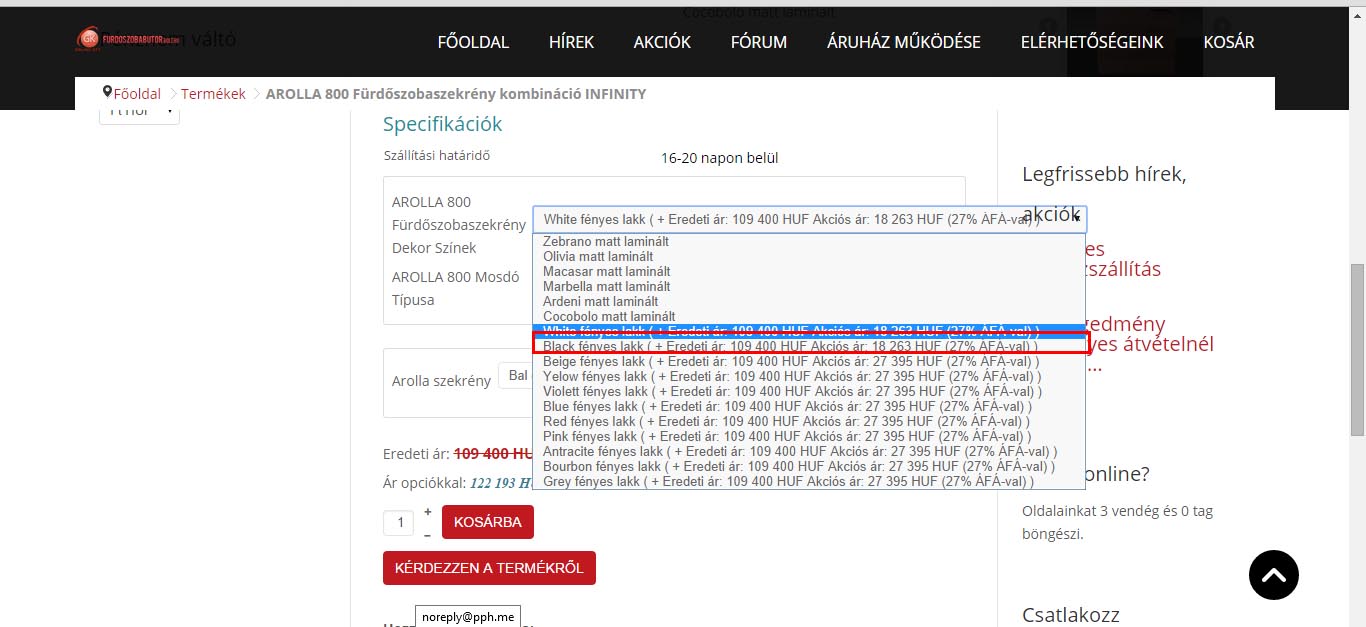
Thanks, but I think if I add that css I will remove the original price from everywhere, and that is not what I want.
I would like to remove it only from the select field.
I have attached a screenshot.
Thanks!
Thanks, but I think if I add that css I will remove the original price from everywhere, and that is not what I want.
I would like to remove it only from the select field.
I have attached a screenshot.
Thanks!
Please Log in or Create an account to join the conversation.

11 years 11 months ago #175689
by nicolas
Replied by nicolas on topic Product options with 2 prices
Hi,
Please replace the file components/com_hikashop/views/product/tmpl/option.php with the one in the archive enclosed and that should fix that.
Please replace the file components/com_hikashop/views/product/tmpl/option.php with the one in the archive enclosed and that should fix that.
This attachment is hidden for guests.
Please log in or register to see it.
Please log in or register to see it.
Please Log in or Create an account to join the conversation.
11 years 11 months ago #175808
by ketsh
Replied by ketsh on topic Product options with 2 prices
Hi!
I have replaced the file but it still looks the same.
I have replaced the file but it still looks the same.
Please Log in or Create an account to join the conversation.
11 years 11 months ago #175885
by nicolas
Replied by nicolas on topic Product options with 2 prices
Then it means that you must have overridden that view file previously.
Go in the menu Display>Views, search for the "option" view file and click on the "bin" icon of the 'remove customization' column of that view file and that should work.
Go in the menu Display>Views, search for the "option" view file and click on the "bin" icon of the 'remove customization' column of that view file and that should work.
Please Log in or Create an account to join the conversation.
Time to create page: 0.225 seconds