
- Posts: 640
- Thank you received: 16
Replace icons for ProductTax OrderStatus Categorie
- PeterChain
-
 Topic Author
- Offline
Less
More
11 years 9 months ago #184107
by PeterChain
Replace icons for ProductTax OrderStatus Categorie was created by PeterChain
-- HikaShop version -- : 2.3.4
-- Joomla version -- : 3.3.6
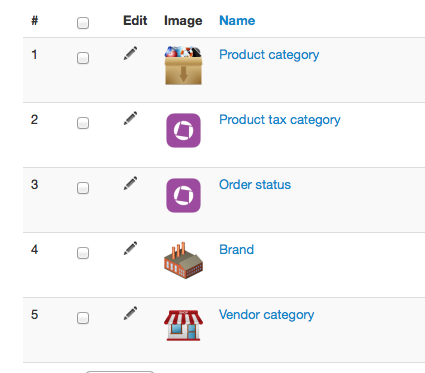
There is no option to change the icons for this two catgories in the backend.
AS it seems they point to some generic category icon, Is there some trick to customize them?
-- Joomla version -- : 3.3.6
There is no option to change the icons for this two catgories in the backend.
AS it seems they point to some generic category icon, Is there some trick to customize them?
Please Log in or Create an account to join the conversation.

Less
More
- Posts: 12953
- Thank you received: 1778
11 years 9 months ago #184111
by Mohamed Thelji
Replied by Mohamed Thelji on topic Replace icons for ProductTax OrderStatus Categorie
Hello,
To do that you'll just have to edit these categories and change their image.
To do that you'll just have to edit these categories and change their image.
Please Log in or Create an account to join the conversation.
- PeterChain
-
Topic Author
- Offline
Less
More
- Posts: 640
- Thank you received: 16
11 years 9 months ago #184198
by PeterChain
Replied by PeterChain on topic Replace icons for ProductTax OrderStatus Categorie
Sorry but this is not possible.
I did this for Product, Brand and Vendor.
Order and Tax categories don't show the proper button to load my own images.
I did this for Product, Brand and Vendor.
Order and Tax categories don't show the proper button to load my own images.
Please Log in or Create an account to join the conversation.

11 years 9 months ago #184227
by nicolas
Replied by nicolas on topic Replace icons for ProductTax OrderStatus Categorie
Hi,
These are not product categories but order statuses and tax categories.
There is no need to add any image to them as the images are not displayed anywhere. That's why there is no option to set an image for them.
These are not product categories but order statuses and tax categories.
There is no need to add any image to them as the images are not displayed anywhere. That's why there is no option to set an image for them.
Please Log in or Create an account to join the conversation.
- PeterChain
-
Topic Author
- Offline
Less
More
- Posts: 640
- Thank you received: 16
11 years 9 months ago #184249
by PeterChain
Replied by PeterChain on topic Replace icons for ProductTax OrderStatus Categorie
Not sure I'm understanding your statement.
As you can see in the attached screen dump in the Backend both categories show a default image for categories. Maybe they not show in the frontend but in the backend it is visually inconsistent.
As you can see in the attached screen dump in the Backend both categories show a default image for categories. Maybe they not show in the frontend but in the backend it is visually inconsistent.
Please Log in or Create an account to join the conversation.
11 years 9 months ago #184254
by nicolas
Replied by nicolas on topic Replace icons for ProductTax OrderStatus Categorie
Yes in the categories listing under the root element, which is never displayed unless you click on the root link.
The goal of the images in categories is to be used for the frontend, not to be pretty in the backend listing.
The goal of the images in categories is to be used for the frontend, not to be pretty in the backend listing.
Please Log in or Create an account to join the conversation.
Time to create page: 0.227 seconds