
- Posts: 640
- Thank you received: 16
Custom fields show wrong in frontend edition
- PeterChain
-
 Topic Author
- Offline
Less
More
11 years 8 months ago #187397
by PeterChain
Custom fields show wrong in frontend edition was created by PeterChain
-- HikaShop version -- : 2.3.5
-- Joomla version -- : 3.x
I have this "preview" of a custom field in the backend when editing it:

But then in the frontend when editing products it looks really bad and inconvenient this way:
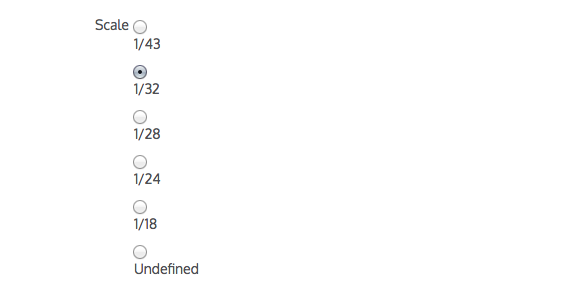
The big problem is that I have various similar custom fields so the edition page requires a whole weekend to scroll it entire.
How can be this fixed and the overall frontend edition improved, to me looks like this is the "missing link" in the whole greatness of hikashop. Everything is so cool and then you have to edit in the frontend and the interface looks like...
not the best. Have you plans to develop a nicer frontend editing interface?
Thank you.
-- Joomla version -- : 3.x
I have this "preview" of a custom field in the backend when editing it:
But then in the frontend when editing products it looks really bad and inconvenient this way:
The big problem is that I have various similar custom fields so the edition page requires a whole weekend to scroll it entire.
How can be this fixed and the overall frontend edition improved, to me looks like this is the "missing link" in the whole greatness of hikashop. Everything is so cool and then you have to edit in the frontend and the interface looks like...
not the best. Have you plans to develop a nicer frontend editing interface?
Thank you.
Please Log in or Create an account to join the conversation.

11 years 8 months ago #187406
by lousyfool
Need help with customisations of layouts, style or other site development? PM me!
(Don't forget to turn on "E-mail notification of new messages" )
Replied by lousyfool on topic Custom fields show wrong in frontend edition
Hi,
Unless you insisted on radio buttons, you should maybe try dropdown fields instead.
But if radio buttons are it, there's hardly anything that couldn't be fixed with CSS. I dare guessing that your template is causing the present appearance, not HikaShop. But nothing speaks against overriding it, putting radio button and label on the same line to start with, and eventually all buttons/labels in the same line as per preview, or reducing vertical distance in between lines, perhaps even reducing font size, etc etc.
Unless you insisted on radio buttons, you should maybe try dropdown fields instead.
But if radio buttons are it, there's hardly anything that couldn't be fixed with CSS. I dare guessing that your template is causing the present appearance, not HikaShop. But nothing speaks against overriding it, putting radio button and label on the same line to start with, and eventually all buttons/labels in the same line as per preview, or reducing vertical distance in between lines, perhaps even reducing font size, etc etc.
Need help with customisations of layouts, style or other site development? PM me!
(Don't forget to turn on "E-mail notification of new messages" )
The following user(s) said Thank You: Jerome
Please Log in or Create an account to join the conversation.

11 years 8 months ago #187481
by Jerome
Jerome - Obsidev.com
HikaMarket & HikaSerial developer / HikaShop core dev team.
Replied by Jerome on topic Custom fields show wrong in frontend edition
Hi,

For sure it's not easy to deal with the front-end template which can define so much things in the CSS ; for sure it's not easy to deal with the HikaShop custom field display system which is used everywhere (in the backend, in the front-end for the order/item custom field, or in the front-end for the editing parts...) but the good thing with CSS is that you can still fix the design to feet it to your needs.
Regards,
It is already the original plan and I think that it is already the caseHave you plans to develop a nicer frontend editing interface?
For sure it's not easy to deal with the front-end template which can define so much things in the CSS ; for sure it's not easy to deal with the HikaShop custom field display system which is used everywhere (in the backend, in the front-end for the order/item custom field, or in the front-end for the editing parts...) but the good thing with CSS is that you can still fix the design to feet it to your needs.
Regards,
Jerome - Obsidev.com
HikaMarket & HikaSerial developer / HikaShop core dev team.
Please Log in or Create an account to join the conversation.
- PeterChain
-
Topic Author
- Offline
Less
More
- Posts: 640
- Thank you received: 16
11 years 8 months ago #187493
by PeterChain
Replied by PeterChain on topic Custom fields show wrong in frontend edition
Ok, just to clarify this was not a complain, just a "want to know" to decide if its worth investing time in creating my own "frontend standards" for my actual and future projects.
For your answer I understand there is no consideration for relevant changes in the near future, right?
For your answer I understand there is no consideration for relevant changes in the near future, right?
Please Log in or Create an account to join the conversation.
11 years 8 months ago #187497
by Jerome
Jerome - Obsidev.com
HikaMarket & HikaSerial developer / HikaShop core dev team.
Replied by Jerome on topic Custom fields show wrong in frontend edition
Hi,
We are taking your feedback in consideration.
I think that we will add some CSS in HikaShop in order to improve the handle of the custom field in the front-end.
And HikaMarket will also take advantage of that too.
Regards,
We are taking your feedback in consideration.
I think that we will add some CSS in HikaShop in order to improve the handle of the custom field in the front-end.
And HikaMarket will also take advantage of that too.
Regards,
Jerome - Obsidev.com
HikaMarket & HikaSerial developer / HikaShop core dev team.
The following user(s) said Thank You: PeterChain
Please Log in or Create an account to join the conversation.
Time to create page: 0.243 seconds