
Bootstrap 3, how to style

11 years 8 months ago - 11 years 7 months ago #189741
by gasoline
I'll keep on trying!
Bootstrap 3, how to style was created by gasoline
-- HikaShop version -- : HikaShop Essential: 2.3.5
-- Joomla version -- : 3.3.6
-- PHP version -- : 5.5.12
-- Browser(s) name and version -- : All
I'm changing website for client and built a Joomla 3 responsive website based on Bootstrap 3.
I Als o set Hikashop to Bootstrap in configuration and I use NoNumber ReReplaceser extension to change all bootsrap 2 code to 3.
I for example want the display of products change from 4 in a row to 2 in a row on smaller screens. However I see f.e. this in the code.
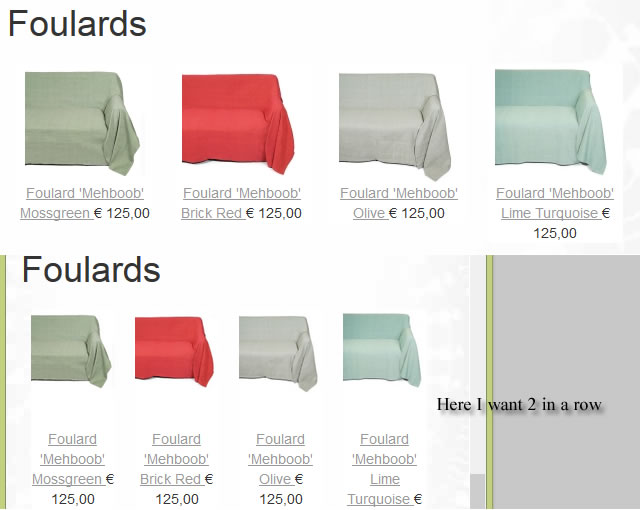
So that should be 48%. How can I achieve that? I read the docs and forum but still can't find it.
P.S. Dont watch other styling, still working on that
-- Joomla version -- : 3.3.6
-- PHP version -- : 5.5.12
-- Browser(s) name and version -- : All
I'm changing website for client and built a Joomla 3 responsive website based on Bootstrap 3.
I Als o set Hikashop to Bootstrap in configuration and I use NoNumber ReReplaceser extension to change all bootsrap 2 code to 3.
I for example want the display of products change from 4 in a row to 2 in a row on smaller screens. However I see f.e. this in the code.
Code:
<div class="hikashop_products_listing">
<div class="hikashop_products">
<div class="hikashop_product" style="width:24%;">
<div class="hikashop_product" style="width:24%;">
<div class="hikashop_product" style="width:24%;">
<div class="hikashop_product" style="width:24%;">
<div style="clear:both"></div>
So that should be 48%. How can I achieve that? I read the docs and forum but still can't find it.
P.S. Dont watch other styling, still working on that
I'll keep on trying!
Last edit: 11 years 7 months ago by gasoline.
Please Log in or Create an account to join the conversation.
11 years 8 months ago - 11 years 8 months ago #189742
by gasoline
I'll keep on trying!
Replied by gasoline on topic Bootstrap 3, how to style
Always, after long search you post and than you find it 5 minutes later. :oops:
Changed
in listing_div.php to

CSS (maybe someone can use it:
Changed
Code:
<div class="hikashop_product" style="width:<?php echo $width;?>%;">
Code:
<div class="hikashop_product">
CSS (maybe someone can use it:
Code:
div.hikashop_products div.hikashop_product{width:24%}
@media (max-width: 768px){
div.hikashop_products div.hikashop_product{width:48%}
}
I'll keep on trying!
Last edit: 11 years 8 months ago by gasoline. Reason: adding CSS
The following user(s) said Thank You: Jerome, markyvento
Please Log in or Create an account to join the conversation.
Time to create page: 0.169 seconds