

- Posts: 69
- Thank you received: 2
Can see products when I click on Subcategory links
11 years 7 months ago - 11 years 7 months ago #192633
by nokki00
Can see products when I click on Subcategory links was created by nokki00
-- HikaShop version -- : 2.3.5
-- Joomla version -- : 3.4
-- PHP version -- : 5.4
-- Browser(s) name and version -- : Firefox 35.0.1
-- Error-message(debug-mod must be tuned on) -- : none
Can't see products when I click on Subcategory links
I am sure this is a simple fix given it happen when I upgraded from 2.3.2 to 2.3.4 but the issue still exist on 2.3.5. It's kind of difficult to explain but I will try.
1. When I click on the Sub Category on the category listing I don't see the products. I only see the heading of the Main Home Module.
2. For the first category on the Category menu it states no Subcategories. I don't have Subcategories for other categories and it doesn't say that.
3. The drop down arrows are displaying duplicate for the categories that doesn't have sub-categories. When you click on the left arrow it moves the menu like it should. When you click on the right arrow it links it to the category listing.
-- Joomla version -- : 3.4
-- PHP version -- : 5.4
-- Browser(s) name and version -- : Firefox 35.0.1
-- Error-message(debug-mod must be tuned on) -- : none
Can't see products when I click on Subcategory links
I am sure this is a simple fix given it happen when I upgraded from 2.3.2 to 2.3.4 but the issue still exist on 2.3.5. It's kind of difficult to explain but I will try.
1. When I click on the Sub Category on the category listing I don't see the products. I only see the heading of the Main Home Module.
2. For the first category on the Category menu it states no Subcategories. I don't have Subcategories for other categories and it doesn't say that.
3. The drop down arrows are displaying duplicate for the categories that doesn't have sub-categories. When you click on the left arrow it moves the menu like it should. When you click on the right arrow it links it to the category listing.
Last edit: 11 years 7 months ago by nokki00.
Please Log in or Create an account to join the conversation.

11 years 7 months ago #192641
by habusam
Replied by habusam on topic Can see products when I click on Subcategory links
Yes I agree with you, the explanation not really clear, however if you mean after you created the categories and after adding the products to these categories , then you can the sub categories like the following screenshot,
you will need to click on the Main root, if i understand correctly your request, thanks
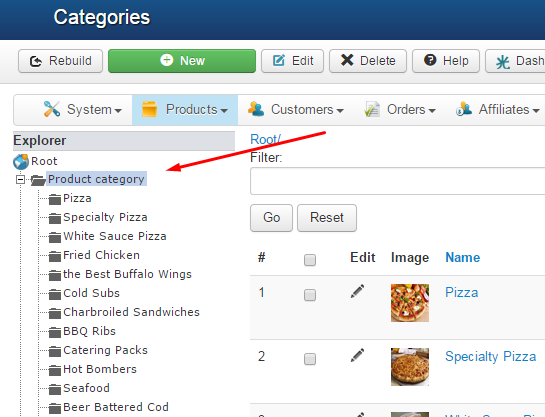
you will need to click on the Main root, if i understand correctly your request, thanks
Please Log in or Create an account to join the conversation.
11 years 7 months ago - 11 years 7 months ago #192643
by nokki00
Replied by nokki00 on topic Can see products when I click on Subcategory links
except its not a back end problem. It's on the front end. My products are not showing on the front end after click the sub category.
How can this be resolved in the front end?
Thanks
How can this be resolved in the front end?
Thanks
Last edit: 11 years 7 months ago by nokki00.
Please Log in or Create an account to join the conversation.
11 years 7 months ago #192700
by nokki00
Replied by nokki00 on topic Can see products when I click on Subcategory links
Does anyone know what is going on?
Please Log in or Create an account to join the conversation.

11 years 7 months ago #192738
by nicolas
Replied by nicolas on topic Can see products when I click on Subcategory links
Hi,
1. There must be a problem with the settings of your menu item (id 101). Edit it via the menu Display->Content menus and check its options.
2. That's a text we added. If you don't want it, you can use a translation override in order to remove it:
hikashop.com/download/languages.html#modify
3. That comes from the CSS of your template. The code:
.pane-toggler a {
background: url("/templates/t3_bs3_blank/images/arrow-right.png") no-repeat scroll 0 3px transparent;
}
should actually be:
.pane-toggler a {
background: none;
}
.pane-toggler a:first-child {
background: url("/templates/t3_bs3_blank/images/arrow-right.png") no-repeat scroll 0 3px transparent;
}
in the file pondies.com/t3-assets/dev/orange/templat...ge.template.less.css
1. There must be a problem with the settings of your menu item (id 101). Edit it via the menu Display->Content menus and check its options.
2. That's a text we added. If you don't want it, you can use a translation override in order to remove it:
hikashop.com/download/languages.html#modify
3. That comes from the CSS of your template. The code:
.pane-toggler a {
background: url("/templates/t3_bs3_blank/images/arrow-right.png") no-repeat scroll 0 3px transparent;
}
should actually be:
.pane-toggler a {
background: none;
}
.pane-toggler a:first-child {
background: url("/templates/t3_bs3_blank/images/arrow-right.png") no-repeat scroll 0 3px transparent;
}
in the file pondies.com/t3-assets/dev/orange/templat...ge.template.less.css
Please Log in or Create an account to join the conversation.
Time to create page: 0.215 seconds