

- Posts: 56
- Thank you received: 2
Can't create menu items
11 years 7 months ago #192929
by mtgt
Can't create menu items was created by mtgt
-- url of the page with the problem -- :
www.nomadsroad.com/
-- HikaShop version -- : 2.3.5
-- Joomla version -- : 3.4.0
-- PHP version -- : 5.3.28
-- Browser(s) name and version -- : chrome
Hi,
I've just install Hikashop, everything work well exept menu items.
I follow the tutorial www.hikashop.com/support/support/documen...splay-front-end.html but I was stop at the stage 2 "Advanced Option" which is not in menu item tabs as you can see on printscreen
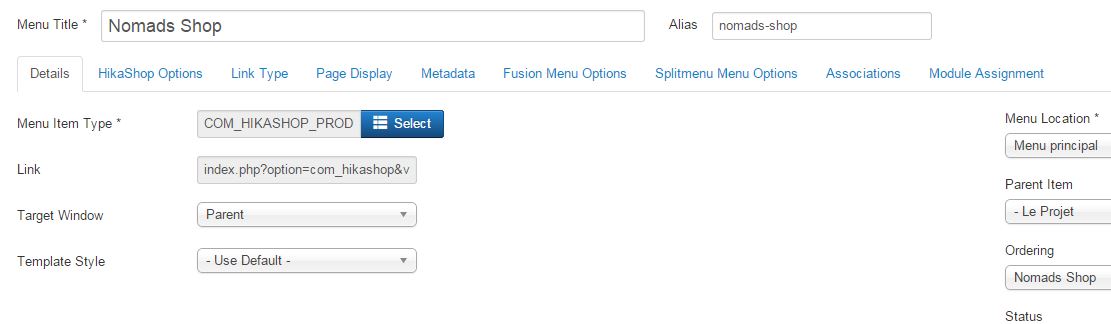
There is also another problem, I don't know if it's linked with the first one,
The the list of menu types of HikaShop are not really readable as you can see on printscreen
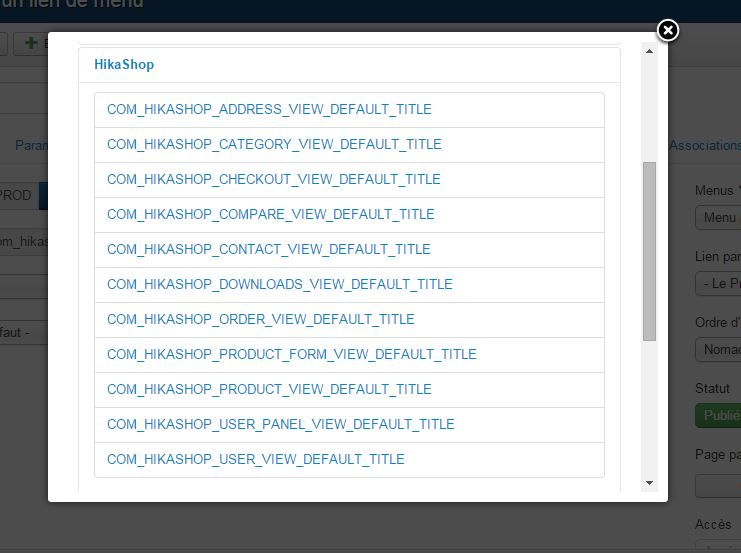
So the only menu items I can create go to the main category.
Any help will be nice.
Thanks in advance
Greg
-- HikaShop version -- : 2.3.5
-- Joomla version -- : 3.4.0
-- PHP version -- : 5.3.28
-- Browser(s) name and version -- : chrome
Hi,
I've just install Hikashop, everything work well exept menu items.
I follow the tutorial www.hikashop.com/support/support/documen...splay-front-end.html but I was stop at the stage 2 "Advanced Option" which is not in menu item tabs as you can see on printscreen
There is also another problem, I don't know if it's linked with the first one,
The the list of menu types of HikaShop are not really readable as you can see on printscreen
So the only menu items I can create go to the main category.
Any help will be nice.
Thanks in advance
Greg
Please Log in or Create an account to join the conversation.

11 years 7 months ago #192937
by nicolas
Replied by nicolas on topic Can't create menu items
Hi,
The "advanced options" tab has been renamed "hikashop options".
The menu items not being readable comes from the translation file for that area which couldn't be written. It's not a big problem. You can just ignore it as it won't cause any function issue.
The "advanced options" tab has been renamed "hikashop options".
The menu items not being readable comes from the translation file for that area which couldn't be written. It's not a big problem. You can just ignore it as it won't cause any function issue.
Please Log in or Create an account to join the conversation.
11 years 7 months ago #193036
by mtgt
Replied by mtgt on topic Can't create menu items
Hi,
Thanks for quick answer.
I check in english, it's same.
But the main problem, There is no place to select the category I want link, or the product.
Any idea why
Thanks in advance for yor help
Greg
Thanks for quick answer.
I check in english, it's same.
But the main problem, There is no place to select the category I want link, or the product.
Any idea why
Thanks in advance for yor help
Greg
Please Log in or Create an account to join the conversation.

11 years 7 months ago #193061
by Xavier
Replied by Xavier on topic Can't create menu items
Hi,
To select the category or the product, you have to click on the HikaShop options link under the tab of the same name.
Then you will see all the HikaShop settings, and the option to fill with the desired value is: "Associated category".
To select the category or the product, you have to click on the HikaShop options link under the tab of the same name.
Then you will see all the HikaShop settings, and the option to fill with the desired value is: "Associated category".
Please Log in or Create an account to join the conversation.
11 years 7 months ago - 11 years 7 months ago #193217
by mtgt
Replied by mtgt on topic Can't create menu items
Hi Xavier,
Thanks for explanation but it's still not working properly
I've done it like explained but I still have the same result.
Here are some printscreen:
I select this 2 items 'epub and pdf' and I have ebook displayed
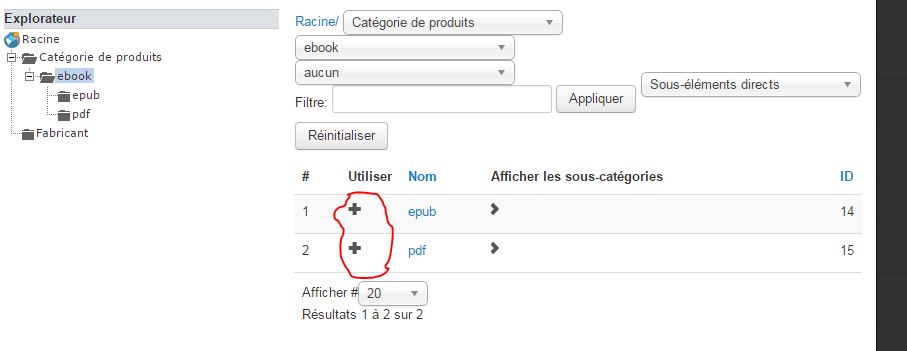
and even I select only epub for exemple, I have display "2 product category" in place of one
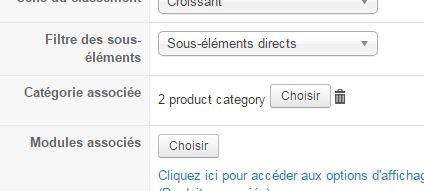
I also notice a problem in URL which is display like this www.nomadsroad.com/fr/le-projet-voyage-i...mads-shop/lang-fr-FR
but if you remove /lang-fr-FR you have the products only.
Thanks again for your help
Greg
Thanks for explanation but it's still not working properly
I've done it like explained but I still have the same result.
Here are some printscreen:
I select this 2 items 'epub and pdf' and I have ebook displayed
and even I select only epub for exemple, I have display "2 product category" in place of one
I also notice a problem in URL which is display like this www.nomadsroad.com/fr/le-projet-voyage-i...mads-shop/lang-fr-FR
but if you remove /lang-fr-FR you have the products only.
Thanks again for your help
Greg
Last edit: 11 years 7 months ago by mtgt.
Please Log in or Create an account to join the conversation.
11 years 7 months ago #193447
by mtgt
Replied by mtgt on topic Can't create menu items
Hi,
I also tried to create other type of menu, but I still have the same result, absolutly no difference in using other choice. I still have the main category displayed.
Thanks in advance for your help
I also tried to create other type of menu, but I still have the same result, absolutly no difference in using other choice. I still have the main category displayed.
Thanks in advance for your help
Please Log in or Create an account to join the conversation.
11 years 6 months ago #193455
by mtgt
Replied by mtgt on topic Can't create menu items
Hi,
I just updated Hika Shop and everything goes well.
No more problem with menu items
Thanks for the update
Greg
I just updated Hika Shop and everything goes well.
No more problem with menu items
Thanks for the update
Greg
Please Log in or Create an account to join the conversation.
Time to create page: 0.283 seconds