

- Posts: 14
- Thank you received: 0
Images not showing in Category page
11 years 6 months ago - 11 years 6 months ago #193708
by SHoggard
-- HikaShop version -- : 2.4.0
-- Joomla version -- : 3.3.1
-- PHP version -- : 5.3.28
-- Browser(s) name and version -- : Firefox: 36.1
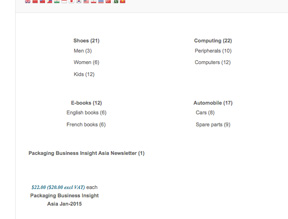
Ok... self confessed newbie here.... I followed the Wizard on install, installed sample data, created a product, uploaded image ...
But I don't have any images on my category page
Images not showing in Category page was created by SHoggard
-- HikaShop version -- : 2.4.0
-- Joomla version -- : 3.3.1
-- PHP version -- : 5.3.28
-- Browser(s) name and version -- : Firefox: 36.1
Ok... self confessed newbie here.... I followed the Wizard on install, installed sample data, created a product, uploaded image ...
But I don't have any images on my category page
Last edit: 11 years 6 months ago by SHoggard. Reason: upload image
Please Log in or Create an account to join the conversation.

11 years 6 months ago #193726
by nicolas
Replied by nicolas on topic Images not showing in Category page
Hi,
That's just a setting issue.
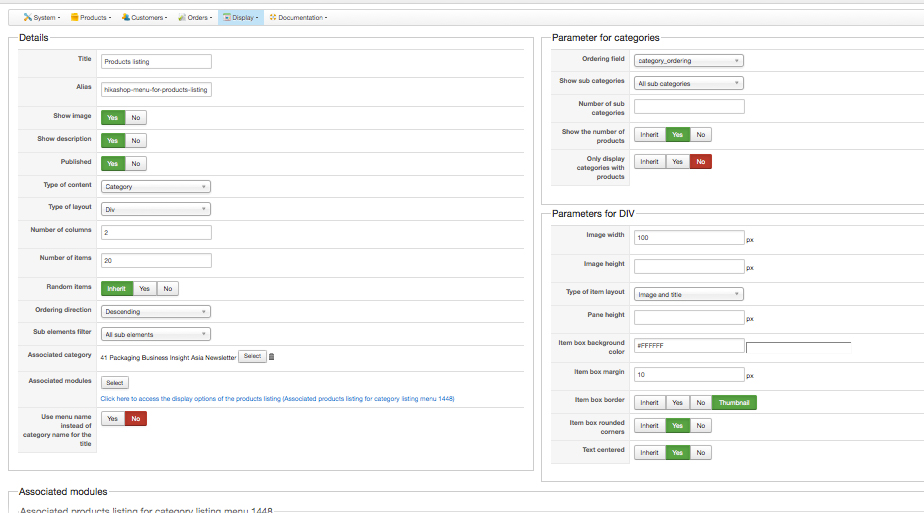
Go in the menu Display->Content menus and edit the menu with the id 1448. There, make sure that the "Type of item layout" options are set to "image and title" and that should help.
That's just a setting issue.
Go in the menu Display->Content menus and edit the menu with the id 1448. There, make sure that the "Type of item layout" options are set to "image and title" and that should help.
Please Log in or Create an account to join the conversation.
11 years 6 months ago #193798
by SHoggard
Replied by SHoggard on topic Images not showing in Category page
No.... doesn't seem to work.... I did as you suggest but for some reason it isn't applying the "image and title" when set just displays title
Please Log in or Create an account to join the conversation.
11 years 6 months ago #193965
by nicolas
Replied by nicolas on topic Images not showing in Category page
Hi,
I checked your link and I can see that you changed the category to display directly a products listing instead of a categories listing.
So the categories image are not relevant anymore since you don't display the categories.
And I see the selected category image at the top of the products listing so I don't think that the is any problem with the display of the images.
In that case, I'm not sure what to tell you.
I checked your link and I can see that you changed the category to display directly a products listing instead of a categories listing.
So the categories image are not relevant anymore since you don't display the categories.
And I see the selected category image at the top of the products listing so I don't think that the is any problem with the display of the images.
In that case, I'm not sure what to tell you.
Please Log in or Create an account to join the conversation.
Time to create page: 0.200 seconds