

- Posts: 94
- Thank you received: 0
Breadcrumbs disapear when at product view
11 years 6 months ago #194049
by paul_sugg
Breadcrumbs disapear when at product view was created by paul_sugg
-- HikaShop version -- : latest
-- Joomla version -- : laytest
Hello
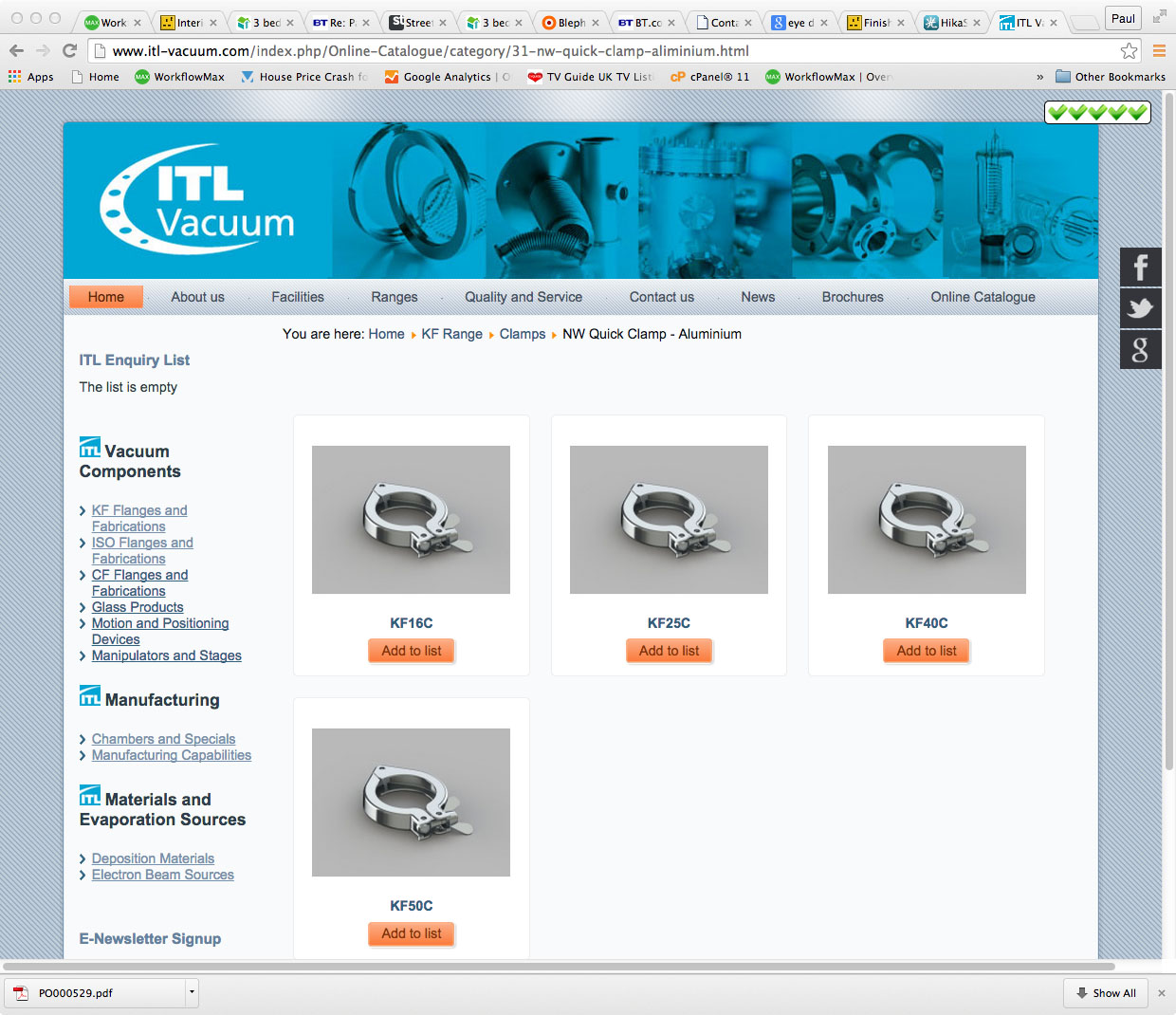
As we drill down the categories to select products the breadcrumbs work fine. See first.jpg.
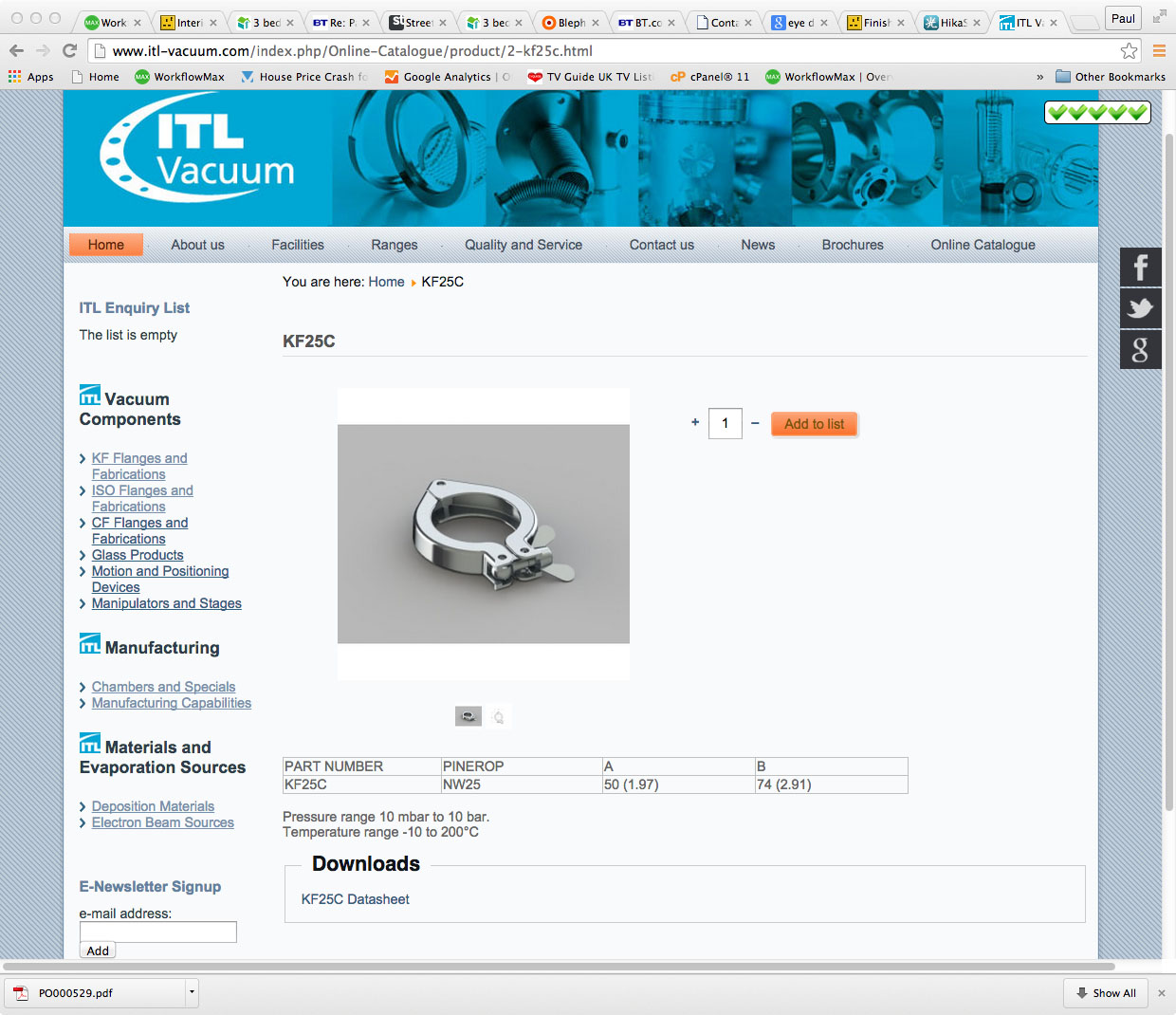
When we click on actual product the breadcrumb trail disappears. See scond.jpg.
How can we fix this?
Thanks
-- Joomla version -- : laytest
Hello
As we drill down the categories to select products the breadcrumbs work fine. See first.jpg.
When we click on actual product the breadcrumb trail disappears. See scond.jpg.
How can we fix this?
Thanks
Please Log in or Create an account to join the conversation.

11 years 6 months ago #194123
by lousyfool
Need help with customisations of layouts, style or other site development? PM me!
(Don't forget to turn on "E-mail notification of new messages" )
Replied by lousyfool on topic Breadcrumbs disapear when at product view
Hi,
Try to set the first option here to "No": www.hikashop.com/support/support/documen...ig.html#features_sef
Try to set the first option here to "No": www.hikashop.com/support/support/documen...ig.html#features_sef
Need help with customisations of layouts, style or other site development? PM me!
(Don't forget to turn on "E-mail notification of new messages" )
Please Log in or Create an account to join the conversation.
11 years 6 months ago #194127
by paul_sugg
Replied by paul_sugg on topic Breadcrumbs disapear when at product view
Thanks,
This option IS set to NO currently.
This option IS set to NO currently.
Please Log in or Create an account to join the conversation.

11 years 6 months ago #194184
by nicolas
Replied by nicolas on topic Breadcrumbs disapear when at product view
Hi,
Then, it means that you must have something in the "canonical URL" field of the product. Empty that field and clear your website cache if any and that should do what you want.
Then, it means that you must have something in the "canonical URL" field of the product. Empty that field and clear your website cache if any and that should do what you want.
Please Log in or Create an account to join the conversation.
11 years 6 months ago #194273
by paul_sugg
Replied by paul_sugg on topic Breadcrumbs disapear when at product view
Hi Nicolas,
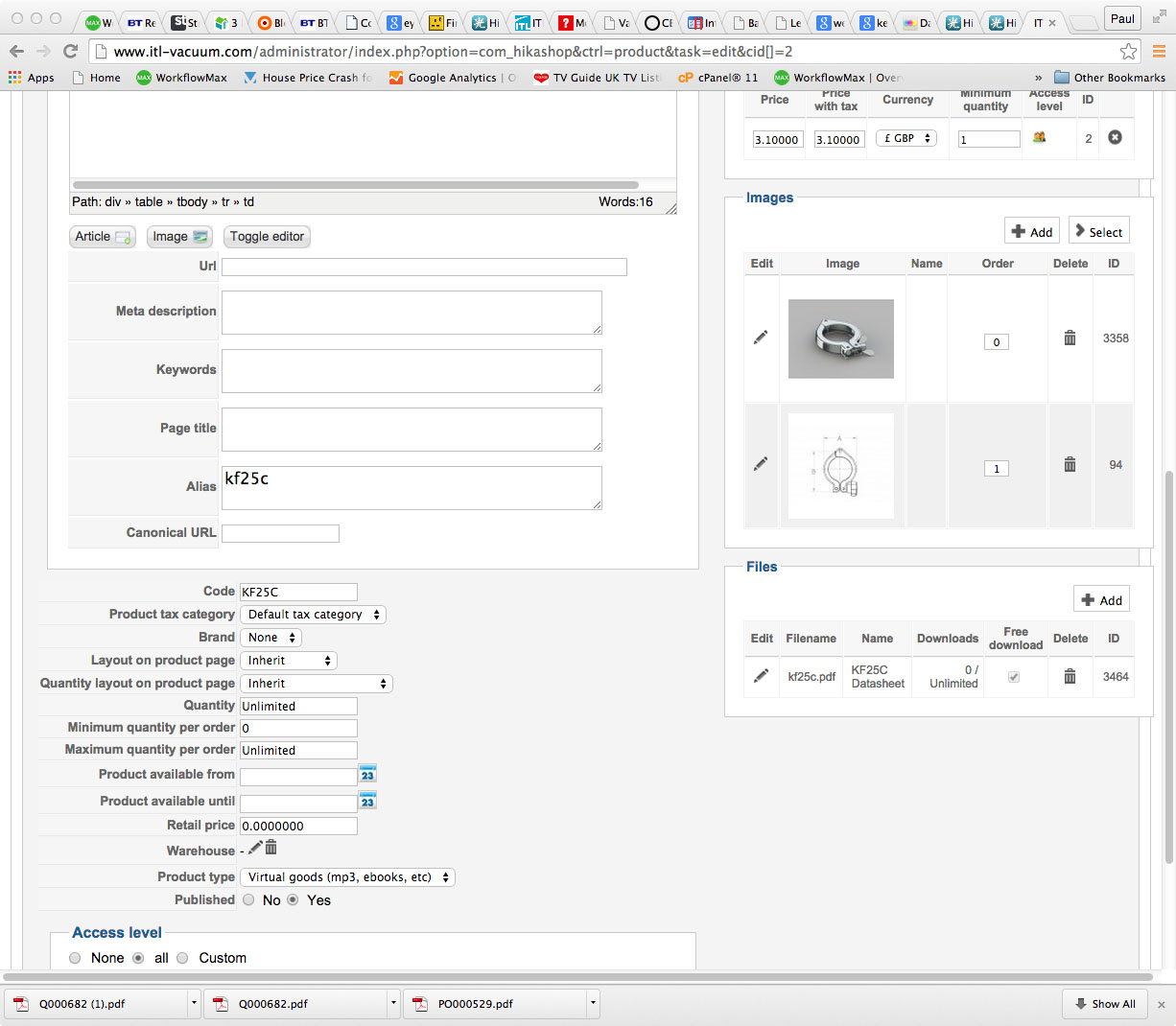
This field is blank also.
Screener here
This field is blank also.
Screener here
Please Log in or Create an account to join the conversation.
11 years 6 months ago #194401
by nicolas
Replied by nicolas on topic Breadcrumbs disapear when at product view
Hi,
That's not normal. The link to the product page should change with you turned off the "simplified breadcrumb" option if you don't have any canonical URL.
You must have something caching the old URL. Either some caching activated on your website, or a SEF extension like sh404sef which also caches the generated URLs.
Could you please check on that ?
That's not normal. The link to the product page should change with you turned off the "simplified breadcrumb" option if you don't have any canonical URL.
You must have something caching the old URL. Either some caching activated on your website, or a SEF extension like sh404sef which also caches the generated URLs.
Could you please check on that ?
Please Log in or Create an account to join the conversation.
11 years 6 months ago #195917
by paul_sugg
Replied by paul_sugg on topic Breadcrumbs disapear when at product view
Thanks I've tried support at sh404sef, not getting anywhere with them. Some products work fine some dont. Also when when you click on home in the breadcrumbs it takes you back to the website home page rather than the store homepage (online catalogue) homepage. Can I change this?
This breadcrumb issue is causing a massive headache - may have to give up and disable and rely on users using their back button!
This breadcrumb issue is causing a massive headache - may have to give up and disable and rely on users using their back button!
Please Log in or Create an account to join the conversation.
11 years 6 months ago - 11 years 6 months ago #195934
by nokki00
Replied by nokki00 on topic Breadcrumbs disapear when at product view
I have the exact Same issue and i dont have any 3rd party extension sef installed. When I take away the canonical i then get home / menu name / product name. The category and sub category doesn't show, i tested eshop and the breadcrumb shows home / category / sub category / product.
Last edit: 11 years 6 months ago by nokki00.
Please Log in or Create an account to join the conversation.
11 years 6 months ago #195998
by nicolas
Replied by nicolas on topic Breadcrumbs disapear when at product view
If you don't have any third party SEF, either you have some caching, like the Joomla cache, or your products have a canonical URL set (see my previous posts in this topic) which prevents you from seeing the new URL after you changed the simplified breadcrumb option.
Please Log in or Create an account to join the conversation.
11 years 6 months ago #196336
by nokki00
Replied by nokki00 on topic Breadcrumbs disapear when at product view
I cleared the caches and tried on two different browsers on two different machines.
on your website it replicates the same thing.
Here you see the breadcrumb drill down to Shoes / Men
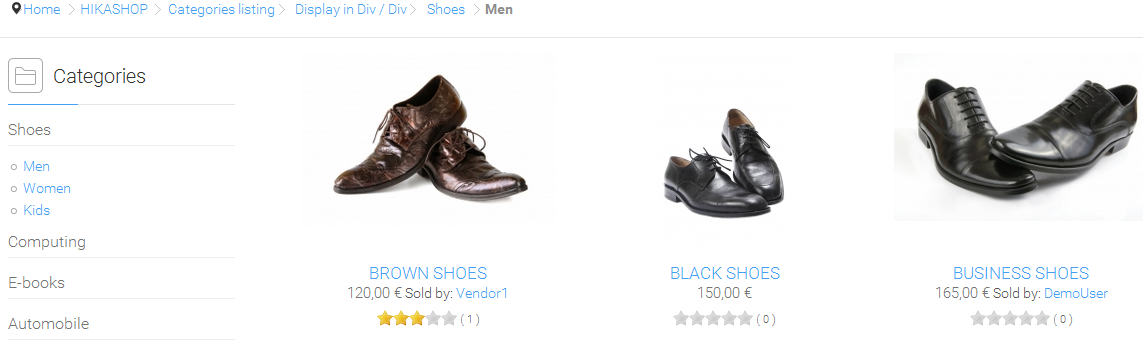
When you click on the product Shoes / Men disappear from bread crumb. Can you make changes on your demo site to show Shoes / Men / product name in the breadcrumb?
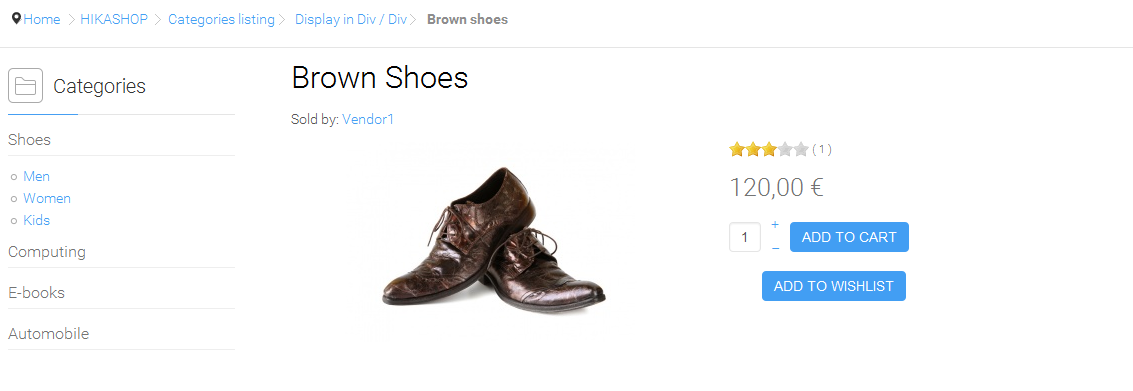
on your website it replicates the same thing.
Here you see the breadcrumb drill down to Shoes / Men
When you click on the product Shoes / Men disappear from bread crumb. Can you make changes on your demo site to show Shoes / Men / product name in the breadcrumb?
Please Log in or Create an account to join the conversation.
11 years 6 months ago #196684
by nicolas
Replied by nicolas on topic Breadcrumbs disapear when at product view
Hi,
It works fine on our demo website.
See: take.ms/Milic
Of course, in order to see that breacrumb on the product page, you first need to turn off the simplified breadcrumb option of the HikaShop configuration on the demo website (and you don't have access to the configuration page of the demo website for security reasons) and by doing that, it will add the /category_pathway-13 parameter at the end of the product page URL as you can see in the screenshot.
That's actually that extra parameter in the URLs of the product page which allows the system to display the breadcrumb like you want.
So if you don't have the category_pathway extra parameter in the URLs it's normal that you don't get the breadcrumb like you want on the product page. And that can come from either having the "simplified breadcrumb" option turned on (it should be off for the way you want the breadcrumb to appear), or that you have a canonical URL filled in your product (make sure that it is not the case), or that you have some caching preventing you from seeing the change on your frontend.
It works fine on our demo website.
See: take.ms/Milic
Of course, in order to see that breacrumb on the product page, you first need to turn off the simplified breadcrumb option of the HikaShop configuration on the demo website (and you don't have access to the configuration page of the demo website for security reasons) and by doing that, it will add the /category_pathway-13 parameter at the end of the product page URL as you can see in the screenshot.
That's actually that extra parameter in the URLs of the product page which allows the system to display the breadcrumb like you want.
So if you don't have the category_pathway extra parameter in the URLs it's normal that you don't get the breadcrumb like you want on the product page. And that can come from either having the "simplified breadcrumb" option turned on (it should be off for the way you want the breadcrumb to appear), or that you have a canonical URL filled in your product (make sure that it is not the case), or that you have some caching preventing you from seeing the change on your frontend.
Please Log in or Create an account to join the conversation.
11 years 6 months ago #196687
by paul_sugg
Replied by paul_sugg on topic Breadcrumbs disapear when at product view
I have set the bradcrumb option to NOT simplified and clear the caches I can find or am aware of.
Still have the same problem of the breadcrumb trail disapearing when I drill down to the product PLUS at anytime clicking on the home breadcrumb take me to the website homepage NOT the store homepage.
I have alawys found a solution / answer eventually with hikashop (and your assistance Nickolas) but this problem is baffling me.
Still have the same problem of the breadcrumb trail disapearing when I drill down to the product PLUS at anytime clicking on the home breadcrumb take me to the website homepage NOT the store homepage.
I have alawys found a solution / answer eventually with hikashop (and your assistance Nickolas) but this problem is baffling me.
Please Log in or Create an account to join the conversation.
11 years 6 months ago #196692
by nicolas
Replied by nicolas on topic Breadcrumbs disapear when at product view
Hi
In my message, I also say that it can come from the canonical URL of your products. You didn't say if you checked it.
Maybe it could be the view of the products listing which has been modified from an old version of HikaShop where the breacrumb wouldn't be supported, but as this option dates back to a few years ago, I doubt that this is the case.
If you checked that you don't have a canonical URL but that you still have the problem, please provide a backend access to the website with a link to this website and a link to the products listing page via our contact form and we'll have a look.
In my message, I also say that it can come from the canonical URL of your products. You didn't say if you checked it.
Maybe it could be the view of the products listing which has been modified from an old version of HikaShop where the breacrumb wouldn't be supported, but as this option dates back to a few years ago, I doubt that this is the case.
If you checked that you don't have a canonical URL but that you still have the problem, please provide a backend access to the website with a link to this website and a link to the products listing page via our contact form and we'll have a look.
Please Log in or Create an account to join the conversation.
11 years 6 months ago #196942
by paul_sugg
Replied by paul_sugg on topic Breadcrumbs disapear when at product view
We don't use canonical URL's.
The website was set up three years ago, client has only now over the last 6 months added all the products. I upgraded to the pro version recently.
Will message you with backend access.
Thanks for all assistance.
The website was set up three years ago, client has only now over the last 6 months added all the products. I upgraded to the pro version recently.
Will message you with backend access.
Thanks for all assistance.
Please Log in or Create an account to join the conversation.

11 years 6 months ago #197113
by river
Replied by river on topic Breadcrumbs disapear when at product view
Any update on this case ? I am having the same problem
Please Log in or Create an account to join the conversation.
11 years 6 months ago #197123
by nicolas
Replied by nicolas on topic Breadcrumbs disapear when at product view
Hi,
I already gave the solution in my messages on this thread and shown that it worked on the demo website with the proper settings set as explained. So if you followed my instructions and still have the problem, either you missed something in my instructions, or the problem comes from a 3rd party SEF extension, a view override, some caching, etc.
I already gave the solution in my messages on this thread and shown that it worked on the demo website with the proper settings set as explained. So if you followed my instructions and still have the problem, either you missed something in my instructions, or the problem comes from a 3rd party SEF extension, a view override, some caching, etc.
Please Log in or Create an account to join the conversation.
11 years 6 months ago #197292
by river
Replied by river on topic Breadcrumbs disapear when at product view
Ok tnx. My mistake.
In order to make the breadcrumbs display correctly
I set Simplified breadcrumbs to: NO
Force canonical URLs on listings: No generate the URLs
Now my breadcrumbs look like this (they way I want them to look)
Hjem => Alle produkter =>Fritid og
Hobby=>Reiseeffekter=>Reisevekt (last one here is the product
name)
The only problem now is that the word "category_pathway" is
displayed in the URL.
Is there a way to keep the function "Use Canoncial URL and
generate if missing" ON and still have the breadcrumbs
displayed like above ?
Because when I turn on this function my breadcrumbs gets
displayed like this: Hjem=>Alle produkter=>Reisevekt
...I need the canoncial function on for best SEO.
In order to make the breadcrumbs display correctly
I set Simplified breadcrumbs to: NO
Force canonical URLs on listings: No generate the URLs
Now my breadcrumbs look like this (they way I want them to look)
Hjem => Alle produkter =>Fritid og
Hobby=>Reiseeffekter=>Reisevekt (last one here is the product
name)
The only problem now is that the word "category_pathway" is
displayed in the URL.
Is there a way to keep the function "Use Canoncial URL and
generate if missing" ON and still have the breadcrumbs
displayed like above ?
Because when I turn on this function my breadcrumbs gets
displayed like this: Hjem=>Alle produkter=>Reisevekt
...I need the canoncial function on for best SEO.
Please Log in or Create an account to join the conversation.
11 years 6 months ago #197299
by nicolas
Replied by nicolas on topic Breadcrumbs disapear when at product view
Hi,
You can have the use canonical URL activated that's not the problem.
The issue you have is that you already have canonical URLs without the category_pathway parameter in them.
That's this parameter which allows for the breadcrumbs to display like you want.
So before activating the canonical URL option, empty the canonical URLs of all your products so that it would then regenerate the canonical URLs of the products with that extra parameter and it will work like you want.
You can have the use canonical URL activated that's not the problem.
The issue you have is that you already have canonical URLs without the category_pathway parameter in them.
That's this parameter which allows for the breadcrumbs to display like you want.
So before activating the canonical URL option, empty the canonical URLs of all your products so that it would then regenerate the canonical URLs of the products with that extra parameter and it will work like you want.
Please Log in or Create an account to join the conversation.
11 years 5 months ago #197488
by river
Replied by river on topic Breadcrumbs disapear when at product view
OK, I can see that this works fine.
But it ads "/category_pathway" at the end of the url, this is fine by me.
But the only problem is that I have more that 1300 products and I have to make a 301 redirect manually for all of these product in order to keep my ratings in Google. I would use the ReDJ component. But this will take ages.
Any better solution ?
But it ads "/category_pathway" at the end of the url, this is fine by me.
But the only problem is that I have more that 1300 products and I have to make a 301 redirect manually for all of these product in order to keep my ratings in Google. I would use the ReDJ component. But this will take ages.
Any better solution ?
Please Log in or Create an account to join the conversation.
11 years 5 months ago #197532
by nokki00
Replied by nokki00 on topic Breadcrumbs disapear when at product view
Hey Nicolas,
I sent a message via the contact. I have the settings enabled and disabled like you stated but it still doesn't work.
I sent a message via the contact. I have the settings enabled and disabled like you stated but it still doesn't work.
Please Log in or Create an account to join the conversation.
Time to create page: 0.337 seconds