
- Posts: 50
- Thank you received: 0
How do I remove category from product listing?
- rjohnson1990
-
 Topic Author
- Offline
Less
More
11 years 6 months ago - 11 years 6 months ago #194918
by rjohnson1990
How do I remove category from product listing? was created by rjohnson1990
-- HikaShop version -- : 2.4.0
-- Joomla version -- : 3.4.0
-- PHP version -- : 5.4.36
-- Browser(s) name and version -- : Mozilla Firefox Developer Edition 38.0a2
-- Error-message(debug-mod must be tuned on) -- : N/A
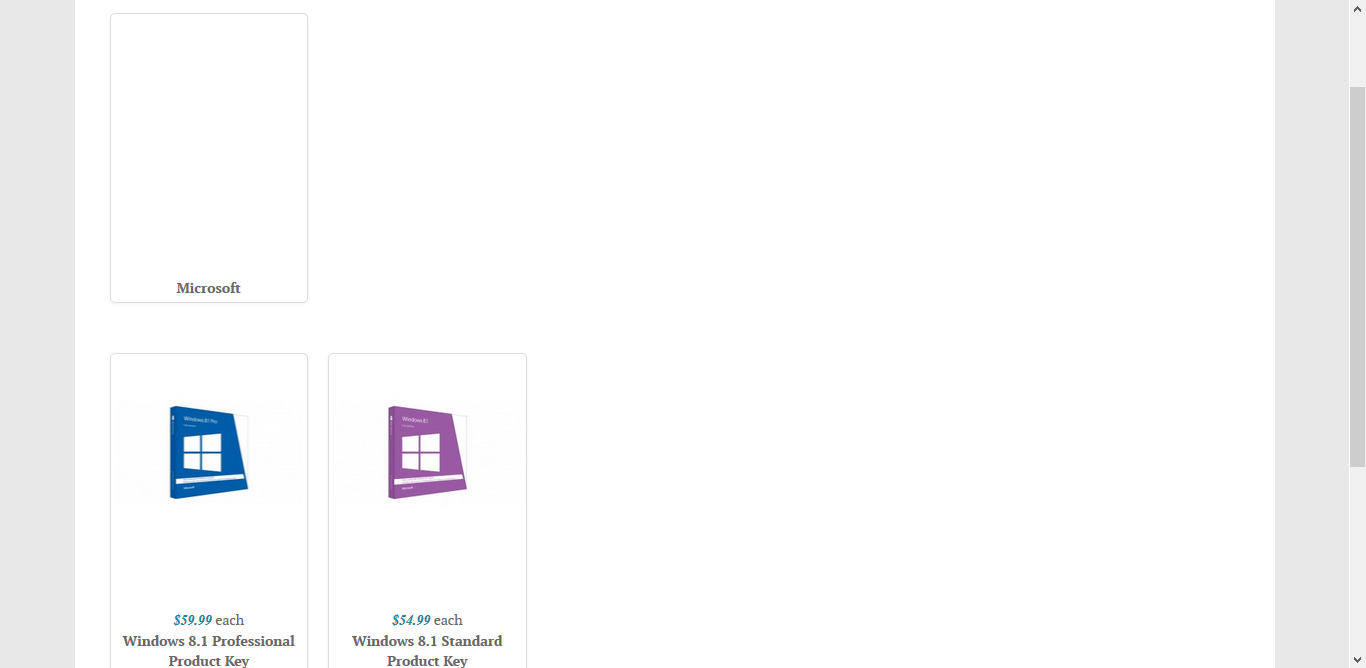
When I visited my website to check it out after adding two products, it shows the category above the products. How can I remove this? I have added an attachment image to show the issue.
Also, I have in the product description, retail price and our price. how can i strike out retail price and leave our price as it is?
-- Joomla version -- : 3.4.0
-- PHP version -- : 5.4.36
-- Browser(s) name and version -- : Mozilla Firefox Developer Edition 38.0a2
-- Error-message(debug-mod must be tuned on) -- : N/A
When I visited my website to check it out after adding two products, it shows the category above the products. How can I remove this? I have added an attachment image to show the issue.
Also, I have in the product description, retail price and our price. how can i strike out retail price and leave our price as it is?
Last edit: 11 years 6 months ago by rjohnson1990.
Please Log in or Create an account to join the conversation.

11 years 6 months ago #194936
by Xavier
Replied by Xavier on topic How do I remove category from product listing?
Hi,
To not have the category in the listing, you have to select another menu type. Use product listing instead of category listing.
Regarding the retail price, you can strike it out thanks to a css property: text-decoration: line-through;
www.hikashop.com/support/support/documen...ize-the-display.html
To not have the category in the listing, you have to select another menu type. Use product listing instead of category listing.
Regarding the retail price, you can strike it out thanks to a css property: text-decoration: line-through;
www.hikashop.com/support/support/documen...ize-the-display.html
Please Log in or Create an account to join the conversation.
- rjohnson1990
-
Topic Author
- Offline
Less
More
- Posts: 50
- Thank you received: 0
11 years 6 months ago - 11 years 6 months ago #195037
by rjohnson1990
Replied by rjohnson1990 on topic How do I remove category from product listing?
Thank you for the reply. It is how I needed it. I do two final questions.
1. How can I use an image for the add to cart button rather than the default button?
2. I would like to add content under the price but above the add to cart button. Where do I add this content?
1. How can I use an image for the add to cart button rather than the default button?
2. I would like to add content under the price but above the add to cart button. Where do I add this content?
Last edit: 11 years 6 months ago by rjohnson1990.
Please Log in or Create an account to join the conversation.

11 years 6 months ago #195045
by Jerome
Jerome - Obsidev.com
HikaMarket & HikaSerial developer / HikaShop core dev team.
Replied by Jerome on topic How do I remove category from product listing?
Hi,
1/ Best is to use the button style "CSS" in the HikaShop configuration ; so you can easily customize them using CSS.
2/ You will need to override the product page view.
www.hikashop.com/support/documentation/1...ize-the-display.html
Regards,
1/ Best is to use the button style "CSS" in the HikaShop configuration ; so you can easily customize them using CSS.
2/ You will need to override the product page view.
www.hikashop.com/support/documentation/1...ize-the-display.html
Regards,
Jerome - Obsidev.com
HikaMarket & HikaSerial developer / HikaShop core dev team.
Please Log in or Create an account to join the conversation.
Time to create page: 0.190 seconds