

- Posts: 19
- Thank you received: 0
Configure page to display list menu on side + pics
11 years 6 months ago #196826
by drrakken
Configure page to display list menu on side + pics was created by drrakken
-- url of the page with the problem -- :
www.highwheelerantiques.com/index.php/hi...r-categories-listing
-- HikaShop version -- : 2.4.0
-- Joomla version -- : 3.4.1
-- PHP version -- : 5.5.22
-- Browser(s) name and version -- : CHROME 41.0.2272.101
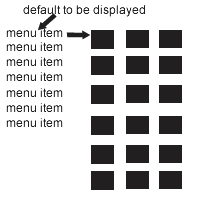
So I just want to configure the page to simply display the categories list menu on the left as it is now but with only the product images of the first category in the list as default. I also want to get rid of the categories being listed again in the main content section of the page in the white blocky background.
I've attached a simple image to explain further.
Thanks
-- HikaShop version -- : 2.4.0
-- Joomla version -- : 3.4.1
-- PHP version -- : 5.5.22
-- Browser(s) name and version -- : CHROME 41.0.2272.101
So I just want to configure the page to simply display the categories list menu on the left as it is now but with only the product images of the first category in the list as default. I also want to get rid of the categories being listed again in the main content section of the page in the white blocky background.
I've attached a simple image to explain further.
Thanks
Please Log in or Create an account to join the conversation.

11 years 6 months ago #196860
by nicolas
Replied by nicolas on topic Configure page to display list menu on side + pics
Hi,
Edit your categories listing menu item (id 1422) via the menu Display>Content menus and change the "associated category" option there to the category of your first category of the left module.
Edit your categories listing menu item (id 1422) via the menu Display>Content menus and change the "associated category" option there to the category of your first category of the left module.
Please Log in or Create an account to join the conversation.
11 years 6 months ago #196958
by drrakken
Replied by drrakken on topic Configure page to display list menu on side + pics
Awesome, thanks.
Unfortunately I have another question.
When I click on the menu item 'Funiture', it displays the subcategories in that ugly block mode, it also shows images of the comic book category which I don;t want it too. Any suggestions for that?
Thanks again
Unfortunately I have another question.
When I click on the menu item 'Funiture', it displays the subcategories in that ugly block mode, it also shows images of the comic book category which I don;t want it too. Any suggestions for that?
Thanks again
Please Log in or Create an account to join the conversation.
11 years 6 months ago #196981
by nicolas
Replied by nicolas on topic Configure page to display list menu on side + pics
Hi,
1. You can add such CSS in the frontend CSS of HikaShop in order to avoid that:
#hikashop_category_information_menu_1422 .hikashop_subcategories{ display: none; }
www.hikashop.com/support/documentation/1...ize-the-display.html
2. That's because these products are also attached to the furniture category. Please make sure that this is not the case.
1. You can add such CSS in the frontend CSS of HikaShop in order to avoid that:
#hikashop_category_information_menu_1422 .hikashop_subcategories{ display: none; }
www.hikashop.com/support/documentation/1...ize-the-display.html
2. That's because these products are also attached to the furniture category. Please make sure that this is not the case.
The following user(s) said Thank You: drrakken
Please Log in or Create an account to join the conversation.
11 years 6 months ago #197075
by drrakken
Replied by drrakken on topic Configure page to display list menu on side + pics
Fantastic, thank you so much.
Cheers
Cheers
Please Log in or Create an account to join the conversation.
Time to create page: 0.171 seconds