
CSV import of variants

11 years 4 months ago #202288
by iedwards
CSV import of variants was created by iedwards
-- HikaShop version -- : 2.4.0
-- Joomla version -- : 3.4.1
When exporting product data as a csv the product_parent_id of variants is the product code (whatever has been entered for the parent product)
When importing variant product data as a csv this has to be the parent product_id (database id)
There is however no way of telling what the database id of a product is from within Hikashop
Ian
-- Joomla version -- : 3.4.1
When exporting product data as a csv the product_parent_id of variants is the product code (whatever has been entered for the parent product)
When importing variant product data as a csv this has to be the parent product_id (database id)
There is however no way of telling what the database id of a product is from within Hikashop
Ian
Please Log in or Create an account to join the conversation.

11 years 4 months ago #202295
by Xavier
Replied by Xavier on topic CSV import of variants
Hi,
When importing you can use the product code of the parent product, the system handle that
When importing you can use the product code of the parent product, the system handle that
Please Log in or Create an account to join the conversation.
11 years 4 months ago #202407
by iedwards
Replied by iedwards on topic CSV import of variants
No, it doesn't work, that's my point.
Ian
Ian
Please Log in or Create an account to join the conversation.

11 years 4 months ago #202424
by nicolas
Replied by nicolas on topic CSV import of variants
Hi,
It works fine on our end, so there is another issue with your CSV.
It works fine on our end, so there is another issue with your CSV.
Please Log in or Create an account to join the conversation.
11 years 4 months ago #202566
by iedwards
Replied by iedwards on topic CSV import of variants
Ok I've tried it again and it's still not working.
Attached are two csv's the first one uses the parent product sku and doesn't work,
the second one is identical except it uses the parent product id and that works.
Is there maybe an issue with the column name?
Thanks,
Ian
Attached are two csv's the first one uses the parent product sku and doesn't work,
This attachment is hidden for guests.
Please log in or register to see it.
Please log in or register to see it.
the second one is identical except it uses the parent product id and that works.
This attachment is hidden for guests.
Please log in or register to see it.
Please log in or register to see it.
Is there maybe an issue with the column name?
Thanks,
Ian
Please Log in or Create an account to join the conversation.
11 years 4 months ago #202574
by nicolas
Replied by nicolas on topic CSV import of variants
Hi,
In our documentation regarding the CSV import, we recommend that you specify one row for the main product and then one row for each variant:
www.hikashop.com/support/support/documen...hikashop-import.html
So we assumed that it is what you were doing, but I can see that you didn't specify the main product rows in your CSV.
I'm surprised it actually works fine at all without the main product rows.
Add one row for the main products before the variants and you'll see that you can use the product_code of the main product in the product_parent_id as we stated before.
In our documentation regarding the CSV import, we recommend that you specify one row for the main product and then one row for each variant:
www.hikashop.com/support/support/documen...hikashop-import.html
So we assumed that it is what you were doing, but I can see that you didn't specify the main product rows in your CSV.
I'm surprised it actually works fine at all without the main product rows.
Add one row for the main products before the variants and you'll see that you can use the product_code of the main product in the product_parent_id as we stated before.
Please Log in or Create an account to join the conversation.
11 years 4 months ago #202642
by iedwards
Replied by iedwards on topic CSV import of variants
Hi Nicolas,
My parent products already exist as I have set those up manually.
Each parent has up to a dozen variants which is why I am using the import. I read the instructions to mean if you are creating a product with variants from scratch then obviously you need to specify the parent before it's variants.
No matter, it's working for me this way, but it would help if the id of the parent product was displayed somewhere, perhaps in your revamped next version?
Thanks for the help,
Ian
My parent products already exist as I have set those up manually.
Each parent has up to a dozen variants which is why I am using the import. I read the instructions to mean if you are creating a product with variants from scratch then obviously you need to specify the parent before it's variants.
No matter, it's working for me this way, but it would help if the id of the parent product was displayed somewhere, perhaps in your revamped next version?
Thanks for the help,
Ian
Please Log in or Create an account to join the conversation.
11 years 4 months ago #202647
by nicolas
Replied by nicolas on topic CSV import of variants
Hi,
The id of the product is displayed on the products listing in the last column on the right of the products listing for each product.
You can also see it in the URL of your browser address bar when you edit the product.
The id of the product is displayed on the products listing in the last column on the right of the products listing for each product.
You can also see it in the URL of your browser address bar when you edit the product.
Please Log in or Create an account to join the conversation.
11 years 4 months ago #202711
by iedwards
Replied by iedwards on topic CSV import of variants
Hi Nicolas,
There's no product id on the product listing on mine, could it be because I've got some custom fields there?
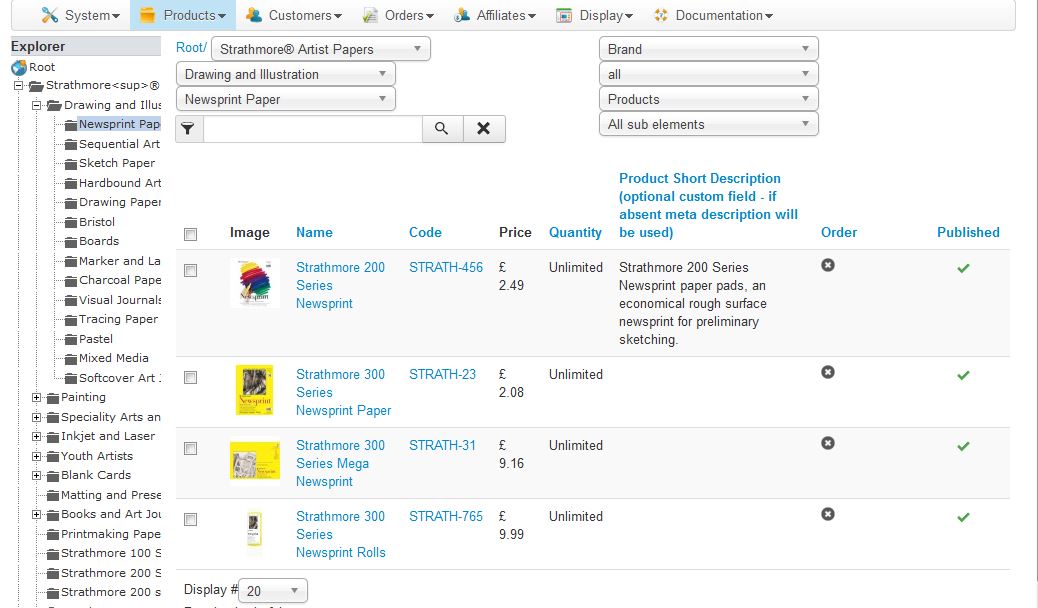
There's no product id on the product listing on mine, could it be because I've got some custom fields there?
Please Log in or Create an account to join the conversation.
11 years 4 months ago #202725
by nicolas
Replied by nicolas on topic CSV import of variants
Hi,
That's because the column is hidden on small screen resolutions so that it can still display the listing properly.
Increase your screen resolution/window size or display it on a computer with a greater resolution and you'll see that column on the right.
That's because the column is hidden on small screen resolutions so that it can still display the listing properly.
Increase your screen resolution/window size or display it on a computer with a greater resolution and you'll see that column on the right.
Please Log in or Create an account to join the conversation.
Time to create page: 0.231 seconds