

- Posts: 61
- Thank you received: 1
Remove Show # and results from category display
11 years 4 months ago #202705
by Digiwacht
Remove Show # and results from category display was created by Digiwacht
-- HikaShop version -- : 2.4.0
-- Joomla version -- : 3.4.1
How can i remove the Show # and the results from the category page?
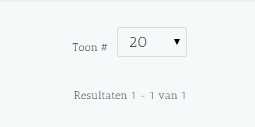
-- Joomla version -- : 3.4.1
How can i remove the Show # and the results from the category page?
Please Log in or Create an account to join the conversation.

11 years 4 months ago #202720
by nicolas
Replied by nicolas on topic Remove Show # and results from category display
It's a text which comes from the Joomla translation file. I think it's this key: JGLOBAL_DISPLAY_NUM
You can override it if you want to change it:
www.inmotionhosting.com/support/edu/joom...ew-language-override
You can override it if you want to change it:
www.inmotionhosting.com/support/edu/joom...ew-language-override
The following user(s) said Thank You: Digiwacht
Please Log in or Create an account to join the conversation.
11 years 4 months ago #202788
by Digiwacht
Replied by Digiwacht on topic Remove Show # and results from category display
Tnx Nicolas. So it's a Joomla thing. I'll see it i can remove it from the template core.
Please Log in or Create an account to join the conversation.
11 years 4 months ago #202956
by Digiwacht
Replied by Digiwacht on topic Remove Show # and results from category display
Turned out te be the pagination. I disabled it and now its gone.
Please Log in or Create an account to join the conversation.

11 years 3 months ago #206541
by disc
Replied by disc on topic Remove Show # and results from category display
Same issue on my website.
Using Joomla´s override mechanism will remove the words "Display #" and "Results x of x", but it will not remove the dropdown field shown in Didiwatch´s screenshot. This seems to be a Joomla configuration thing.
Under Joomla configuration I turned off everything that has to do with pagination and page listing. But the dropdown field still appears.
Any other idea?
Thanks.
Using Joomla´s override mechanism will remove the words "Display #" and "Results x of x", but it will not remove the dropdown field shown in Didiwatch´s screenshot. This seems to be a Joomla configuration thing.
Under Joomla configuration I turned off everything that has to do with pagination and page listing. But the dropdown field still appears.
Any other idea?
Thanks.
Please Log in or Create an account to join the conversation.
11 years 3 months ago #206556
by Digiwacht
Replied by Digiwacht on topic Remove Show # and results from category display
Did you check under the articles? The option there has articles and categorie options for pagination and # of items.
Please Log in or Create an account to join the conversation.
11 years 3 months ago #206565
by nicolas
Replied by nicolas on topic Remove Show # and results from category display
Hi,
If you want to completely turn off the pagination, you can turn off the option "pagination" of the HikaShop configuration.
If you want to completely turn off the pagination, you can turn off the option "pagination" of the HikaShop configuration.
Please Log in or Create an account to join the conversation.
11 years 3 months ago #206674
by disc
Replied by disc on topic Remove Show # and results from category display
Aaaaaarrrghhhh!
It´s crazy. Do you think I´ve seen this option on the configuration page?
And went through the whole Joomla setup yesterday for hours...
Sorry for asking this unnecessary question! But maybe someone else will be as blind as me and it helps!
Thanks Nicolas.
It´s crazy. Do you think I´ve seen this option on the configuration page?
And went through the whole Joomla setup yesterday for hours...
Sorry for asking this unnecessary question! But maybe someone else will be as blind as me and it helps!
Thanks Nicolas.
Please Log in or Create an account to join the conversation.
Time to create page: 0.199 seconds