

- Posts: 24
- Thank you received: 0
Product Image Parameters Change?
11 years 3 months ago #206740
by Fishwise
Product Image Parameters Change? was created by Fishwise
-- url of the page with the problem -- :
fishwise.co.nz/index.php/shop-online/pro...fishwise-s-moss-cave
-- HikaShop version -- : 2.5.0
-- Joomla version -- : 3.2.1
-- PHP version -- : 5.4.36-0+deb7u1
-- Browser(s) name and version -- : Chrome 43.0.2357.130
I imagine it's a bit of CSS that I've gotten wrong, but I can't seem to figure out what's causing this difference.
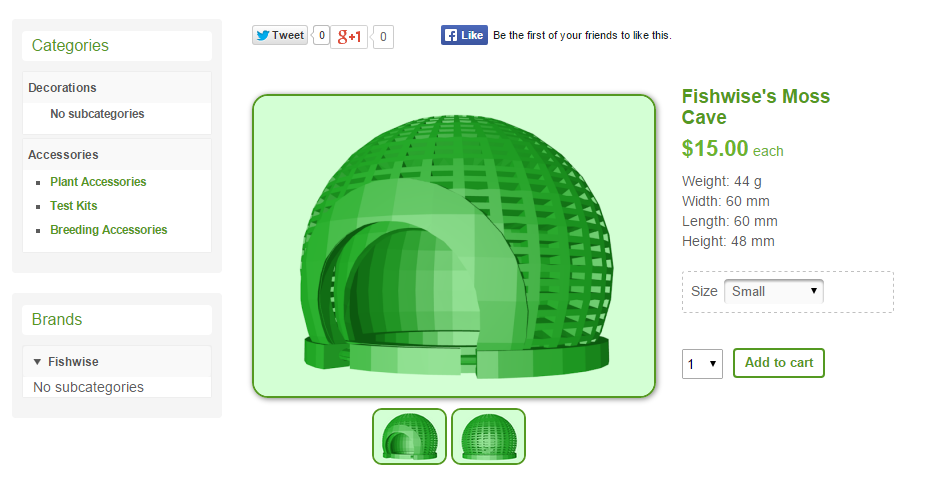
My main product image is set to the following parameters -
img#hikashop_main_image {
border-style: solid;
border-width: 2px;
border-radius: 16px;
box-shadow: 1px 1px 7px #818181;
(I'm editing the CSS in a separate CSS file, rather than the Hikashop css as it's easier for me to backup and access. My Configuration page is broken with "An error has occurred. 0 JPath::clean: $path is not a string." so I've been unable to edit it anyway).
Which you can see on this page - fishwise.co.nz/index.php/shop-online/pro...fishwise-s-moss-cave
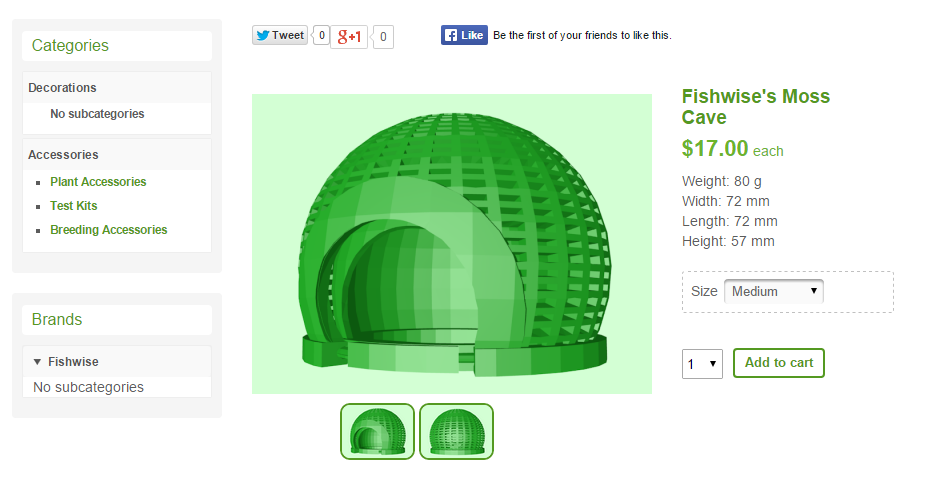
However, when you click one of the options (eg small, medium, large), these parameters disappear and the image goes back to its defaults. I can't seem to figure out what div to edit the parameters to so that they stay permanently.
Some images:
What it's set up to be
When you click an option
Thanks in advanced - sorry if I've missed something silly!
-- HikaShop version -- : 2.5.0
-- Joomla version -- : 3.2.1
-- PHP version -- : 5.4.36-0+deb7u1
-- Browser(s) name and version -- : Chrome 43.0.2357.130
I imagine it's a bit of CSS that I've gotten wrong, but I can't seem to figure out what's causing this difference.
My main product image is set to the following parameters -
img#hikashop_main_image {
border-style: solid;
border-width: 2px;
border-radius: 16px;
box-shadow: 1px 1px 7px #818181;
(I'm editing the CSS in a separate CSS file, rather than the Hikashop css as it's easier for me to backup and access. My Configuration page is broken with "An error has occurred. 0 JPath::clean: $path is not a string." so I've been unable to edit it anyway).
Which you can see on this page - fishwise.co.nz/index.php/shop-online/pro...fishwise-s-moss-cave
However, when you click one of the options (eg small, medium, large), these parameters disappear and the image goes back to its defaults. I can't seem to figure out what div to edit the parameters to so that they stay permanently.
Some images:
What it's set up to be
When you click an option
Thanks in advanced - sorry if I've missed something silly!
Please Log in or Create an account to join the conversation.

11 years 3 months ago #206749
by lousyfool
Need help with customisations of layouts, style or other site development? PM me!
(Don't forget to turn on "E-mail notification of new messages" )
Replied by lousyfool on topic Product Image Parameters Change?
That's because your CSS is only valid for the main image of the main product, not the variants. Their images have numbers appended to the ID, e.g "hikashop_main_image_52".
To catch those as well and have the CSS applying to all main images, please replace your CSS with this:
By the way, you're using "characteristics" creating "variants". Not "options". Just saying because it's a big difference when setting up your shop, and sometimes also when referring to them here in the forum.
To catch those as well and have the CSS applying to all main images, please replace your CSS with this:
Code:
img[id*="hikashop_main_image"] {
border-radius: 16px;
border-style: solid;
border-width: 2px;
box-shadow: 1px 1px 7px #818181;
}
By the way, you're using "characteristics" creating "variants". Not "options". Just saying because it's a big difference when setting up your shop, and sometimes also when referring to them here in the forum.
Need help with customisations of layouts, style or other site development? PM me!
(Don't forget to turn on "E-mail notification of new messages" )
The following user(s) said Thank You: Mohamed Thelji
Please Log in or Create an account to join the conversation.
11 years 3 months ago - 11 years 3 months ago #206858
by Fishwise
Replied by Fishwise on topic Product Image Parameters Change?
Thank you so much! Had to do it with the small images too, but that fixed it!
Sorry about the variants/options - I have some products with both so got them a bit mixed up in that context
Thanks heaps!
Edit:
Is there a way to get images to automatically stretch and fill? My product thumbnails on the category listings are a different image ratio to that on the product page, which means the images have white borders around them - or is the only option to keep both at the same image ratio?
Edited again to say that I just upgraded to the most recent version - thanks for adding the ability to being able to edit the variants on the same page! That's been something I've wanted for a while now However it's super glitchy and when I click "edit" it brings up several different popups like "add file", "upload image" etc before bringing me to the edit section.
Sorry about the variants/options - I have some products with both so got them a bit mixed up in that context
Thanks heaps!
Edit:
Is there a way to get images to automatically stretch and fill? My product thumbnails on the category listings are a different image ratio to that on the product page, which means the images have white borders around them - or is the only option to keep both at the same image ratio?
Edited again to say that I just upgraded to the most recent version - thanks for adding the ability to being able to edit the variants on the same page! That's been something I've wanted for a while now
However it's super glitchy and when I click "edit" it brings up several different popups like "add file", "upload image" etc before bringing me to the edit section.
Last edit: 11 years 3 months ago by Fishwise.
Please Log in or Create an account to join the conversation.
11 years 3 months ago - 11 years 3 months ago #206860
by lousyfool
Need help with customisations of layouts, style or other site development? PM me!
(Don't forget to turn on "E-mail notification of new messages" )
Replied by lousyfool on topic Product Image Parameters Change?
1.) From how your listings are appearing now, if there are "white borders" around the thumbs, then this is on white background, so I'm not sure you are having a problem compared with the first two of these three alternatives:
a.) "Stretch & fill": You could use CSS to turn any image into e.g. a square, no matter what aspect ratio it had before. That would definitely stretch and fill. But you'd be the first one to be happy with the stretched appearance...
b.) "Crop to fill": Define a certain aspect ratio in pixels, and let the software cut off what doesn't fit. Built into HikaShop already: turn on "Force image sizes" in the main configuration and play with the pixel values for the thumbs. Yes, you can override the size per listing menu/module. And yes, depending on the variations in "raw material", there will be some loss due to the images being cropped smaller.
c.) Pre-production/processing: Always the best to have total control. Before uploading, use an image editor like Photoshop or Gimp to get all images to an identical aspect ratio - as best for all or at least most images, and/or to your liking.
2.) Something for the HikaShop devs/support.
a.) "Stretch & fill": You could use CSS to turn any image into e.g. a square, no matter what aspect ratio it had before. That would definitely stretch and fill. But you'd be the first one to be happy with the stretched appearance...
b.) "Crop to fill": Define a certain aspect ratio in pixels, and let the software cut off what doesn't fit. Built into HikaShop already: turn on "Force image sizes" in the main configuration and play with the pixel values for the thumbs. Yes, you can override the size per listing menu/module. And yes, depending on the variations in "raw material", there will be some loss due to the images being cropped smaller.
c.) Pre-production/processing: Always the best to have total control. Before uploading, use an image editor like Photoshop or Gimp to get all images to an identical aspect ratio - as best for all or at least most images, and/or to your liking.
2.) Something for the HikaShop devs/support.
Need help with customisations of layouts, style or other site development? PM me!
(Don't forget to turn on "E-mail notification of new messages" )
Last edit: 11 years 3 months ago by lousyfool. Reason: typo
Please Log in or Create an account to join the conversation.
Time to create page: 0.184 seconds