

- Posts: 92
- Thank you received: 0
css in custom fields
11 years 3 months ago #206949
by pymgym
css in custom fields was created by pymgym
-- HikaShop version -- : 2.5.0
-- Joomla version -- : 3.4.2
Hi,
I have some custom fields in several products of my shop.
I'm changing my frontend template by a responsive one. This new template uses google fonts.
Values are shown with right font (as the rest of the shop) but labels don't use it.
How can I fix it?
I suppose I have to change view product/show_block_custom_item and put some code to load template but I have no idea of php and how to do it.
please, help.
many thanks in advance.
-- Joomla version -- : 3.4.2
Hi,
I have some custom fields in several products of my shop.
I'm changing my frontend template by a responsive one. This new template uses google fonts.
Values are shown with right font (as the rest of the shop) but labels don't use it.
How can I fix it?
I suppose I have to change view product/show_block_custom_item and put some code to load template but I have no idea of php and how to do it.
please, help.
many thanks in advance.
Please Log in or Create an account to join the conversation.

11 years 3 months ago #206966
by lousyfool
Need help with customisations of layouts, style or other site development? PM me!
(Don't forget to turn on "E-mail notification of new messages" )
Replied by lousyfool on topic css in custom fields
Hi,
No need to edit views for changing fonts. It is done per CSS, and here is some general documentation with examples (maybe not for fonts, but the concept is very similar, of course): www.hikashop.com/support/support/documen...ize-the-display.html
No need to edit views for changing fonts. It is done per CSS, and here is some general documentation with examples (maybe not for fonts, but the concept is very similar, of course): www.hikashop.com/support/support/documen...ize-the-display.html
Need help with customisations of layouts, style or other site development? PM me!
(Don't forget to turn on "E-mail notification of new messages" )
Please Log in or Create an account to join the conversation.
11 years 3 months ago #206972
by pymgym
Replied by pymgym on topic css in custom fields
thanks lousyfool,
I know I can change fonts with css. In facts, I use a custom css file in my frontend.
My problem is that I don't understand why values load google fonts in custom fields and labels don't. And I don't know how to fix it
I know I can change fonts with css. In facts, I use a custom css file in my frontend.
My problem is that I don't understand why values load google fonts in custom fields and labels don't. And I don't know how to fix it
Please Log in or Create an account to join the conversation.
11 years 3 months ago #206979
by lousyfool
Need help with customisations of layouts, style or other site development? PM me!
(Don't forget to turn on "E-mail notification of new messages" )
Replied by lousyfool on topic css in custom fields
It depends on several possible factors, like your template and the existing CSS for the labels (often coming from bootstrap.css, depending on template), also what CSS which HikaShop CSS file is applying if any, if you're using one of the files, what you edited in your custom.css, which order the CSS files are loading in, etc etc... I don't need to go on if you do understand a little bit of CSS. And if you do, and can handle it, you won't have any problem to use a decent browser console to figure it out and then change it.
The link I gave you holds valuable advice on how to tackle it.
For the obvious reasons as mentioned above, no one can say anything more without seeing the page in question live.
The link I gave you holds valuable advice on how to tackle it.
For the obvious reasons as mentioned above, no one can say anything more without seeing the page in question live.
Need help with customisations of layouts, style or other site development? PM me!
(Don't forget to turn on "E-mail notification of new messages" )
Please Log in or Create an account to join the conversation.
11 years 3 months ago #207066
by pymgym
Replied by pymgym on topic css in custom fields
Hi again,
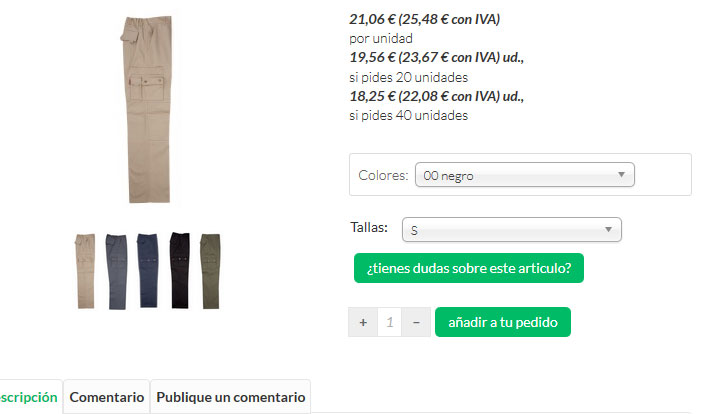
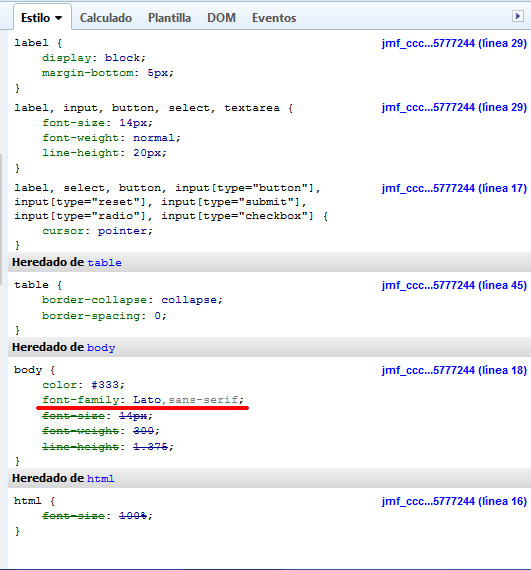
I'm testing the new template in local, so you can't see live page. I send you 2 screenshots: 1 with product page and 2 with css rules applied to it (I use firebug for it).
As you can see, label inherits font-family from body, but in fact it is not true. And this is my problem: I can handle css with "normal" fonts, but I don't know how to do with google fonts.
I'm not a newbie, but my skills are very limited. I'm just amateur and any help will be wellcome
I'm testing the new template in local, so you can't see live page. I send you 2 screenshots: 1 with product page and 2 with css rules applied to it (I use firebug for it).
As you can see, label inherits font-family from body, but in fact it is not true. And this is my problem: I can handle css with "normal" fonts, but I don't know how to do with google fonts.
I'm not a newbie, but my skills are very limited. I'm just amateur and any help will be wellcome
Please Log in or Create an account to join the conversation.
11 years 3 months ago #207070
by lousyfool
I'm not sure what your problem is with Google fonts. Once such font is loaded on the site, it can be applied with the font-family property just like any standard web font. You actually see how it's done in Firebug, you're having the complete property on your screen, and more so, you actually highlighted it in the screenshot...!!! It can't be more obvious, or?
So, choose the selector, in this case "label", and apply the property you already found:
Since you're "not a newbie", you know you can even test it in Firebug. And you know, that if it doesn't apply, you'll need to add !important and/or classes or ID to give it priority. And you know that you'll need to turn file compression and caches off during the modification, if you have any of it on.
Need help with customisations of layouts, style or other site development? PM me!
(Don't forget to turn on "E-mail notification of new messages" )
Replied by lousyfool on topic css in custom fields
pymgym wrote: I can handle css with "normal" fonts, but I don't know how to do with google fonts.
I'm not sure what your problem is with Google fonts. Once such font is loaded on the site, it can be applied with the font-family property just like any standard web font. You actually see how it's done in Firebug, you're having the complete property on your screen, and more so, you actually highlighted it in the screenshot...!!! It can't be more obvious, or?
So, choose the selector, in this case "label", and apply the property you already found:
Code:
font-family: Lato,sans-serif;
Since you're "not a newbie", you know you can even test it in Firebug. And you know, that if it doesn't apply, you'll need to add !important and/or classes or ID to give it priority. And you know that you'll need to turn file compression and caches off during the modification, if you have any of it on.
Need help with customisations of layouts, style or other site development? PM me!
(Don't forget to turn on "E-mail notification of new messages" )
Please Log in or Create an account to join the conversation.
11 years 3 months ago #207085
by pymgym
Replied by pymgym on topic css in custom fields
I already did all you told me. I tested it in firefox, explorer and chrome.
what I wanted to say with "normal" fonts is I can change label font to arial, verdana, times new roman, etc... and label font changes with no problems. but nothing occurs with Lato font
what I wanted to say with "normal" fonts is I can change label font to arial, verdana, times new roman, etc... and label font changes with no problems. but nothing occurs with Lato font
Please Log in or Create an account to join the conversation.
11 years 3 months ago #207091
by lousyfool
Need help with customisations of layouts, style or other site development? PM me!
(Don't forget to turn on "E-mail notification of new messages" )
Replied by lousyfool on topic css in custom fields
Looking at your screenshot again, I can't even see where Lato is not applied in the part of the product page you're showing.
Plus your browser console is not showing a different font in use for any element in the console screenshot.
But maybe you are seeing something I don't, or the console screenshot is wrong, or a different element was marked when the console screenshot was taken, or whatever.
If there is really a <label> or else appearing in a font different from Lato, first try to simulate changing its font in the browser console. (I can't explain more on this here, it's a thousand times elsewhere on the web incl the link I gave you.)
Then take that CSS and add it to the proper custom CSS file. Best copy & paste the entire rule to avoid syntax errors.
If it still all won't work, you're either not turning off the file compression (which you seemed to have on since all seemed to be in the same CSS file when you took the screenshot, but which should always be turned off during development), or using the wrong CSS file or the wrong location in it, or have a syntax error in the selector or property, or are giving the property not the priority it needs to override whatever is set somewhere before or after.
Only you know about the first potential sources of error. So, I can only shoot for the last two. Try this CSS at the very end of whatever custom CSS file you are using:
If this doesn't work, I can only repeat myself: no one can say anything more without seeing the page in question live. So, then maybe get back here once the site is accessible on a web server - with a link to the page and a word on what to look for.
Plus your browser console is not showing a different font in use for any element in the console screenshot.
But maybe you are seeing something I don't, or the console screenshot is wrong, or a different element was marked when the console screenshot was taken, or whatever.
If there is really a <label> or else appearing in a font different from Lato, first try to simulate changing its font in the browser console. (I can't explain more on this here, it's a thousand times elsewhere on the web incl the link I gave you.)
Then take that CSS and add it to the proper custom CSS file. Best copy & paste the entire rule to avoid syntax errors.
If it still all won't work, you're either not turning off the file compression (which you seemed to have on since all seemed to be in the same CSS file when you took the screenshot, but which should always be turned off during development), or using the wrong CSS file or the wrong location in it, or have a syntax error in the selector or property, or are giving the property not the priority it needs to override whatever is set somewhere before or after.
Only you know about the first potential sources of error. So, I can only shoot for the last two. Try this CSS at the very end of whatever custom CSS file you are using:
Code:
label {
font-family: Lato,sans-serif !important;
}
If this doesn't work, I can only repeat myself: no one can say anything more without seeing the page in question live. So, then maybe get back here once the site is accessible on a web server - with a link to the page and a word on what to look for.
Need help with customisations of layouts, style or other site development? PM me!
(Don't forget to turn on "E-mail notification of new messages" )
The following user(s) said Thank You: pymgym
Please Log in or Create an account to join the conversation.
11 years 3 months ago #207092
by pymgym
Replied by pymgym on topic css in custom fields
:blush: :blush: :blush: :blush: :blush:
I feel really, really stupid.
the only problem was the font-weight rule. it was different for options label and custom label. And I thought it was a different font.
I am very ashamed. :blush: :blush: :blush: :blush:
Forgive me in the time that I made to you lose.
I feel really, really stupid.
the only problem was the font-weight rule. it was different for options label and custom label. And I thought it was a different font.
I am very ashamed. :blush: :blush: :blush: :blush:
Forgive me in the time that I made to you lose.
Please Log in or Create an account to join the conversation.

11 years 3 months ago #207087
by nicolas
Replied by nicolas on topic css in custom fields
We really need to analyze the issue directly on the page, otherwise, both you and us are wasting time with all the back and forth.
I would recommend that you come back to the issue once you put the website online so that we'll be able to analyze the problem.
I would recommend that you come back to the issue once you put the website online so that we'll be able to analyze the problem.
Please Log in or Create an account to join the conversation.
11 years 3 months ago #207178
by pymgym
Replied by pymgym on topic css in custom fields
thanks Nicolas,
I'll do it
I'll do it
Please Log in or Create an account to join the conversation.
Time to create page: 0.303 seconds