
- Posts: 73
- Thank you received: 0
HikaShop Module Options
11 years 2 months ago - 11 years 2 months ago #208074
by sokartch
HikaShop Module Options was created by sokartch
-- HikaShop version -- : 2.5.0
Hello
I am a full day at the following problem:
- New modules
- HikaShop Modules Content Display for HikaShop
- Enter Module Name
- HikaShop Options
- For example, "Show title" "Yes / No" do not change te state on click. Example "Yes" is active. Click on "No" nothing happens. When I click on "Save" then also "Show Title" änderst to "No". I mostly use Firefox. On the first day I tried it with Chrome and it went. Not any longer longer. I deleted Joomla session cache also. It just will not! Whatever Categorie I set it always shows the same although always "Successfully Saved" is displayed. And always categories, never products.
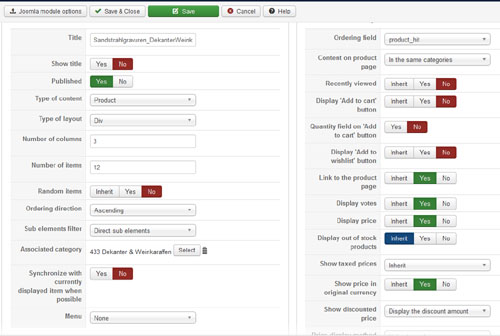
Hello
I am a full day at the following problem:
- New modules
- HikaShop Modules Content Display for HikaShop
- Enter Module Name
- HikaShop Options
- For example, "Show title" "Yes / No" do not change te state on click. Example "Yes" is active. Click on "No" nothing happens. When I click on "Save" then also "Show Title" änderst to "No". I mostly use Firefox. On the first day I tried it with Chrome and it went. Not any longer longer. I deleted Joomla session cache also. It just will not! Whatever Categorie I set it always shows the same although always "Successfully Saved" is displayed. And always categories, never products.
Last edit: 11 years 2 months ago by sokartch.
Please Log in or Create an account to join the conversation.

11 years 2 months ago - 11 years 2 months ago #208091
by lousyfool
Need help with customisations of layouts, style or other site development? PM me!
(Don't forget to turn on "E-mail notification of new messages" )
Replied by lousyfool on topic HikaShop Module Options
Hi,
I've also noticed that since 2.5.0 there's a slight problem with the display of button states in this section, and the same is true for menu item edition and the three buttons there for "Show image", "Show description" and "Published", too. All other buttons work fine.
However, I figured it's only the display of the button state. If you click on the alternate (grey) button, the buttons don't change their state very clearly but only very slightly - see here:
Before:
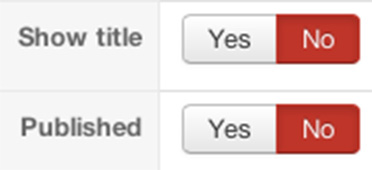
After:
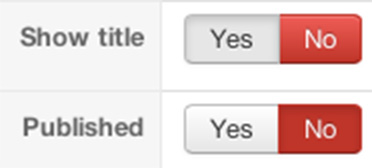
Notice the slight change in the bevelling and color of both grey and red buttons.
As you say, the function works fine, actually. So, I didn't dig deeper, but got used to it: as you say, just click the grey button, then "Save", and the page will return with desired and correct button states.
Latest now since it's mentioned here, I bet HikaShop peeps are going to fix it for the next version. Meanwhile, the important thing is that you didn't lose functionality.
I've also noticed that since 2.5.0 there's a slight problem with the display of button states in this section, and the same is true for menu item edition and the three buttons there for "Show image", "Show description" and "Published", too. All other buttons work fine.
However, I figured it's only the display of the button state. If you click on the alternate (grey) button, the buttons don't change their state very clearly but only very slightly - see here:
Before:
After:
Notice the slight change in the bevelling and color of both grey and red buttons.
As you say, the function works fine, actually. So, I didn't dig deeper, but got used to it: as you say, just click the grey button, then "Save", and the page will return with desired and correct button states.
Latest now since it's mentioned here, I bet HikaShop peeps are going to fix it for the next version. Meanwhile, the important thing is that you didn't lose functionality.
Need help with customisations of layouts, style or other site development? PM me!
(Don't forget to turn on "E-mail notification of new messages" )
Last edit: 11 years 2 months ago by lousyfool.
Please Log in or Create an account to join the conversation.

11 years 2 months ago #208098
by Jerome
Jerome - Obsidev.com
HikaMarket & HikaSerial developer / HikaShop core dev team.
Replied by Jerome on topic HikaShop Module Options
Hi,
It's a fix we made 2-3 weeks ago in the file "administrator/components/com_hikashop/helpers/joomla30.php"
By
so if the "booleanlist" already have some HTML class in his parameters, it does not break the classes that we are trying to add.
And for an unknown reason, some boolean selectors in the modules/menus have classes (a rest from old versions).
Regards,
It's a fix we made 2-3 weeks ago in the file "administrator/components/com_hikashop/helpers/joomla30.php"
Code:
if(!empty($obj->class)) {
$extra .= ' class="'.$obj->class.'"';
}
Code:
if(!empty($obj->class)) {
if(strpos($extra, 'class="') === false)
$extra .= ' class="'.$obj->class.'"';
else
$extra = str_replace('class="', 'class="'.$obj->class.' ', $extra);
}
And for an unknown reason, some boolean selectors in the modules/menus have classes (a rest from old versions).
Regards,
Jerome - Obsidev.com
HikaMarket & HikaSerial developer / HikaShop core dev team.
Please Log in or Create an account to join the conversation.
Time to create page: 0.161 seconds