

- Posts: 58
- Thank you received: 2
Custom fields that are product based
11 years 1 month ago #210985
by rcadmin
Custom fields that are product based was created by rcadmin
-- HikaShop version -- : 2.5.0
Is it possible to have custom fields per item purchased eg We want students to pay for a rugby tour. We therefore create a product called "Rugby Tour". A parent can then purchase one for each child. At checkout is there a way to assign a different name to each tour purchased?
Is it possible to have custom fields per item purchased eg We want students to pay for a rugby tour. We therefore create a product called "Rugby Tour". A parent can then purchase one for each child. At checkout is there a way to assign a different name to each tour purchased?
Please Log in or Create an account to join the conversation.

11 years 1 month ago #210998
by Xavier
Replied by Xavier on topic Custom fields that are product based
Hi,
Yes you have to create custom product fields. This way, when adding a product to the cart the parents can fill the name of the child, so each product will have a name attached.
Yes you have to create custom product fields. This way, when adding a product to the cart the parents can fill the name of the child, so each product will have a name attached.
Please Log in or Create an account to join the conversation.
11 years 1 month ago #211126
by rcadmin
Replied by rcadmin on topic Custom fields that are product based
I created the following fields
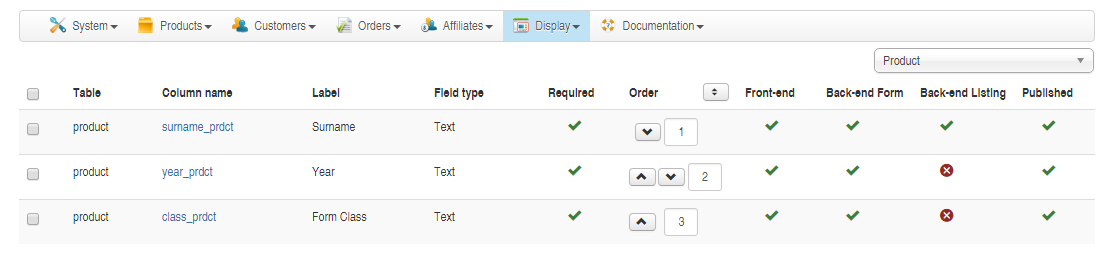
But when you go through checkout, after shopping at www.rosmini.school.nz/community/shop you are not asked to enter any information.
But when you go through checkout, after shopping at www.rosmini.school.nz/community/shop you are not asked to enter any information.
Please Log in or Create an account to join the conversation.
11 years 1 month ago #211134
by Xavier
Replied by Xavier on topic Custom fields that are product based
Hi,
My bad, the fields to use are the custom itemfields...
This way on the product detail page the customer will be able to enter the desired informations directly.
Be sure that the option "Display custom item fields" is enabled in Configuration > Display > Product.
My bad, the fields to use are the custom itemfields...
This way on the product detail page the customer will be able to enter the desired informations directly.
Be sure that the option "Display custom item fields" is enabled in Configuration > Display > Product.
The following user(s) said Thank You: rcadmin
Please Log in or Create an account to join the conversation.
11 years 1 month ago #211198
by rcadmin
Replied by rcadmin on topic Custom fields that are product based
That that worked.... but I have now exposed a new problem with the way I have configured things:
www.hikashop.com/support/forum/install-u...-options.html#211197
Please Log in or Create an account to join the conversation.
Time to create page: 0.207 seconds