

- Posts: 128
- Thank you received: 3
Update product total price with quantity & option
11 years 1 month ago - 11 years 1 month ago #211662
by deuce4884
Update product total price with quantity & option was created by deuce4884
-- HikaShop version -- : 2.5.4
-- Joomla version -- : 3.4.1
-- PHP version -- : 5.3.24
I have created a product that has multiple prices based on quantity (see attached screenshot). I have found a way to display the prices based on the minimum quantities instead of per unit by editing Hikashop->Display->Views->product/listing_price.php where it has:
To:
The problem I'm having is when you land on the page I would like it to show the price for 250 next to "Price with options:" instead of $0.00. I then also need it to update that price on quantity change and option change. For instance:
quantity of 500 with option as yes would display $65.00
quantity of 2000 with option as no would display $200.00
etc.
Right now the price is not updating at all, except if you change the option and then it is per unit ($0.02). What do I need to edit to make this happen.
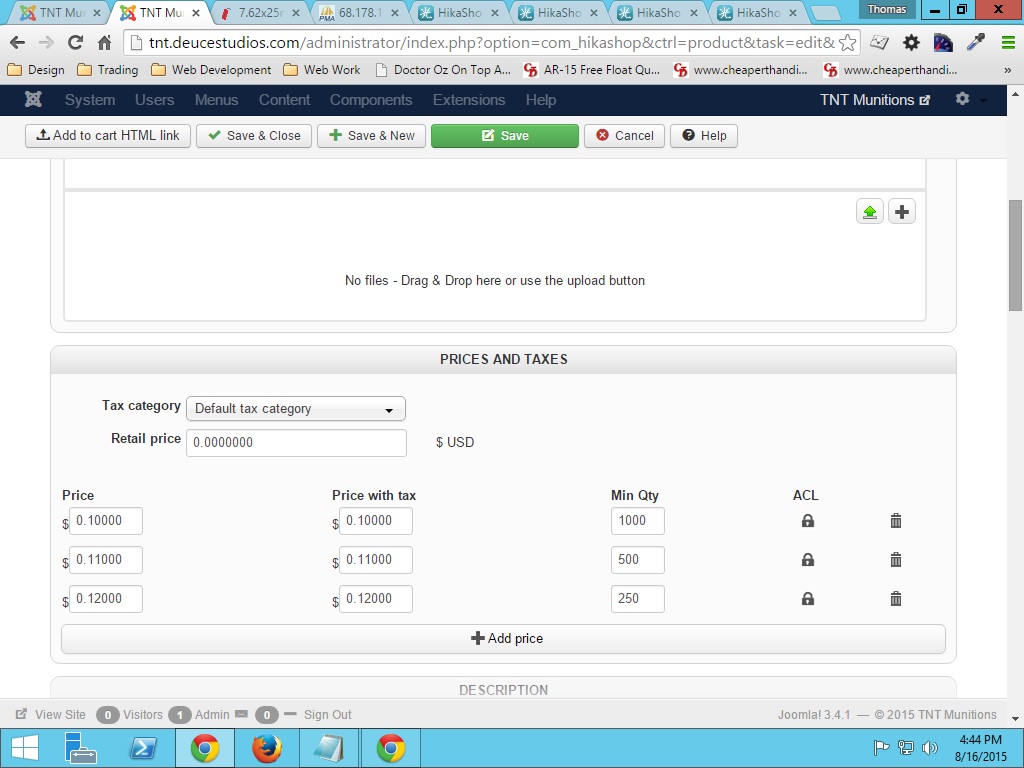
-- Joomla version -- : 3.4.1
-- PHP version -- : 5.3.24
I have created a product that has multiple prices based on quantity (see attached screenshot). I have found a way to display the prices based on the minimum quantities instead of per unit by editing Hikashop->Display->Views->product/listing_price.php where it has:
Code:
echo '<span class="'.implode(' ',$classes).'">';
if($this->params->get('price_with_tax')){
echo $this->currencyHelper->format(@$price->price_value_with_tax,$price->price_currency_id);
}
if($this->params->get('price_with_tax')==2){
echo JText::_('PRICE_BEFORE_TAX');
}
if($this->params->get('price_with_tax')==2||!$this->params->get('price_with_tax')){
echo $this->currencyHelper->format(@$price->price_value,$price->price_currency_id);
}
To:
Code:
echo '<span class="'.implode(' ',$classes).'">';
if($this->params->get('price_with_tax')){
echo $this->currencyHelper->format(@$price->price_value_with_tax*$price->price_min_quantity,$price->price_currency_id);
}
if($this->params->get('price_with_tax')==2){
echo JText::_('PRICE_BEFORE_TAX');
}
if($this->params->get('price_with_tax')==2||!$this->params->get('price_with_tax')){
echo $this->currencyHelper->format(@$price->price_value*$price->price_min_quantity,$price->price_currency_id);
}
The problem I'm having is when you land on the page I would like it to show the price for 250 next to "Price with options:" instead of $0.00. I then also need it to update that price on quantity change and option change. For instance:
quantity of 500 with option as yes would display $65.00
quantity of 2000 with option as no would display $200.00
etc.
Right now the price is not updating at all, except if you change the option and then it is per unit ($0.02). What do I need to edit to make this happen.
Last edit: 11 years 1 month ago by deuce4884. Reason: Forgot url for product in question
Please Log in or Create an account to join the conversation.

11 years 1 month ago #211674
by nicolas
Replied by nicolas on topic Update product total price with quantity & option
Hi,
There is no system to take into account the quantity entered in the display of the price.
That will require complex javascript code to be added to the view.
Mainly in the "option" view file (to have the "price with options" calculus take into account the quantity) but also in the "show_quantity" view file (to have the modification of the quantity input trigger the recalculation of the price with options).
There is no system to take into account the quantity entered in the display of the price.
That will require complex javascript code to be added to the view.
Mainly in the "option" view file (to have the "price with options" calculus take into account the quantity) but also in the "show_quantity" view file (to have the modification of the quantity input trigger the recalculation of the price with options).
Please Log in or Create an account to join the conversation.
11 years 1 month ago - 11 years 1 month ago #211708
by deuce4884
Replied by deuce4884 on topic Update product total price with quantity & option
So, am I correct in assuming that at this time a customer cannot see the total price of the quantity and options they have selected for a product before adding it to the cart? If so, what does the javascript function "hikashopChangeOption()" do?
edit: I just did some digging and I noticed that the input id="hikashop_price_product_158" value="0" (see attached screenshot).
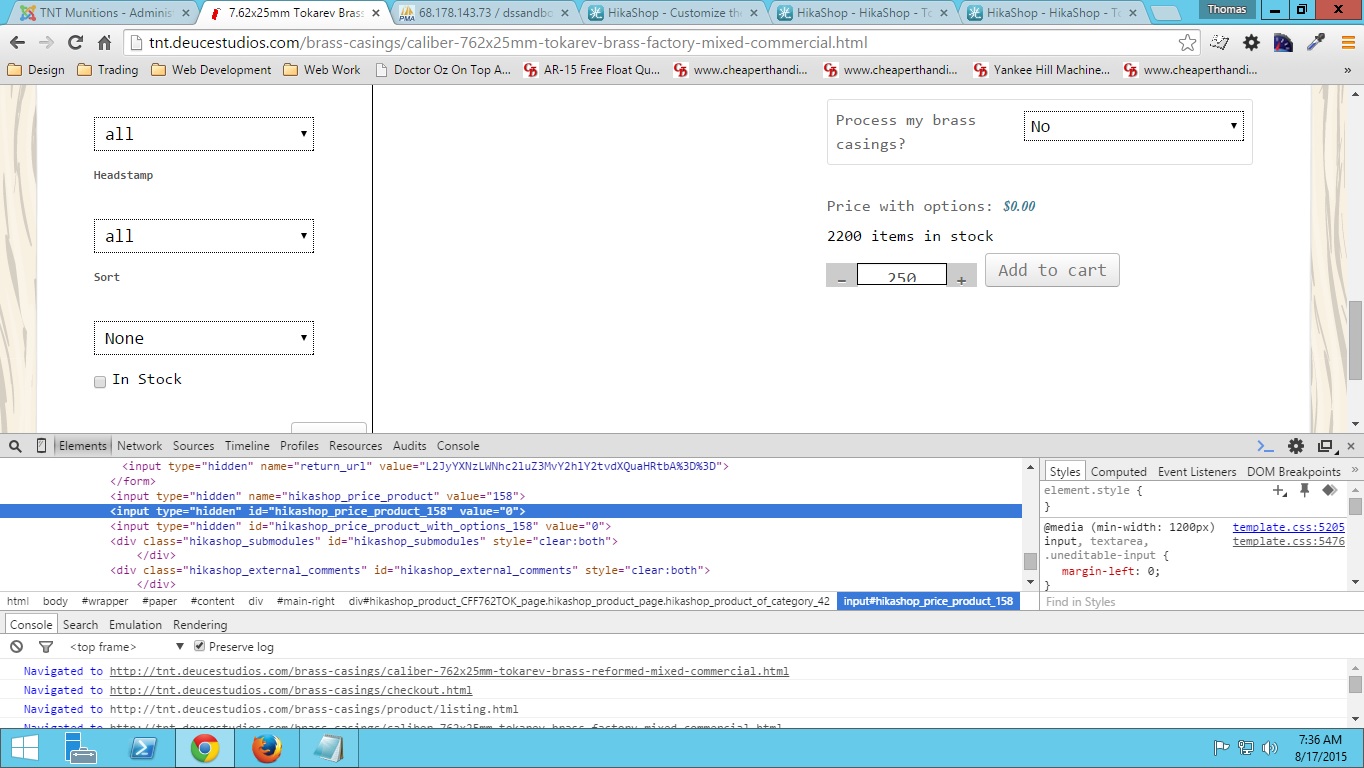
I think this may be part of the problem because I would think the value should = 0.12. Am I wrong?
edit: I just did some digging and I noticed that the input id="hikashop_price_product_158" value="0" (see attached screenshot).
I think this may be part of the problem because I would think the value should = 0.12. Am I wrong?
Last edit: 11 years 1 month ago by deuce4884. Reason: noticed something in code
Please Log in or Create an account to join the conversation.
11 years 1 month ago #211714
by nicolas
Replied by nicolas on topic Update product total price with quantity & option
Hi,
1. That's correct.
2. The hikashopChangeOption function will display the price of the unit price of the product with all the options unit price added up. So it takes into account the options you selected and the variants selected, but not the quantity you entered. You can see an example on our demo website here:
demo.hikashop.com/index.php/en/hikashop/...ct-page/with-options
1. That's correct.
2. The hikashopChangeOption function will display the price of the unit price of the product with all the options unit price added up. So it takes into account the options you selected and the variants selected, but not the quantity you entered. You can see an example on our demo website here:
demo.hikashop.com/index.php/en/hikashop/...ct-page/with-options
Please Log in or Create an account to join the conversation.
11 years 1 month ago #211764
by deuce4884
Replied by deuce4884 on topic Update product total price with quantity & option
The hikshopChangeOption function is not summing correctly for the product in question and I believe it is because of what I mentioned above.
For some reason the appropriate unit price is not in that input's value. Sorry to be such a bother but I really need to figure out a way to make this work and update based on quantity and option. Your help is greatly appreciated.
deuce4884 wrote:
edit: I just did some digging and I noticed that the input id="hikashop_price_product_158" value="0" (see attached screenshot).
I think this may be part of the problem because I would think the value should = 0.12. Am I wrong?
For some reason the appropriate unit price is not in that input's value. Sorry to be such a bother but I really need to figure out a way to make this work and update based on quantity and option. Your help is greatly appreciated.
Please Log in or Create an account to join the conversation.
11 years 1 month ago #211838
by deuce4884
Replied by deuce4884 on topic Update product total price with quantity & option
I've been looking into this some more and I come across something in the Views->product/show.php file that I have a question about. Lines 126-132:
Why is it if($price->price_min_quantity<=1)? This is the reason I'm getting 0 as a value for the input I mentioned earlier in this thread. For this product all values of $price->price_min_quantity are greater than 1. They are 250, 500, 1000. Maybe I'm just missing something here though.
Code:
if($price->price_min_quantity<=1){
if($this->params->get('price_with_tax')){
$priceUsed = $price->price_value_with_tax;
} else {
$priceUsed = $price->price_value;
}
}
Why is it if($price->price_min_quantity<=1)? This is the reason I'm getting 0 as a value for the input I mentioned earlier in this thread. For this product all values of $price->price_min_quantity are greater than 1. They are 250, 500, 1000. Maybe I'm just missing something here though.
Please Log in or Create an account to join the conversation.
11 years 1 month ago #211872
by nicolas
Replied by nicolas on topic Update product total price with quantity & option
Hi,
As I said, the system uses the unit price. As you didn't enter any on your product, you get that result.
Add a new price line with a min qty of 1 in your product and you'll see that the system will take it.
If you want to change the code there to use another price_min_quantity, you can do it, but again, the system isn't made to update the base price when you change the quantity of the product, so even though it might be a bit better it won't be perfect on your website with the way your products are configured.
As I said, the system uses the unit price. As you didn't enter any on your product, you get that result.
Add a new price line with a min qty of 1 in your product and you'll see that the system will take it.
If you want to change the code there to use another price_min_quantity, you can do it, but again, the system isn't made to update the base price when you change the quantity of the product, so even though it might be a bit better it won't be perfect on your website with the way your products are configured.
Please Log in or Create an account to join the conversation.
11 years 1 month ago - 11 years 1 month ago #211882
by deuce4884
Replied by deuce4884 on topic Update product total price with quantity & option
I understand what you mean by the unit price of 1 now. Is there anyway I could do what I want by setting up an AJAX call to retrieve the appropriate price and overwrite the value of that input. I was thinking about something like:
in the Views->option.php file (I'm really not sure if the new Ajax is setup right). Then create a function that retrieves the appropriate price dependent upon qty and price_id. Something like:
If this would work where would be the best place to this function to avoid being overwritten on update? Once the value is retrieved I can sum it up. I could then call the function hikashopAjaxQtyPriceId onclick and onchange with the quantity and options. Again I really appreciate you guys helping me. Would any of this work for what I'm wanting to do?
Code:
$js =
"function hikashopAjaxQtyPriceId(){
var qty = document.getElementById('hikashop_product_quantity_field_1').value;
var price_id = document.getElementById('hikashop_price_product').value;
if(qty && price_id){
try{
new Ajax('path_/to_/file_/that_/contains_/function.php?qty='+qty+'&price_id='+price_id, { method: 'get', onComplete: function(result) { var thisQtyPrice = window.document.getElementById('hikashop_price_product_'+price_id); if(thisQtyPrice) thisQtyPrice.value = result;}}).request();
}catch(err){
new Request({url:'path_/to_/file_/that_/contains_/function.php?qty='+qty+'&price_id='+price_id, method: 'get', onComplete: function(result) { var thisQtyPrice = window.document.getElementById('hikashop_price_product_'+price_id); if(thisQtyPrice) thisQtyPrice.value = result;}}).send();
}
}
}
window.hikashop.ready(function(){hikashopAjaxQtyPriceId();});
";
if(!HIKASHOP_PHP5)
$doc =& JFactory::getDocument();
else
$doc = JFactory::getDocument();
$doc->addScriptDeclaration("\n<!--\n".$js."\n//-->\n");
Code:
//Request variables
$qty = $_GET['qty'];
$price_id = $_GET['price_id'];
function ajax(){
// Get a db connection.
$db = JFactory::getDbo();
// Create a new query object.
$query = $db->getQuery(true);
// Select appropriate price
$query->select('MIN(price_value)');
$query->from($db->quoteName('#__hikashop_price'));
$query->where($db->quoteName('price_product_id').' = '. $db->quote($price_id).' AND '.$db->quoteName('price_min_quantity').' <= '. $db->quote($qty));
// Reset the query using our newly populated query object.
$db->setQuery($query);
// Load the result
$result = $db->loadResult();
echo $result;
}
Last edit: 11 years 1 month ago by deuce4884. Reason: edited code
Please Log in or Create an account to join the conversation.
11 years 1 month ago #211953
by nicolas
Replied by nicolas on topic Update product total price with quantity & option
Hi,
Yes, this would work.
Regarding the javascript code, you can add it to one of the files of the product view.
The best is to do it via the menu Display>Views of HikaShop (for example, in the show_default view file). When you change stuff there, the changes are saved as view overrides so you won't loose them when you update HikaShop.
Yes, this would work.
Regarding the javascript code, you can add it to one of the files of the product view.
The best is to do it via the menu Display>Views of HikaShop (for example, in the show_default view file). When you change stuff there, the changes are saved as view overrides so you won't loose them when you update HikaShop.
Please Log in or Create an account to join the conversation.
11 years 1 month ago - 11 years 1 month ago #212002
by deuce4884
Replied by deuce4884 on topic Update product total price with quantity & option
I'm still not getting the value I need. I'm sure it's me doing something wrong, but I'm not sure what it is since I've never done anything exactly like this before. I've created a new view from product/show_default.php called show_brass_casings.php. At the beginning of that view I have:
I then created a file at the root of my template folder called ajax_qty_price_id.php. Here is the entire code of that:
I'm very new to this type of Ajax call. Is this from PrototypeJS? I'm wondering if something may be wrong with the ajax or the php file itself. Any suggestions?
Code:
$app = JFactory::getApplication();
$js =
"function hikashopAjaxQtyPriceId(){
var qty = document.getElementById('hikashop_product_quantity_field_1').value;
var price_id = document.getElementById('hikashop_price_product').value;
if(qty && price_id){
try{
new Ajax('".JURI::base()."template/".$app->getTemplate()."ajax_qty_price_id.php?qty='+qty+'&price_id='+price_id, { method: 'get', onComplete: function(result) { var thisQtyPrice = window.document.getElementById('hikashop_price_product_'+price_id); if(thisQtyPrice) thisQtyPrice.value = result;}}).request();
}catch(err){
new Request({url:'".JURI::base()."template/".$app->getTemplate()."ajax_qty_price_id.php?qty='+qty+'&price_id='+price_id, method: 'get', onComplete: function(result) { var thisQtyPrice = window.document.getElementById('hikashop_price_product_'+price_id); if(thisQtyPrice) thisQtyPrice.value = result;}}).send();
}
}
}
window.hikashop.ready(function(){hikashopAjaxQtyPriceId();});
";
if(!HIKASHOP_PHP5)
$doc =& JFactory::getDocument();
else
$doc = JFactory::getDocument();
$doc->addScriptDeclaration("\n<!--\n".$js."\n//-->\n");
Code:
<?php
defined('_JEXEC') or die('Resticted access');
//Request variables
$request = JFactory::getApplication()->input;
$qty = $request->get->get('qty');
$price_id = $request->get->get('price_id');
// Get a db connection.
$db = JFactory::getDbo();
// Create a new query object.
$query = $db->getQuery(true);
// Select all records from the user profile table where key begins with "custom.".
// Order it by the ordering field.
$query->select('MIN(price_value)');
$query->from($db->quoteName('#__hikashop_price'));
$query->where($db->quoteName('price_product_id').' = '. $db->quote($price_id).' AND '.$db->quoteName('price_min_quantity').' <= '. $db->quote($qty));
// Reset the query using our newly populated query object.
$db->setQuery($query);
// Load the results as a list of stdClass objects (see later for more options on retrieving data).
$result = $db->loadResult();
echo $result;
?>
Last edit: 11 years 1 month ago by deuce4884.
Please Log in or Create an account to join the conversation.
11 years 1 month ago #212032
by nicolas
Replied by nicolas on topic Update product total price with quantity & option
Hi,
The ajax call seems fine and I don't see any js error.
So there must be an issue with the if:
if(qty && price_id){
either qty or price_id are false and thus the ajax call is not done.
I would recommend to add some alerts there to see what is in these variables and go from there.
The ajax call seems fine and I don't see any js error.
So there must be an issue with the if:
if(qty && price_id){
either qty or price_id are false and thus the ajax call is not done.
I would recommend to add some alerts there to see what is in these variables and go from there.
The following user(s) said Thank You: deuce4884
Please Log in or Create an account to join the conversation.
11 years 1 month ago #212100
by deuce4884
Replied by deuce4884 on topic Update product total price with quantity & option
Hey Nicolas,
I just thought you may want to know where I stand on this issue we've been working on. For security reasons I developed an Ajax plugin and now have it functioning as I intended. It's kind of a round about way to do something but it works. I have attached the plugin to this post, so you can check that out and any of the product pages i mentioned earlier in the thread. Notes about everything are in the installation.txt file. Thanks for all your help and pointing me in the right direction.
I just thought you may want to know where I stand on this issue we've been working on. For security reasons I developed an Ajax plugin and now have it functioning as I intended. It's kind of a round about way to do something but it works. I have attached the plugin to this post, so you can check that out and any of the product pages i mentioned earlier in the thread. Notes about everything are in the installation.txt file. Thanks for all your help and pointing me in the right direction.
This attachment is hidden for guests.
Please log in or register to see it.
Please log in or register to see it.
The following user(s) said Thank You: nicolas
Please Log in or Create an account to join the conversation.

10 years 11 months ago #216878
by sarah0173
Replied by sarah0173 on topic Update product total price with quantity & option
Thank you for the plugin... I followed the instructions, but it doesn't work for me... When i select a quantity, the price does not change... Is there anything i have to do in the admin configuration to make it work ?
Please Log in or Create an account to join the conversation.
10 years 11 months ago #216912
by deuce4884
Replied by deuce4884 on topic Update product total price with quantity & option
Hey Sarah,
Sorry the plugin isn't working for you. I'm assuming you are using the latest versions of Joomla and Hikashop Business. The plugin was developed on Joomla 3.4.1 and Hikashop 2.5.4. I did not have to do any special admin configuration to make it work. However, I have worked on some of the javascript functions for this plugin to allow it to work for products that have characteristics and options and have just finished putting together the new install instructions. I have attached the new version to this post. So, if you want remove the old version including all the view customizations you made and install the new version and go through the new install instructions. If it still doesn't work reply back with a webpage that's giving you problems and I'll try to help.
Sorry the plugin isn't working for you. I'm assuming you are using the latest versions of Joomla and Hikashop Business. The plugin was developed on Joomla 3.4.1 and Hikashop 2.5.4. I did not have to do any special admin configuration to make it work. However, I have worked on some of the javascript functions for this plugin to allow it to work for products that have characteristics and options and have just finished putting together the new install instructions. I have attached the new version to this post. So, if you want remove the old version including all the view customizations you made and install the new version and go through the new install instructions. If it still doesn't work reply back with a webpage that's giving you problems and I'll try to help.
This attachment is hidden for guests.
Please log in or register to see it.
Please log in or register to see it.
Please Log in or Create an account to join the conversation.
10 years 11 months ago #216919
by sarah0173
Replied by sarah0173 on topic Update product total price with quantity & option
Really thank you... But i have an error : Parse error: syntax error, unexpected 'var' (T_VAR) in ... com_hikashop\product\show_quantity.php on line 20
Line 20 : var variant=variantId.split('_');
Line 20 : var variant=variantId.split('_');
Please Log in or Create an account to join the conversation.
10 years 11 months ago #216921
by sarah0173
Replied by sarah0173 on topic Update product total price with quantity & option
the problem is in that line var variantId = jQuery('#'+field+'').parents('[id*=hikashop_product_quantity_]').attr('id');
but i don't see where
but i don't see where
Please Log in or Create an account to join the conversation.
10 years 11 months ago #216922
by deuce4884
Replied by deuce4884 on topic Update product total price with quantity & option
I see the problem. It's my fault. I made a simple mistake in the install directions. Change $js = ' to $js = " and that should fix it.
Please Log in or Create an account to join the conversation.
10 years 11 months ago - 10 years 11 months ago #216923
by sarah0173
Replied by sarah0173 on topic Update product total price with quantity & option
silly me... fixed, thank you.
But still not working, nothing happen when i select the quantity... to sad...
Really thank you for what you've done so far.
But still not working, nothing happen when i select the quantity... to sad...
Really thank you for what you've done so far.
Last edit: 10 years 11 months ago by sarah0173.
Please Log in or Create an account to join the conversation.
10 years 11 months ago #216924
by deuce4884
Replied by deuce4884 on topic Update product total price with quantity & option
if you will give me a link to the page in question I'll take a look at it and see if I can see what may be the problem
Please Log in or Create an account to join the conversation.
10 years 11 months ago #216950
by sarah0173
Replied by sarah0173 on topic Update product total price with quantity & option
Really... THANK YOU !
Here the link : creasavoie.com/levivier/drive-en-ligne/p...-blanc-de-ligne.html
Here the link : creasavoie.com/levivier/drive-en-ligne/p...-blanc-de-ligne.html
Please Log in or Create an account to join the conversation.
Time to create page: 0.379 seconds