
- Posts: 34
- Thank you received: 0
Category list show products
- co88agency
-
 Topic Author
- Offline
Less
More
11 years 2 weeks ago - 11 years 2 weeks ago #214794
by co88agency
Category list show products was created by co88agency
-- HikaShop version -- : 2.5.0
-- Joomla version -- : 3.4.4
-- PHP version -- : 5.5.29
-- Browser(s) name and version -- : All browsers
-- Error-message(debug-mod must be tuned on) -- : No errors
Hi,
If I choose a menu item listing category under the category list also show products. I do not want to display them, how can I do it? I want that page only shows the categories and not products.
In the attached categories are circled in red and products that I don't want to show are in blue.
And... I don't want "Additional information" and "Reviews" tabs in product page... how can I do it?
Thanks.
Best regards,
Loredana
-- Joomla version -- : 3.4.4
-- PHP version -- : 5.5.29
-- Browser(s) name and version -- : All browsers
-- Error-message(debug-mod must be tuned on) -- : No errors
Hi,
If I choose a menu item listing category under the category list also show products. I do not want to display them, how can I do it? I want that page only shows the categories and not products.
In the attached categories are circled in red and products that I don't want to show are in blue.
And... I don't want "Additional information" and "Reviews" tabs in product page... how can I do it?
Thanks.
Best regards,
Loredana
Last edit: 11 years 2 weeks ago by co88agency.
Please Log in or Create an account to join the conversation.

11 years 2 weeks ago #214801
by nicolas
Replied by nicolas on topic Category list show products
Hi,
1. Go in the menu Display>content menus and edit your menu there.
In the products listing associated modules settings area, change the "sub element filter" setting from "all sub elements" to "direct sub elements" and that should do it.
2. Change the "layout on product page" setting of the HikaShop configuration to "default" instead of "tabular".
1. Go in the menu Display>content menus and edit your menu there.
In the products listing associated modules settings area, change the "sub element filter" setting from "all sub elements" to "direct sub elements" and that should do it.
2. Change the "layout on product page" setting of the HikaShop configuration to "default" instead of "tabular".
Please Log in or Create an account to join the conversation.
- co88agency
-
Topic Author
- Offline
Less
More
- Posts: 34
- Thank you received: 0
11 years 2 weeks ago #214923
by co88agency
Replied by co88agency on topic Category list show products
Hi,
Settings were already set like this so this is not the problem ... how can I do?
Thanks...
Settings were already set like this so this is not the problem ... how can I do?
Thanks...
Please Log in or Create an account to join the conversation.

11 years 2 weeks ago #214937
by Xavier
Replied by Xavier on topic Category list show products
Hi,
In the backend, do you have products assigned on the parent category of the displayed ones ?
If it is, you have to unassigned them from this category.
Are you sure that you don't have any product listing module associated to that menu ?
In the backend, do you have products assigned on the parent category of the displayed ones ?
If it is, you have to unassigned them from this category.
Are you sure that you don't have any product listing module associated to that menu ?
Please Log in or Create an account to join the conversation.
- co88agency
-
Topic Author
- Offline
Less
More
- Posts: 34
- Thank you received: 0
11 years 1 week ago - 11 years 1 week ago #215055
by co88agency
Replied by co88agency on topic Category list show products
Hi,
thank you for your reply. All product have a single category (like "Sughi italiani" "Creme", "Specialità"...), in attachment you can see my categories's tree.
I don't have product listing module associated to that menu but when I create that menu item it requires me an hikashop module.
Best regards
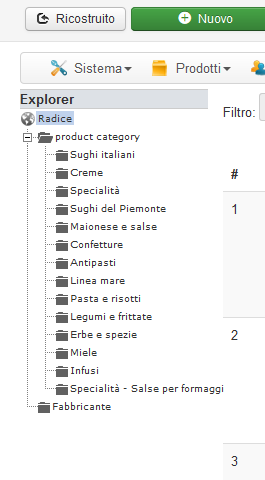
thank you for your reply. All product have a single category (like "Sughi italiani" "Creme", "Specialità"...), in attachment you can see my categories's tree.
I don't have product listing module associated to that menu but when I create that menu item it requires me an hikashop module.
Best regards
Last edit: 11 years 1 week ago by co88agency.
Please Log in or Create an account to join the conversation.
- co88agency
-
Topic Author
- Offline
Less
More
- Posts: 34
- Thank you received: 0
11 years 1 week ago #215063
by co88agency
Replied by co88agency on topic Category list show products
In attachment you can see my menu item panel. If I create module in that advise it display me product list after categories but if I don't create that module I can't see products inside categories's page.
Regards
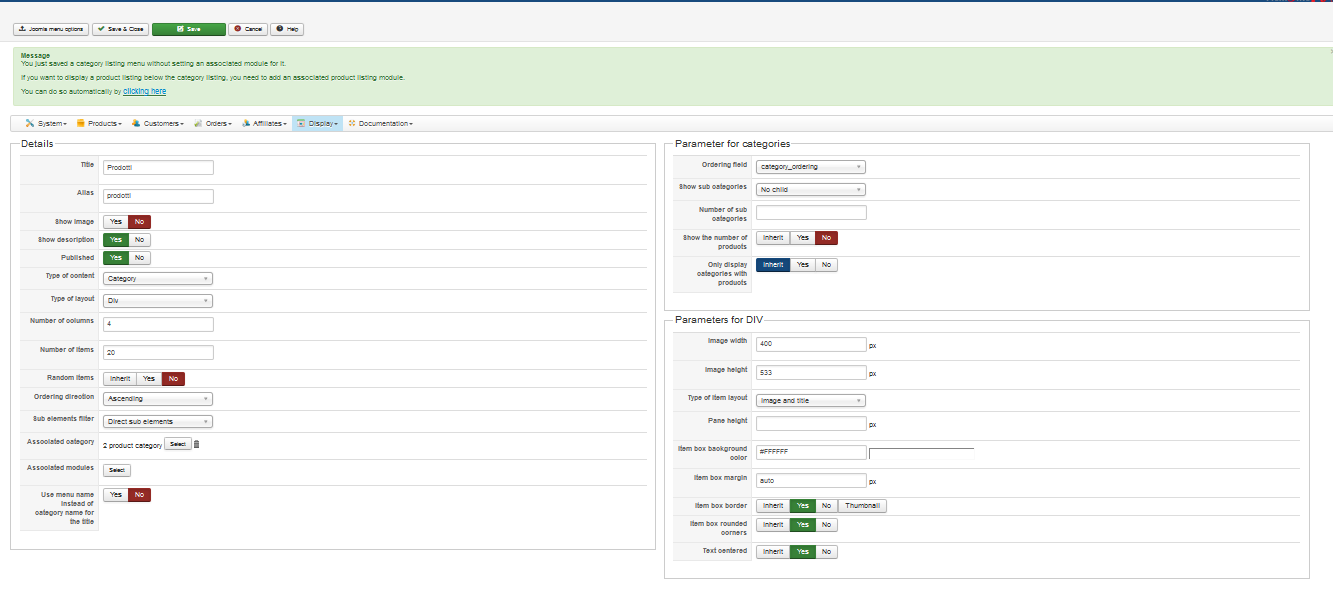
Regards
Please Log in or Create an account to join the conversation.
11 years 1 week ago #215070
by Xavier
Replied by Xavier on topic Category list show products
Hi,
Once the module is created, please give us a screenshot of this associated module settings.
The "Direct sub element" value for the option "Sub element filter" must be set on the module settings.
If that is the case and it still doesn't work as expected, so you can give us a backend access via our contact form, don't forget to give us the link to that topic in the message.
www.hikashop.com/support/contact-us.html
Once the module is created, please give us a screenshot of this associated module settings.
The "Direct sub element" value for the option "Sub element filter" must be set on the module settings.
If that is the case and it still doesn't work as expected, so you can give us a backend access via our contact form, don't forget to give us the link to that topic in the message.
www.hikashop.com/support/contact-us.html
Please Log in or Create an account to join the conversation.
Time to create page: 0.247 seconds