
- Posts: 90
- Thank you received: 2
Font size and boxes around category names
- BounceHouseOwner
-
 Topic Author
- Offline
Less
More
11 years 2 weeks ago #215030
by BounceHouseOwner
Font size and boxes around category names was created by BounceHouseOwner
-- url of the page with the problem -- :
www.boodlebouncers.com/index.php/hikasho...r-categories-listing
-- Joomla version -- : 3.3.1
-- Browser(s) name and version -- : Chrome
When there was an update, it changed the font in my category. The font is now very big and there are boxes around each category. I can't figure out how to change the font size nor can I figure out how to remove the boxes around the category name. (I'm not very savvy with websites)
-- Joomla version -- : 3.3.1
-- Browser(s) name and version -- : Chrome
When there was an update, it changed the font in my category. The font is now very big and there are boxes around each category. I can't figure out how to change the font size nor can I figure out how to remove the boxes around the category name. (I'm not very savvy with websites)
Please Log in or Create an account to join the conversation.

11 years 1 week ago #215101
by Philip
Replied by Philip on topic Font size and boxes around category names
Hello,
It's possible that with your last update you have lost all your custom in your "frontend_old.css", so the most simple way may be to use a back up of this Css file.
Regards,
It's possible that with your last update you have lost all your custom in your "frontend_old.css", so the most simple way may be to use a back up of this Css file.
Regards,
Please Log in or Create an account to join the conversation.
- BounceHouseOwner
-
Topic Author
- Offline
Less
More
- Posts: 90
- Thank you received: 2
11 years 1 week ago #215172
by BounceHouseOwner
Replied by BounceHouseOwner on topic Font size and boxes around category names
I didn't build the website. How do I go about obtaining a back up file?
Please Log in or Create an account to join the conversation.
11 years 1 week ago - 11 years 1 week ago #215215
by Philip
Replied by Philip on topic Font size and boxes around category names
Ok let's make it simple!
I will show you step by step how to custom your CSS, That will solve your trouble.
Take care to follow precisely ALL steps.
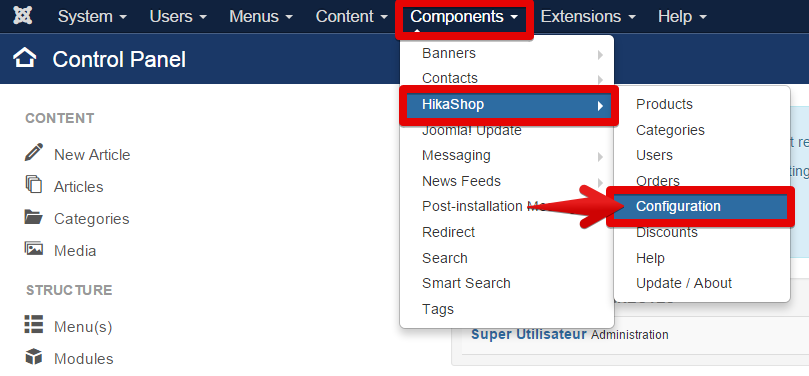
1° Go to the Components -> HikaShop -> Configuration
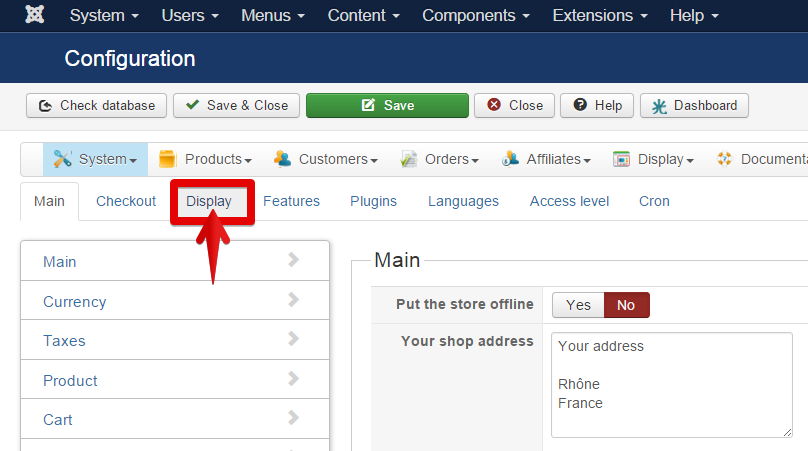
2° Click on "Display" tab
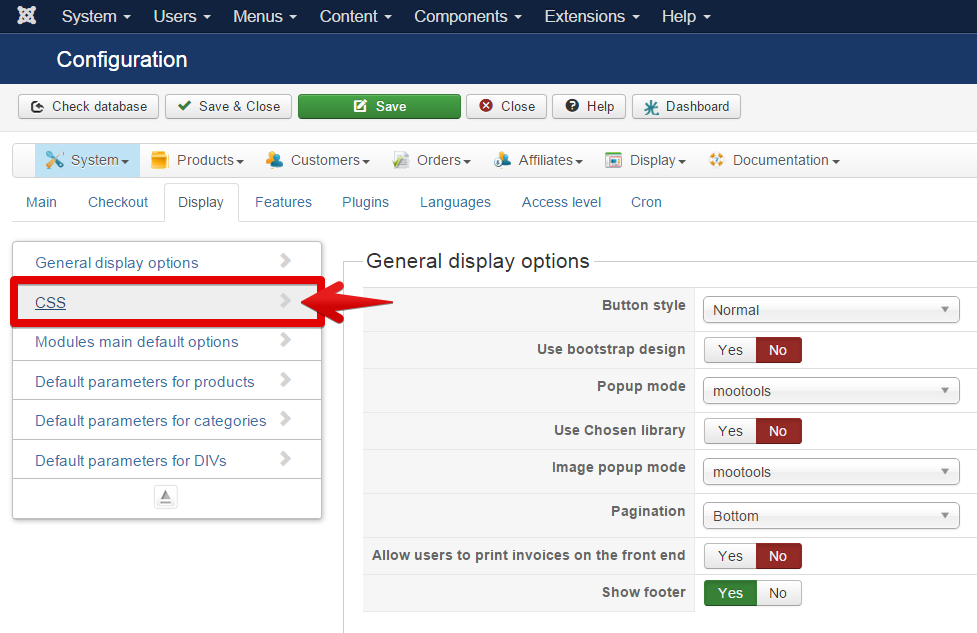
3° Click on CSS
4° Here, on Front-end CSS File you must have selected "old" BUT if not, select it!
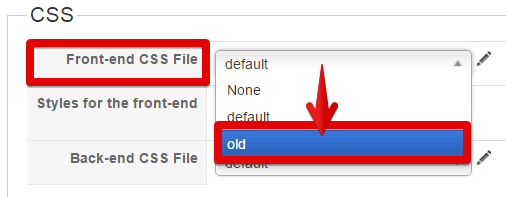
5° Click on the little pen/ "edit" icon
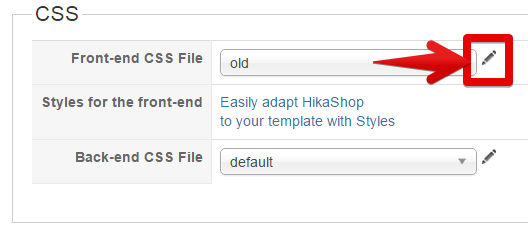
6° Copy & Paste this code :
/*ADD CSS CODE HERE !!! */
.pane-sliders .panel {
border: 0px solid #E5E5E5;
}
div#category_panel_181 h3 {
font-size: 100% !important;
}
/* CUSTOM END */
AND don't forget to save !!!
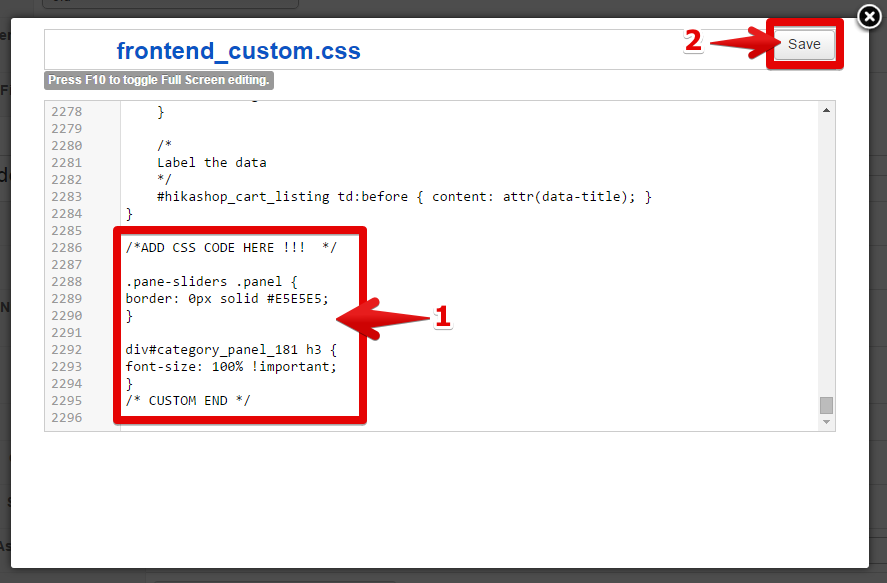
If I'm right your issue will be solve with this.
Regards,
I will show you step by step how to custom your CSS, That will solve your trouble.
Take care to follow precisely ALL steps.
1° Go to the Components -> HikaShop -> Configuration
2° Click on "Display" tab
3° Click on CSS
4° Here, on Front-end CSS File you must have selected "old" BUT if not, select it!
5° Click on the little pen/ "edit" icon
6° Copy & Paste this code :
/*ADD CSS CODE HERE !!! */
.pane-sliders .panel {
border: 0px solid #E5E5E5;
}
div#category_panel_181 h3 {
font-size: 100% !important;
}
/* CUSTOM END */
AND don't forget to save !!!
If I'm right your issue will be solve with this.
Regards,
Last edit: 11 years 1 week ago by Philip.
The following user(s) said Thank You: BounceHouseOwner
Please Log in or Create an account to join the conversation.
- BounceHouseOwner
-
Topic Author
- Offline
Less
More
- Posts: 90
- Thank you received: 2
11 years 1 week ago #215250
by BounceHouseOwner
Replied by BounceHouseOwner on topic Font size and boxes around category names
Thank you so much Philip. I contacted my hosting company and got some old files and I was searching for .css files to see if I could find the coding. I was having a hard time but took a break. Your directions made it so much easier (and I have them for future reference). Again, thanks for the help.
The following user(s) said Thank You: Philip
Please Log in or Create an account to join the conversation.
Time to create page: 0.335 seconds